Preparing to install with the Agent-based Installer
The Agent-based Installer provides the flexibility to boot your on-premise servers in any way that you choose. It combines the ease of use of the Assisted Installation service with the ability to run offline, including in air-gapped environments.
The Agent-based Installer uses a subcommand of the OpenShift Container Platform installation program. It generates a bootable ISO image containing all of the information required to deploy an OpenShift Container Platform cluster, with an available release image.
The configuration is in the same format as for the installer-provisioned infrastructure and user-provisioned infrastructure installation methods. The Agent-based Installer can also optionally generate or accept Zero Touch Provisioning (ZTP) custom resources. ZTP allows you to provision new edge sites with declarative configurations of bare-metal equipment.
To deploy clusters with virtualized control planes running on OpenShift Virtualization VMs, you can use KubeVirt Redfish to expose VMs as Redfish-compatible endpoints. For more information about using virtualized control planes, see "Using virtualized control planes".
Agent-based Installer supported architectures
| CPU architecture | Connected installation | Disconnected installation |
|---|---|---|
64-bit x86 | ✓ | ✓ |
64-bit ARM | ✓ | ✓ |
ppc64le | ✓ | ✓ |
s390x | ✓ | ✓ |
Additional resources
Understand Agent-based Installer
As an OpenShift Container Platform user, you can leverage the advantages of the Assisted Installer hosted service in disconnected environments.
The Agent-based Installer uses a bootable ISO that contains the Assisted discovery agent and the Assisted Service. Both are required to perform the cluster installation, but the Assisted Service runs on only one of the hosts.
Currently, ISO boot support on IBM Z(R) (s390x) is available only for Red Hat Enterprise Linux (RHEL) KVM, which provides the flexibility to choose either PXE or ISO-based installation. For installations with z/VM and Logical Partition (LPAR), only PXE boot is supported.
The openshift-install agent create image subcommand generates an ephemeral ISO based on the inputs that you provide. You can choose to provide inputs through the following manifests:
Preferred manifests:
install-config.yamlagent-config.yaml
Optional ZTP manifests:
cluster-manifests/cluster-deployment.yamlcluster-manifests/agent-cluster-install.yamlcluster-manifests/pull-secret.yamlcluster-manifests/infraenv.yamlcluster-manifests/cluster-image-set.yamlcluster-manifests/nmstateconfig.yamlmirror/registries.confmirror/ca-bundle.crt
Agent-based Installer workflow
One of the control plane hosts runs the Assisted Service at the start of the boot process and eventually becomes the bootstrap host. This node is called the rendezvous host (or node 0).
The Assisted Service ensures that all the hosts meet the requirements and triggers an OpenShift Container Platform cluster deployment. All the nodes have the Red Hat Enterprise Linux (RHEL) image written to the disk. The non-bootstrap nodes reboot and initiate a cluster deployment.
Once the nodes are rebooted, the rendezvous host reboots and joins the cluster. The bootstrapping is then complete and the cluster is deployed.
Figure 1. Node installation workflow
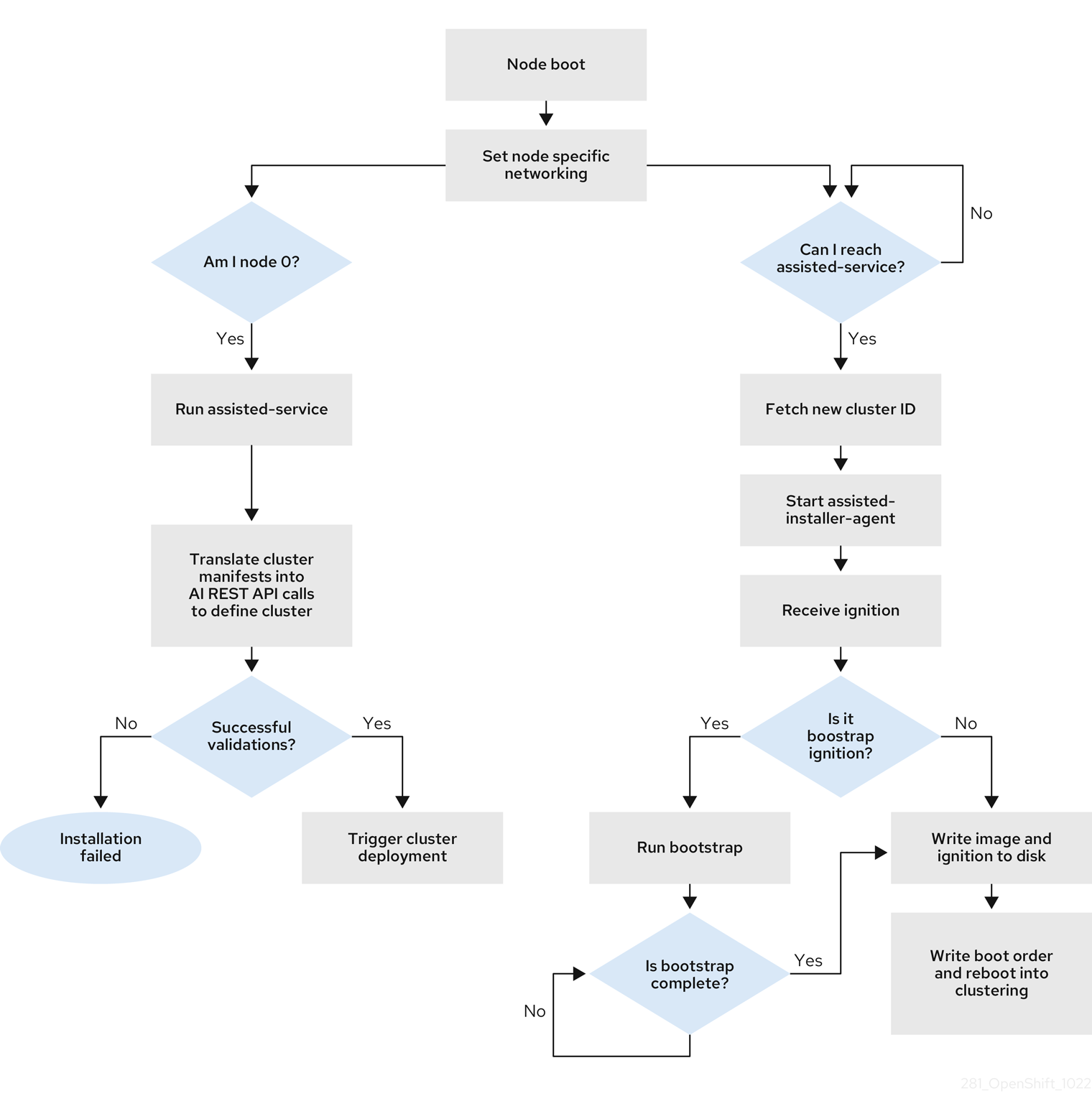
You can install a disconnected OpenShift Container Platform cluster through the openshift-install agent create image subcommand for the following topologies:
- A single-node OpenShift Container Platform cluster: A node that is both a control plane and compute.
- A three-node OpenShift Container Platform cluster : A compact cluster that has three control plane nodes that are also compute nodes.
- Highly available OpenShift Container Platform cluster (HA): Three control plane nodes with any number of compute nodes.
- Two-node OpenShift Container Platform cluster with Arbiter: Two control plane nodes with one local arbiter node. For more information, see "About a local arbiter node".
Recommended resources for topologies
The following cluster resources are recommended for each topology:
Recommended cluster resources
| Topology | Number of control plane nodes | Number of compute nodes | vCPU | Memory | Storage |
|---|---|---|---|---|---|
| Single-node cluster | 1 | 0 | 8 vCPUs | 16 GB of RAM | 120 GB |
| Two-node OpenShift cluster with Arbiter | 2 (control plane nodes) | 0 | 4 vCPUs | 16 GB of RAM | 120 GB |
| 1 (arbiter node) | 0 | 2 vCPUs | 8 GB of RAM | 50 GB | |
| Two-node OpenShift cluster with fencing (TNF) | 2 | 0 | 4 vCPUs | 16 GB of RAM | 120 GB |
| Compact cluster | 3 | 0 or 1 | 8 vCPUs | 16 GB of RAM | 120 GB |
| HA cluster | 3 to 5 | 2 and above | 8 vCPUs | 16 GB of RAM | 120 GB |
You can use as few as 4 vCPUs for an single-node OpenShift cluster.
However, running single-node OpenShift on 4 vCPUs leaves very little "headroom" for user applications, and creates a high risk of resource contention and performance degradation.
To ensure cluster stability at this threshold, you must take steps to minimize the total resource footprint of the cluster, such as limiting the amount of workloads running on the cluster or limiting cluster capabilities. For more information, see "Cluster capabilities".
Otherwise, it is recommended to provide more compute resources to the cluster.
Supported platforms
In the install-config.yaml file, specify the platform on which to perform the installation. The following platforms are supported:
baremetalvspherenutanixexternalnone
For a two-node OpenShift Container Platform cluster with fencing (TNF), only the following platforms are supported:
-
baremetal -
external -
noneThevsphereandnutanixplatforms are not supported for two-node clusters with fencing.warningFor platform
none:- The
noneoption requires the provision of DNS name resolution and load balancing infrastructure in your cluster. See Requirements for a cluster using the platform "none" option in the "Additional resources" section for more information. - See "Deploying OpenShift 4.x on non-tested platforms using the bare metal install method" before you attempt to install an OpenShift Container Platform cluster in virtualized or cloud environments.
For platform
vsphere, or for platformbaremetalon vSphere:- You must set the
disk.EnableUUIDparameter toTRUEon all OpenShift Container Platform nodes. If this parameter is not enabled, the Agent-based Installer validation fails.
- The
Additional resources
- Cluster capabilities
- Deploying OpenShift 4.x on non-tested platforms using the bare metal install method (Red Hat Knowledgebase article)
- Requirements for a cluster using the platform "none" option
- Increase the network MTU
- Adding worker nodes to single-node OpenShift clusters
- About a local arbiter node
About FIPS compliance
For many OpenShift Container Platform customers, regulatory readiness, or compliance, on some level is required before any systems can be put into production. That regulatory readiness can be imposed by national standards, industry standards or the organization’s corporate governance framework.
Federal Information Processing Standards (FIPS) compliance is one of the most critical components required in highly secure environments to ensure that only supported cryptographic technologies are allowed on nodes.
To enable FIPS mode for your cluster, you must run the installation program from a Red Hat Enterprise Linux (RHEL) computer configured to operate in FIPS mode. For more information about configuring FIPS mode on RHEL, see Switching RHEL to FIPS mode.
When running Red Hat Enterprise Linux (RHEL) or Red Hat Enterprise Linux CoreOS (RHCOS) booted in FIPS mode, OpenShift Container Platform core components use the RHEL cryptographic libraries that have been submitted to NIST for FIPS 140-2/140-3 Validation on only the x86_64, ppc64le, and s390x architectures.
Configure FIPS through the Agent-based Installer
During a cluster deployment, the Federal Information Processing Standards (FIPS) change is applied when the Red Hat Enterprise Linux CoreOS (RHCOS) machines are deployed in your cluster.
For Red Hat Enterprise Linux (RHEL) machines, you must enable FIPS mode when you install the operating system on the machines that you plan to use as worker machines.
OpenShift Container Platform requires the use of a FIPS-capable installation binary to install a cluster in FIPS mode.
You can enable FIPS mode through the preferred method of install-config.yaml and agent-config.yaml files:
You must set value of the fips field to true in the install-config.yaml file:
apiVersion: v1
baseDomain: test.example.com
metadata:
  name: sno-cluster
fips: true
To enable FIPS mode on IBM Z(R) clusters, you must also enable FIPS in either the .parm file or using virt-install as outlined in the procedures for manually adding IBM Z(R) agents.
If you are using the optional GitOps ZTP manifests, you must set the value of fips as true in the agent-install.openshift.io/install-config-overrides field in the agent-cluster-install.yaml file:
apiVersion: extensions.hive.openshift.io/v1beta1
kind: AgentClusterInstall
metadata:
  annotations:
    agent-install.openshift.io/install-config-overrides: '{"fips":true}'
  name: sno-cluster
  namespace: sno-cluster-test
Additional resources
Host configuration
You can make additional configurations for each host on the cluster in the agent-config.yaml file, such as network configurations and root device hints.
For each host you configure, you must specify which host you are configuring by providing the MAC address of an interface on the host.
Host roles
Each host in the cluster is assigned a role of either master or worker. You can define the role for each host in the agent-config.yaml file by using the role parameter. If you do not assign a role to the hosts, the roles will be assigned at random during installation.
It is recommended to explicitly define roles for your hosts.
The rendezvousIP must be assigned to a host with the master role. This can be done manually or by allowing the Agent-based Installer to assign the role.
You do not need to explicitly define the master role for the rendezvous host, however you cannot create configurations that conflict with this assignment.
For example, if you have 4 hosts with 3 of the hosts explicitly defined to have the master role, the last host that is automatically assigned the worker role during installation cannot be configured as the rendezvous host.
apiVersion: v1beta1
kind: AgentConfig
metadata:
  name: example-cluster
rendezvousIP: 192.168.111.80
hosts:
  - hostname: master-1
    role: master
    interfaces:
      - name: eno1
        macAddress: 00:ef:44:21:e6:a5
  - hostname: master-2
    role: master
    interfaces:
      - name: eno1
        macAddress: 00:ef:44:21:e6:a6
  - hostname: master-3
    role: master
    interfaces:
      - name: eno1
        macAddress: 00:ef:44:21:e6:a7
  - hostname: worker-1
    role: worker
    interfaces:
      - name: eno1
        macAddress: 00:ef:44:21:e6:a8
About root device hints
The rootDeviceHints parameter enables the installation program to provision the Red Hat Enterprise Linux CoreOS (RHCOS) image to a particular device.
The installation program examines the devices in the order it discovers them, and compares the discovered values with the hint values. The installation program uses the first discovered device that matches the hint value. The configuration can combine multiple hints, but a device must match all hints for the installation program to select it.
Subfields
| Subfield | Description |
deviceName |
A string containing a Linux device name such as /dev/vda or /dev/disk/by-path/. [NOTE] ==== It is recommended to use the /dev/disk/by-path/<device_path> link to the storage location. ====The hint must match the actual value exactly. |
hctl |
A string containing a SCSI bus address like 0:0:0:0. The hint must match the actual value exactly. |
model |
A string containing a vendor-specific device identifier. The hint can be a substring of the actual value. |
vendor |
A string containing the name of the vendor or manufacturer of the device. The hint can be a sub-string of the actual value. |
serialNumber |
A string containing the device serial number. The hint must match the actual value exactly. |
minSizeGigabytes |
An integer representing the minimum size of the device in gigabytes. |
wwn |
A string containing the unique storage identifier. The hint must match the actual value exactly. If you use the udevadm command to retrieve the wwn value, and the command outputs a value for ID_WWN_WITH_EXTENSION, then you must use this value to specify the wwn subfield. |
rotational |
A boolean indicating whether the device should be a rotating disk (true) or not (false). |
     - name: master-0
       role: master
       rootDeviceHints:
         deviceName: "/dev/sda"
About networking
The rendezvous IP must be known at the time of generating the agent ISO, so that during the initial boot all the hosts can check in to the assisted service.
If the IP addresses are assigned using a Dynamic Host Configuration Protocol (DHCP) server, then the rendezvousIP field must be set to an IP address of one of the hosts that will become part of the deployed control plane. In an environment without a DHCP server, you can define IP addresses statically.
In addition to static IP addresses, you can apply any network configuration that is in NMState format. This includes VLANs and NIC bonds.
By default, Podman uses a subnet of 10.88.0.0/16 as a bridge network. Do not set the network.machineNetwork.cidr parameter to include this address range, otherwise a conflict causes the cluster installation to fail.
Port requirements for the rendezvous host
During the discovery and bootstrap phases of an installation, all the hosts connect to the Assisted Service that runs on the rendezvous host. Configure your firewall to allow the following traffic from each host to the rendezvous host:
Ports required to reach the Assisted Service on the rendezvous host
| Port | Protocol | Description |
|---|---|---|
8090 |
TCP | Assisted Service API. Hosts use this port to register with the Assisted Service, report hardware information, and retrieve installation instructions. |
Port 8090 is required only during installation. After installation completes, the Assisted Service is no longer exposed on the rendezvous host.
This specific port requirement is in addition to the standard OpenShift Container Platform networking requirements for installation.
DHCP
When using Dynamic Host Configuration Protocol (DHCP), you must specify the value for the rendezvousIP field in the agent-config.yaml file, and the networkConfig fields can be left blank:
apiVersion: v1alpha1
kind: AgentConfig
metadata:
  name: sno-cluster
rendezvousIP: 192.168.111.80
where:
rendezvousIP- Specifies the IP address for the rendezvous host.
Static networking
When using static networking with the preferred install-config.yaml and agent-config.yaml files, you can specify the value for the rendezvousIP field in the agent-config.yaml file or allow the installation program to choose a static IP address from the networkConfig fields.
cat > agent-config.yaml << EOF
apiVersion: v1alpha1
kind: AgentConfig
metadata:
  name: sno-cluster
rendezvousIP: 192.168.111.80
hosts:
  - hostname: master-0
    interfaces:
      - name: eno1
        macAddress: 00:ef:44:21:e6:a5
    networkConfig:
      interfaces:
        - name: eno1
          type: ethernet
          state: up
          mac-address: 00:ef:44:21:e6:a5
          ipv4:
            enabled: true
            address:
              - ip: 192.168.111.80
                prefix-length: 23
            dhcp: false
      dns-resolver:
        config:
          server:
            - 192.168.111.1
      routes:
        config:
          - destination: 0.0.0.0/0
            next-hop-address: 192.168.111.1
            next-hop-interface: eno1
            table-id: 254
EOF
where:
rendezvousIP- Specifies the IP address for the rendezvous host. If a value is not specified for the
rendezvousIPfield, one address will be chosen from the static IP addresses specified in thenetworkConfigfields. hosts.interfaces.macAddress- Specifies the MAC address of an interface on the host, used to determine which host to apply the configuration to.
ipv4.address.ip- Specifies the static IP address of the target bare-metal host.
ipv4.address.prefix-length- Specifies the static IP address’s subnet prefix for the target bare-metal host.
dns-resolver.config.server- Specifies the DNS server for the target bare-metal host.
routes.config.next-hop-address- Specifies the next-hop address for the node traffic. This must be in the same subnet as the IP address set for the specified interface.
When using static networking with the optional method of GitOps ZTP custom resources, which comprises 6 custom resources, you can configure static IPs in the nmstateconfig.yaml file. The rendezvous IP is chosen from the static IP addresses specified in the config fields.
apiVersion: agent-install.openshift.io/v1beta1
kind: NMStateConfig
metadata:
  name: master-0
  namespace: openshift-machine-api
  labels:
    cluster0-nmstate-label-name: cluster0-nmstate-label-value
spec:
  config:
    interfaces:
      - name: eth0
        type: ethernet
        state: up
        mac-address: 52:54:01:aa:aa:a1
        ipv4:
          enabled: true
          address:
            - ip: 192.168.122.2
              prefix-length: 23
          dhcp: false
    dns-resolver:
      config:
        server:
          - 192.168.122.1
    routes:
      config:
        - destination: 0.0.0.0/0
          next-hop-address: 192.168.122.1
          next-hop-interface: eth0
          table-id: 254
  interfaces:
    - name: eth0
      macAddress: 52:54:01:aa:aa:a1
where:
ipv4.address.ip- Specifies the static IP address of the target bare-metal host.
ipv4.address.prefix-length- Specifies the static IP address’s subnet prefix for the target bare-metal host.
dns-resolver.config.server- Specifies the DNS server for the target bare-metal host.
routes.config.next-hop-address- Specifies the next-hop address for the node traffic. This must be in the same subnet as the IP address set for the specified interface.
spec.interfaces.macAddress- Specifies the MAC address of an interface on the host, used to determine which host to apply the configuration to.
Requirements for a cluster using the platform "none" option
There are additional requirements when installing a cluster using the platform "none" option with the Agent-based Installer.
See "Deploying OpenShift 4.x on non-tested platforms using the bare metal install method" before you attempt to install an OpenShift Container Platform cluster in virtualized or cloud environments.
Platform "none" DNS requirements
In OpenShift Container Platform deployments, DNS name resolution is required for several components.
The following components need DNS name resolution:
- The Kubernetes API
- The OpenShift Container Platform application wildcard
- The control plane and compute machines
Reverse DNS resolution is also required for the Kubernetes API, the control plane machines, and the compute machines.
DNS A/AAAA or CNAME records are used for name resolution and PTR records are used for reverse name resolution. The reverse records are important because Red Hat Enterprise Linux CoreOS (RHCOS) uses the reverse records to set the hostnames for all the nodes, unless the hostnames are provided by DHCP. Additionally, the reverse records are used to generate the certificate signing requests (CSR) that OpenShift Container Platform needs to operate.
It is recommended to use a DHCP server to provide the hostnames to each cluster node.
The following DNS records are required for an OpenShift Container Platform cluster using the platform none option and they must be in place before installation. In each record, <cluster_name> is the cluster name and <base_domain> is the base domain that you specify in the install-config.yaml file. A complete DNS record takes the form: <component>.<cluster_name>.<base_domain>..
Required DNS records
| Component | Record | Description |
|---|---|---|
| Kubernetes API | api.<cluster_name>.<base_domain>. |
A DNS A/AAAA or CNAME record, and a DNS PTR record, to identify the API load balancer. These records must be resolvable by both clients external to the cluster and from all the nodes within the cluster. |
api-int.<cluster_name>.<base_domain>. |
A DNS A/AAAA or CNAME record, and a DNS PTR record, to internally identify the API load balancer. These records must be resolvable from all the nodes within the cluster. Important The API server must be able to resolve the worker nodes by the hostnames that are recorded in Kubernetes. If the API server cannot resolve the node names, then proxied API calls can fail, and you cannot retrieve logs from pods. | |
| Routes | *.apps.<cluster_name>.<base_domain>. |
A wildcard DNS A/AAAA or CNAME record that refers to the application ingress load balancer. The application ingress load balancer targets the machines that run the Ingress Controller pods. The Ingress Controller pods run on the compute machines by default. These records must be resolvable by both clients external to the cluster and from all the nodes within the cluster. For example, console-openshift-console.apps.<cluster_name>.<base_domain> is used as a wildcard route to the OpenShift Container Platform console. |
| Control plane machines | <master><n>.<cluster_name>.<base_domain>. |
DNS A/AAAA or CNAME records and DNS PTR records to identify each machine for the control plane nodes. These records must be resolvable by the nodes within the cluster. |
| Compute machines | <worker><n>.<cluster_name>.<base_domain>. |
DNS A/AAAA or CNAME records and DNS PTR records to identify each machine for the worker nodes. These records must be resolvable by the nodes within the cluster. |
In OpenShift Container Platform 4.4 and later, you do not need to specify etcd host and SRV records in your DNS configuration.
You can use the dig command to verify name and reverse name resolution.
Example DNS configuration for platform "none" clusters
This section provides A and PTR record configuration samples that meet the DNS requirements for deploying OpenShift Container Platform using the platform none option. The samples are not meant to provide advice for choosing one DNS solution over another.
In the examples, the cluster name is ocp4 and the base domain is example.com.
- Example DNS A record configuration for a platform "none" cluster
- The following example is a BIND zone file that shows sample A records for name resolution in a cluster using the platform
noneoption.
$TTL 1W
@	IN	SOA	ns1.example.com.	root (
			2019070700	; serial
			3H		; refresh (3 hours)
			30M		; retry (30 minutes)
			2W		; expiry (2 weeks)
			1W )		; minimum (1 week)
	IN	NS	ns1.example.com.
	IN	MX 10	smtp.example.com.
;
;
ns1.example.com.		IN	A	192.168.1.5
smtp.example.com.		IN	A	192.168.1.5
;
helper.example.com.		IN	A	192.168.1.5
helper.ocp4.example.com.	IN	A	192.168.1.5
;
api.ocp4.example.com.		IN	A	192.168.1.5
api-int.ocp4.example.com.	IN	A	192.168.1.5
;
*.apps.ocp4.example.com.	IN	A	192.168.1.5
;
master0.ocp4.example.com.	IN	A	192.168.1.97
master1.ocp4.example.com.	IN	A	192.168.1.98
master2.ocp4.example.com.	IN	A	192.168.1.99
;
worker0.ocp4.example.com.	IN	A	192.168.1.11
worker1.ocp4.example.com.	IN	A	192.168.1.7
;
;EOF
where:
api.ocp4.example.com.- Provides name resolution for the Kubernetes API. The record refers to the IP address of the API load balancer.
api-int.ocp4.example.com.- Provides name resolution for the Kubernetes API. The record refers to the IP address of the API load balancer and is used for internal cluster communications.
*.apps.ocp4.example.com.- Provides name resolution for the wildcard routes. The record refers to the IP address of the application ingress load balancer. The application ingress load balancer targets the machines that run the Ingress Controller pods. The Ingress Controller pods run on the compute machines by default.
note
In the example, the same load balancer is used for the Kubernetes API and application ingress traffic. In production scenarios, you can deploy the API and application ingress load balancers separately so that you can scale the load balancer infrastructure for each in isolation.
master0.ocp4.example.com.-master2.ocp4.example.com.- Provides name resolution for the control plane machines.
worker0.ocp4.example.com.-worker1.ocp4.example.com.- Provides name resolution for the compute machines.
- Example DNS PTR record configuration for a platform "none" cluster
- The following example BIND zone file shows sample PTR records for reverse name resolution in a cluster using the platform
noneoption.
$TTL 1W
@	IN	SOA	ns1.example.com.	root (
			2019070700	; serial
			3H		; refresh (3 hours)
			30M		; retry (30 minutes)
			2W		; expiry (2 weeks)
			1W )		; minimum (1 week)
	IN	NS	ns1.example.com.
;
5.1.168.192.in-addr.arpa.	IN	PTR	api.ocp4.example.com.
5.1.168.192.in-addr.arpa.	IN	PTR	api-int.ocp4.example.com.
;
97.1.168.192.in-addr.arpa.	IN	PTR	master0.ocp4.example.com.
98.1.168.192.in-addr.arpa.	IN	PTR	master1.ocp4.example.com.
99.1.168.192.in-addr.arpa.	IN	PTR	master2.ocp4.example.com.
;
11.1.168.192.in-addr.arpa.	IN	PTR	worker0.ocp4.example.com.
7.1.168.192.in-addr.arpa.	IN	PTR	worker1.ocp4.example.com.
;
;EOF
where:
api.ocp4.example.com.- Provides reverse DNS resolution for the Kubernetes API. The PTR record refers to the record name of the API load balancer.
api-int.ocp4.example.com.- Provides reverse DNS resolution for the Kubernetes API. The PTR record refers to the record name of the API load balancer and is used for internal cluster communications.
master0.ocp4.example.com.-master2.ocp4.example.com.- Provides reverse DNS resolution for the control plane machines.
worker0.ocp4.example.com.-worker1.ocp4.example.com.- Provides reverse DNS resolution for the compute machines.
A PTR record is not required for the OpenShift Container Platform application wildcard.
Platform "none" Load balancing requirements
Before you install OpenShift Container Platform, you must provision the API and application Ingress load balancing infrastructure. In production scenarios, you can deploy the API and application Ingress load balancers separately so that you can scale the load balancer infrastructure for each in isolation.
- These requirements do not apply to single-node OpenShift clusters using the platform
noneoption. - If you want to deploy the API and application Ingress load balancers with a Red Hat Enterprise Linux (RHEL) instance, you must purchase the RHEL subscription separately.
The load balancing infrastructure must meet the following requirements:
-
API load balancer: Provides a common endpoint for users, both human and machine, to interact with and configure the platform. Configure the following conditions:
- Layer 4 load balancing only. This can be referred to as Raw TCP, SSL Passthrough, or SSL Bridge mode. If you use SSL Bridge mode, you must enable Server Name Indication (SNI) for the API routes.
- A stateless load balancing algorithm. The options vary based on the load balancer implementation.
warningDo not configure session persistence for an API load balancer.
Configure the following ports on both the front and back of the load balancers:
API load balancer
Port Back-end machines (pool members) Internal External Description 6443Control plane. You must configure the /readyzendpoint for the API server health check probe.X X Kubernetes API server 22623Control plane. X Machine config server warningThe Agent-based Installer requires TCP port
8090to be open between all hosts and the rendezvous host so that the hosts can access the Assisted Service API. Port8090is required only during the discovery and bootstrap phases. For more information, see "Port requirements for the rendezvous host".noteThe load balancer must be configured to take a maximum of 30 seconds from the time the API server turns off the
/readyzendpoint to the removal of the API server instance from the pool. Within the time frame after/readyzreturns an error or becomes healthy, the endpoint must have been removed or added. Probing every 5 or 10 seconds, with two successful requests to become healthy and three to become unhealthy, are well-tested values. -
Application Ingress load balancer: Provides an ingress point for application traffic flowing in from outside the cluster. A working configuration for the Ingress router is required for an OpenShift Container Platform cluster. Configure the following conditions:
- Layer 4 load balancing only. This can be referred to as Raw TCP, SSL Passthrough, or SSL Bridge mode. If you use SSL Bridge mode, you must enable Server Name Indication (SNI) for the ingress routes.
- A connection-based or session-based persistence is recommended, based on the options available and types of applications that will be hosted on the platform.
tipIf the true IP address of the client can be seen by the application Ingress load balancer, enabling source IP-based session persistence can improve performance for applications that use end-to-end TLS encryption.
Configure the following ports on both the front and back of the load balancers:
Application Ingress load balancer
Port Back-end machines (pool members) Internal External Description 443The machines that run the Ingress Controller pods, compute, or worker, by default. X X HTTPS traffic 80The machines that run the Ingress Controller pods, compute, or worker, by default. X X HTTP traffic noteIf you are deploying a three-node cluster with zero compute nodes, the Ingress Controller pods run on the control plane nodes. In three-node cluster deployments, you must configure your application Ingress load balancer to route HTTP and HTTPS traffic to the control plane nodes.
Example load balancer configuration for platform "none" clusters
This section provides an example API and application Ingress load balancer configuration that meets the load balancing requirements for clusters using the platform none option. The sample is an /etc/haproxy/haproxy.cfg configuration for an HAProxy load balancer. The example is not meant to provide advice for choosing one load balancing solution over another.
In the example, the same load balancer is used for the Kubernetes API and application ingress traffic. In production scenarios, you can deploy the API and application ingress load balancers separately so that you can scale the load balancer infrastructure for each in isolation.
If you are using HAProxy as a load balancer and SELinux is set to enforcing, you must ensure that the HAProxy service can bind to the configured TCP port by running setsebool -P haproxy_connect_any=1.
global
  log         127.0.0.1 local2
  pidfile     /var/run/haproxy.pid
  maxconn     4000
  daemon
defaults
  mode                    http
  log                     global
  option                  dontlognull
  option http-server-close
  option                  redispatch
  retries                 3
  timeout http-request    10s
  timeout queue           1m
  timeout connect         10s
  timeout client          1m
  timeout server          1m
  timeout http-keep-alive 10s
  timeout check           10s
  maxconn                 3000
listen api-server-6443
  bind *:6443
  mode tcp
  server master0 master0.ocp4.example.com:6443 check inter 1s
  server master1 master1.ocp4.example.com:6443 check inter 1s
  server master2 master2.ocp4.example.com:6443 check inter 1s
listen machine-config-server-22623
  bind *:22623
  mode tcp
  server master0 master0.ocp4.example.com:22623 check inter 1s
  server master1 master1.ocp4.example.com:22623 check inter 1s
  server master2 master2.ocp4.example.com:22623 check inter 1s
listen ingress-router-443
  bind *:443
  mode tcp
  balance source
  server worker0 worker0.ocp4.example.com:443 check inter 1s
  server worker1 worker1.ocp4.example.com:443 check inter 1s
listen ingress-router-80
  bind *:80
  mode tcp
  balance source
  server worker0 worker0.ocp4.example.com:80 check inter 1s
  server worker1 worker1.ocp4.example.com:80 check inter 1s
-
Port
6443handles the Kubernetes API traffic and points to the control plane machines. You must configure health checks on this port to ensure that the API server is available before routing traffic. -
Port
22623handles the machine config server traffic and points to the control plane machines. -
Port
443handles the HTTPS traffic and points to the machines that run the Ingress Controller pods. The Ingress Controller pods run on the compute machines by default. -
Port
80handles the HTTP traffic and points to the machines that run the Ingress Controller pods. The Ingress Controller pods run on the compute machines by default.noteIf you are deploying a compact three-node cluster with zero compute nodes, the Ingress Controller pods run on the control plane nodes. In three-node cluster deployments, you must configure your application Ingress load balancer to route HTTP and HTTPS traffic to the control plane nodes.
tipIf you are using HAProxy as a load balancer, you can check that the
haproxyprocess is listening on ports6443,22623,443, and80by runningnetstat -nltupeon the HAProxy node.
Additional resources
- Port requirements for the rendezvous host
- Cluster capabilities
- Deploying OpenShift 4.x on non-tested platforms using the bare metal install method (Red Hat Knowledgebase article)
About an arbiter node
You can configure an OpenShift Container Platform cluster with two control plane nodes and one arbiter node so as to retain high availability (HA) while reducing infrastructure costs for your cluster.
An arbiter node is a lower-cost, co-located machine that participates in control plane quorum decisions. Unlike a standard control plane node, the arbiter node does not run the full set of control plane services. You can use this configuration to maintain HA in your cluster with only two fully provisioned control plane nodes instead of three.
To deploy a cluster with two control plane nodes and one arbiter node, you must define the following nodes in the install-config.yaml file:
- 2 control plane nodes
- 1 arbiter node
The arbiter node must meet the following minimum system requirements:
- 2 vCPUs
- 8 GB of RAM
- 50 GB of SSD or equivalent storage
- The arbiter node must be located in a network environment with an end-to-end latency of less than 100 milliseconds, including disk I/O. In high-latency environments, you might need to apply the
etcdslow profile.
The control plane nodes must meet the following minimum system requirements:
- 4 vCPUs
- 16 GB of RAM
- 120 GB of SSD or equivalent storage
Additionally, the control plane nodes must also have enough storage for the workload.
apiVersion: v1
baseDomain: devcluster.openshift.com
compute:
  - architecture: amd64
    hyperthreading: Enabled
    name: worker
    platform: {}
    replicas: 0
arbiter:
  architecture: amd64
  hyperthreading: Enabled
  replicas: 1
  name: arbiter
  platform:
    baremetal: {}
controlPlane:
  architecture: amd64
  hyperthreading: Enabled
  name: master
  platform:
    baremetal: {}
  replicas: 2
platform:
  baremetal:
    hosts:
      - name: cluster-master-0
        role: master
# ...
      - name: cluster-master-1
        role: master
        ...
      - name: cluster-arbiter-0
        role: arbiter
# ...
where:
arbiter- Specifies the arbiter machine pool. You configure this field to deploy a cluster with an arbiter node.
arbiter.replicas- Specifies the
arbiter.replicasparameter as1for the arbiter pool. You cannot set this field to a value that is greater than 1. arbiter.name- Specifies a name for the arbiter machine pool.
controlPlane- Specifies the control plane machine pool.
controlPlane.replicas- Specifies the
controlPlane.replicasparameter. When an arbiter pool is defined, two control plane replicas are valid.
Example: Bonds and VLAN interface node network configuration
See example manifest files to better understand configuration options for deploying your cluster.
The following agent-config.yaml file is an example of a manifest for bond and VLAN interfaces:
  apiVersion: v1alpha1
  kind: AgentConfig
  rendezvousIP: 10.10.10.14
  hosts:
    - hostname: master0
      role: master
      interfaces:
       - name: enp0s4
         macAddress: 00:21:50:90:c0:10
       - name: enp0s5
         macAddress: 00:21:50:90:c0:20
      networkConfig:
        interfaces:
          - name: bond0.300
            type: vlan
            state: up
            vlan:
              base-iface: bond0
              id: 300
            ipv4:
              enabled: true
              address:
                - ip: 10.10.10.14
                  prefix-length: 24
              dhcp: false
          - name: bond0
            type: bond
            state: up
            mac-address: 00:21:50:90:c0:10
            ipv4:
              enabled: false
            ipv6:
              enabled: false
            link-aggregation:
              mode: active-backup
              options:
                miimon: "150"
              port:
               - enp0s4
               - enp0s5
        dns-resolver:
          config:
            server:
              - 10.10.10.11
              - 10.10.10.12
        routes:
          config:
            - destination: 0.0.0.0/0
              next-hop-address: 10.10.10.10
              next-hop-interface: bond0.300
              table-id: 254
where:
networkConfig.interfaces.name- Specifies the name of the interface.
note
This value does not need to match the device name.
networkConfig.interfaces.type- Specifies the type of interface. Specifying
vlancreates a VLAN and specifyingbondcreates a bond. link-aggregation.mode- Specifies the bonding mode.
link-aggregation.options.mode- Specifies the MII link monitoring frequency in milliseconds. This example inspects the bond link every 150 milliseconds.
dns-resolver- Specifies the search and server settings for the DNS server. This configuration is optional.
routes.config.next-hop-address- Specifies the next hop address for the node traffic. This must be in the same subnet as the IP address set for the specified interface.
routes.config.next-hop-interface- Specifies the next hop interface for the node traffic.
Example: Bonds and SR-IOV dual-NIC node network configuration
See example manifest files to better understand configuration options for deploying your cluster.
The following agent-config.yaml file is an example of a manifest for dual port network interface controller (NIC) with a bond and SR-IOV interfaces:
apiVersion: v1alpha1
kind: AgentConfig
rendezvousIP: 10.10.10.14
hosts:
  - hostname: worker-1
    interfaces:
      - name: eno1
        macAddress: 0c:42:a1:55:f3:06
      - name: eno2
        macAddress: 0c:42:a1:55:f3:07
    networkConfig:
      interfaces:
        - name: eno1
          type: ethernet
          state: up
          mac-address: 0c:42:a1:55:f3:06
          ipv4:
            enabled: true
            dhcp: false
          ethernet:
            sr-iov:
              total-vfs: 2
          ipv6:
            enabled: false
        - name: sriov:eno1:0
          type: ethernet
          state: up
          ipv4:
            enabled: false
          ipv6:
            enabled: false
            dhcp: false
        - name: sriov:eno1:1
          type: ethernet
          state: down
        - name: eno2
          type: ethernet
          state: up
          mac-address: 0c:42:a1:55:f3:07
          ipv4:
            enabled: true
          ethernet:
            sr-iov:
              total-vfs: 2
          ipv6:
            enabled: false
        - name: sriov:eno2:0
          type: ethernet
          state: up
          ipv4:
            enabled: false
          ipv6:
            enabled: false
        - name: sriov:eno2:1
          type: ethernet
          state: down
        - name: bond0
          type: bond
          state: up
          min-tx-rate: 100
          max-tx-rate: 200
          link-aggregation:
            mode: active-backup
            options:
              primary: sriov:eno1:0
            port:
              - sriov:eno1:0
              - sriov:eno2:0
          ipv4:
            address:
              - ip: 10.19.16.57
                prefix-length: 23
            dhcp: false
            enabled: true
          ipv6:
            enabled: false
          dns-resolver:
            config:
              server:
              - 10.11.5.160
              - 10.2.70.215
          routes:
            config:
            - destination: 0.0.0.0/0
              next-hop-address: 10.19.17.254
              next-hop-interface: bond0
              table-id: 254
where:
networkConfig- Specifies information about the network configuration of the host, with subfields including
interfaces,dns-resolver, androutes. networkConfig.interfaces- Specifies an array of network interfaces defined for the host.
networkConfig.interfaces.name- Specifies the name of the interface.
note
This value does not need to match the device name.
networkConfig.interfaces.type- Specifies the type of interface. This example creates an ethernet interface.
networkConfig.interfaces.ipv4.dhcp- Specifies DHCP enablement. Set this to
falseto disable DHCP for the physical function (PF) if it is not strictly required. ethernet.sr-iov.total-vfs- Specifies the number of SR-IOV virtual functions (VFs) to instantiate.
networkConfig.interfaces.state- Specifies the value of
networkConfig.interfaces.state. Set this parameter toup. networkConfig.interfaces.ipv4.enabled- Specifies the enablement of IPv4 addressing for the VF attached to the bond. Set this to
falseto disable. networkConfig.interfaces.min-tx-rate- Specifies a minimum transmission rate, in Mbps, for the VF. This sample value sets a rate of 100 Mbps. This value must be less than or equal to the maximum transmission rate.
note
Intel NICs do not support the
min-tx-rateparameter. For more information, see BZ#1772847. networkConfig.interfaces.max-tx-rate- Specifies a maximum transmission rate, in Mbps, for the VF. This sample value sets a rate of 200 Mbps.
link-aggregation.mode- Specifies the needed bond mode.
link-aggregation.options.primary- Specifies the preferred port of the bonding interface. The primary device is the first of the bonding interfaces to be used and is not abandoned unless it fails. This setting is particularly useful when one NIC in the bonding interface is faster and, therefore, able to handle a bigger load. This setting is only valid when the bonding interface is in
active-backupmode (mode 1). ipv4.address.ip- Specifies a static IP address for the bond interface. This is the node IP address.
routes.config.next-hop-interface- Specifies
bond0as the gateway for the default route.
Additional resources
Sample install-config.yaml file for bare metal
You can customize the install-config.yaml file to specify more details about your OpenShift Container Platform cluster’s platform or modify the values of the required parameters.
apiVersion: v1
baseDomain: example.com
compute:
- name: worker
  replicas: 0
  architecture: amd64
controlPlane:
  name: master
  replicas: 1
  architecture: amd64
metadata:
  name: sno-cluster
networking:
  clusterNetwork:
  - cidr: 10.128.0.0/14
    hostPrefix: 23
  machineNetwork:
  - cidr: 192.168.0.0/16
  networkType: OVNKubernetes
  serviceNetwork:
  - 172.30.0.0/16
platform:
  none: {}
fips: false
pullSecret: '{"auths": ...}'
sshKey: 'ssh-ed25519 AAAA...'
where:
baseDomain- Specifies the base domain of the cluster. All DNS records must be sub-domains of this base and include the cluster name.
compute- Specifies a sequence of mappings. To meet the requirements of the different data structures, the first line of the
computesection must begin with a hyphen, -. compute.replicas- Specifies the number of compute machines that the Agent-based Installer waits to discover before triggering the installation process. It is the number of compute machines that must be booted with the generated ISO.
note
If you are installing a three-node cluster, do not deploy any compute machines when you install the Red Hat Enterprise Linux CoreOS (RHCOS) machines.
controlPlane- Specifies a single mapping. To meet the requirements of the different data structures, the first line of the
controlPlanesection must not begin with a hyphen, -. Only one control plane pool is used. controlPlane.replicas- Specifies the number of control plane machines that you add to the cluster. Because the cluster uses these values as the number of etcd endpoints in the cluster, the value must match the number of control plane machines that you deploy.
metadata.name- Specifies the cluster name that you specified in your DNS records.
networking.clusterNetwork.cidr- Specifies a block of IP addresses from which pod IP addresses are allocated. This block must not overlap with existing physical networks. These IP addresses are used for the pod network. If you need to access the pods from an external network, you must configure load balancers and routers to manage the traffic.
note
Class E CIDR range is reserved for a future use. To use the Class E CIDR range, you must ensure your networking environment accepts the IP addresses within the Class E CIDR range.
networking.clusterNetwork.hostPrefix- Specifies the subnet prefix length to assign to each individual node. For example, if
hostPrefixis set to23, then each node is assigned a/23subnet out of the givencidr, which allows for 510 (2^(32 - 23) - 2) pod IP addresses. If you are required to provide access to nodes from an external network, configure load balancers and routers to manage the traffic. networking.networkType- Specifies the cluster network plugin to install. The default value
OVNKubernetesis the only supported value. networking.serviceNetwork- Specifies the IP address pool to use for service IP addresses. You can enter only one IP address pool. This block must not overlap with existing physical networks. If you need to access the services from an external network, configure load balancers and routers to manage the traffic.
platform.none- Specifies platform
none. You must set the platform tononefor a single-node cluster. You can set the platform tovsphere,baremetal, ornonefor multi-node clusters.noteIf you set the platform to
vsphereorbaremetal, you can configure IP address endpoints for cluster nodes in three ways:- IPv4
- IPv6
- IPv4 and IPv6 in parallel (dual-stack)
Example of dual-stack networkingnetworking:clusterNetwork:- cidr: 172.21.0.0/16hostPrefix: 23- cidr: fd02::/48hostPrefix: 64machineNetwork:- cidr: 192.168.11.0/16- cidr: 2001:DB8::/32serviceNetwork:- 172.22.0.0/16- fd03::/112networkType: OVNKubernetesplatform:baremetal:apiVIPs:- 192.168.11.3- 2001:DB8::4ingressVIPs:- 192.168.11.4- 2001:DB8::5 fips- Specifies whether to enable or disable FIPS mode. By default, FIPS mode is not enabled. If FIPS mode is enabled, the Red Hat Enterprise Linux CoreOS (RHCOS) machines that OpenShift Container Platform runs on bypass the default Kubernetes cryptography suite and use the cryptography modules that are provided with RHCOS instead.
warning
When running Red Hat Enterprise Linux (RHEL) or Red Hat Enterprise Linux CoreOS (RHCOS) booted in FIPS mode, OpenShift Container Platform core components use the RHEL cryptographic libraries that have been submitted to NIST for FIPS 140-2/140-3 Validation on only the x86_64, ppc64le, and s390x architectures.
pullSecret- Specifies a pull secret that allows you to authenticate with the services that are provided by the included authorities, including Quay.io, which serves the container images for OpenShift Container Platform components.
sshKey- Specifies the SSH public key for the
coreuser in Red Hat Enterprise Linux CoreOS (RHCOS).noteFor production OpenShift Container Platform clusters on which you want to perform installation debugging or disaster recovery, specify an SSH key that your
ssh-agentprocess uses.
Validation checks before agent ISO creation
The Agent-based Installer performs validation checks on user defined YAML files before the ISO is created. Once the validations are successful, the agent ISO is created.
install-config.yaml-
baremetal,vsphereandnoneplatforms are supported.- The
networkTypeparameter must beOVNKubernetesin the case ofnoneplatform. apiVIPsandingressVIPsparameters must be set for bare metal and vSphere platforms.- Some host-specific fields in the bare metal platform configuration that have equivalents in
agent-config.yamlfile are ignored. A warning message is logged if these fields are set.
agent-config.yaml-
- Each interface must have a defined MAC address. Additionally, all interfaces must have a different MAC address.
- At least one interface must be defined for each host.
- World Wide Name (WWN) vendor extensions are not supported in root device hints.
- The
roleparameter in thehostobject must have a value of eithermasterorworker.
- Additional validation checks for Two-Node with Fencing (TNF)
-
- When the
controlPlane.replicasparameter is set to2, you must provide exactly 2 fencing credentials. - Each fencing credential must include
hostName,address,username, andpassword. - The
addressfield must contain a Redfish URL, that is, the string must contain "redfish". IPMI addresses are explicitly rejected. - All
hostNamevalues must be unique. - If you specify
certificateVerification, the value must be eitherEnabledorDisabled. - Fencing credentials are valid only with
baremetal,external, ornoneplatforms. Other platforms result in a validation error.
- When the
Validation checks for ZTP manifests
The following validation checks are performed when using ZTP manifests:
agent-cluster-install.yaml-
- For IPv6, the only supported value for the
networkTypeparameter isOVNKubernetes. TheOpenshiftSDNvalue can be used only for IPv4.
- For IPv6, the only supported value for the
cluster-image-set.yaml-
- The
ReleaseImageparameter must match the release defined in the installer.
- The
Zero Touch Provisioning (ZTP) is not supported for two-node clusters with fencing (TNF). Although you can use Red Hat Advanced Cluster Management (RHACM) for installations, the additional infrastructure components required for ZTP are not validated for this topology.
Additional resources