OVN-Kubernetes architecture
The following sections describe the OVN-Kubernetes architecture, how OVN components map to cluster resources and databases, and how to install and run network-tools for debugging.
Introduction to OVN-Kubernetes architecture
The OVN-Kubernetes architecture comprises specialized databases and daemons that process network state requests. Use this mapping to evaluate data paths and troubleshoot multi-node communication routing.
Figure 1. OVN-Kubernetes architecture
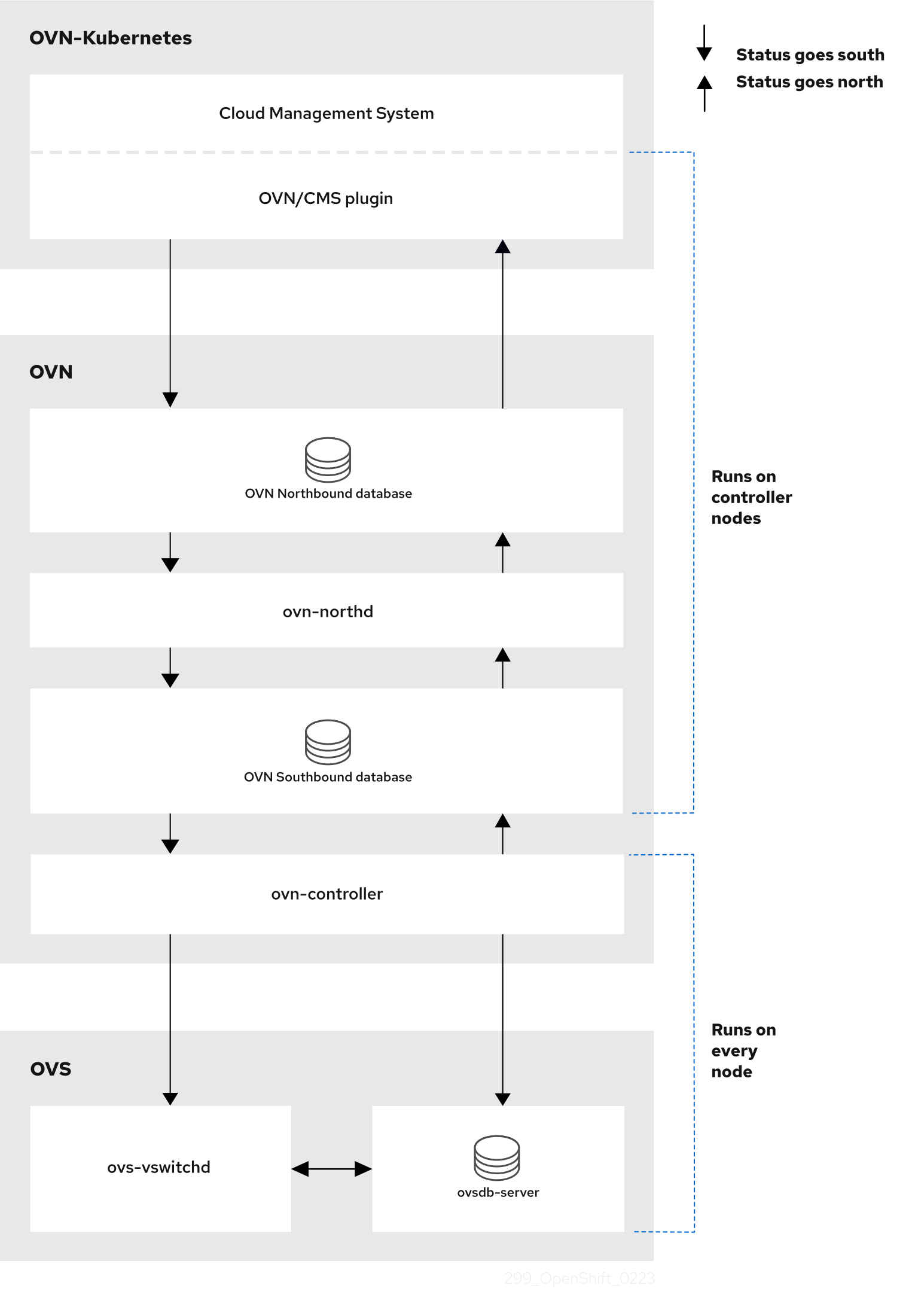
The key components are:
- Cloud Management System (CMS) - A platform specific client for OVN that provides a CMS specific plugin for OVN integration. The plugin translates the cloud management system’s concept of the logical network configuration, stored in the CMS configuration database in a CMS-specific format, into an intermediate representation understood by OVN.
- OVN Northbound database (
nbdb) container - Stores the logical network configuration passed by the CMS plugin. - OVN Southbound database (
sbdb) container - Stores the physical and logical network configuration state for Open vSwitch (OVS) system on each node, including tables that bind them. - OVN north daemon (
ovn-northd) - This is the intermediary client betweennbdbcontainer andsbdbcontainer. It translates the logical network configuration in terms of conventional network concepts, taken from thenbdbcontainer, into logical data path flows in thesbdbcontainer. The container name forovn-northddaemon isnorthdand it runs in theovnkube-nodepods. - ovn-controller - This is the OVN agent that interacts with OVS and hypervisors, for any information or update that is required for
sbdbcontainer. Theovn-controllerreads logical flows from thesbdbcontainer, translates them intoOpenFlowflows and sends them to the node’s OVS daemon. The container name isovn-controllerand it runs in theovnkube-nodepods.
The OVN northd, northbound database, and southbound database run on each node in the cluster and mostly contain and process information that is local to that node.
The OVN northbound database has the logical network configuration passed down to it by the cloud management system (CMS). The OVN northbound database contains the current intended state of the network, presented as a collection of logical ports, logical switches, logical routers, and more. The ovn-northd (northd container) connects to the OVN northbound database and the OVN southbound database. It translates the logical network configuration in terms of conventional network concepts, taken from the OVN northbound database, into logical data path flows in the OVN southbound database.
The OVN southbound database has physical and logical representations of the network and binding tables that link them together. It contains the chassis information of the node and other constructs such as remote transit switch ports that are required to connect to the other nodes in the cluster. The OVN southbound database also contains all the logic flows. The logic flows are shared with the ovn-controller process that runs on each node and the ovn-controller turns those into OpenFlow rules to program Open vSwitch(OVS).
The Kubernetes control plane nodes contain two ovnkube-control-plane pods on separate nodes, which perform the central IP address management (IPAM) allocation for each node in the cluster. At any given time, a single ovnkube-control-plane pod is the leader.
Listing all resources in the OVN-Kubernetes project
List the resources and containers running within the OVN-Kubernetes project to identify network workload states and verify component placement across the infrastructure.
Procedure
-
List all pods and endpoints by entering the following command:
$ oc get all,ep,cm -n openshift-ovn-kubernetesExample outputWarning: apps.openshift.io/v1 DeploymentConfig is deprecated in v4.14+, unavailable in v4.10000+NAME READY STATUS RESTARTS AGEpod/ovnkube-control-plane-65c6f55656-6d55h 2/2 Running 0 114mpod/ovnkube-control-plane-65c6f55656-fd7vw 2/2 Running 2 (104m ago) 114mpod/ovnkube-node-bcvts 8/8 Running 0 113mpod/ovnkube-node-drgvv 8/8 Running 0 113mpod/ovnkube-node-f2pxt 8/8 Running 0 113mpod/ovnkube-node-frqsb 8/8 Running 0 105mpod/ovnkube-node-lbxkk 8/8 Running 0 105mpod/ovnkube-node-tt7bx 8/8 Running 1 (102m ago) 105mNAME TYPE CLUSTER-IP EXTERNAL-IP PORT(S) AGEservice/ovn-kubernetes-control-plane ClusterIP None <none> 9108/TCP 114mservice/ovn-kubernetes-node ClusterIP None <none> 9103/TCP,9105/TCP 114mNAME DESIRED CURRENT READY UP-TO-DATE AVAILABLE NODE SELECTOR AGEdaemonset.apps/ovnkube-node 6 6 6 6 6 beta.kubernetes.io/os=linux 114mNAME READY UP-TO-DATE AVAILABLE AGEdeployment.apps/ovnkube-control-plane 3/3 3 3 114mNAME DESIRED CURRENT READY AGEreplicaset.apps/ovnkube-control-plane-65c6f55656 3 3 3 114mNAME ENDPOINTS AGEendpoints/ovn-kubernetes-control-plane 10.0.0.3:9108,10.0.0.4:9108,10.0.0.5:9108 114mendpoints/ovn-kubernetes-node 10.0.0.3:9105,10.0.0.4:9105,10.0.0.5:9105 + 9 more... 114mNAME DATA AGEconfigmap/control-plane-status 1 113mconfigmap/kube-root-ca.crt 1 114mconfigmap/openshift-service-ca.crt 1 114mconfigmap/ovn-ca 1 114mconfigmap/ovnkube-config 1 114mconfigmap/signer-ca 1 114mThere is one
ovnkube-nodepod for each node in the cluster. Theovnkube-configconfig map has the OpenShift Container Platform OVN-Kubernetes configurations. -
Display the container layout within the node pod by entering the following command:
$ oc get pods ovnkube-node-bcvts -o jsonpath='{.spec.containers[*].name}' -n openshift-ovn-kubernetesExample outputovn-controller ovn-acl-logging kube-rbac-proxy-node kube-rbac-proxy-ovn-metrics northd nbdb sbdb ovnkube-controllerThe
ovnkube-nodepod hosts the following networking containers:- The northbound database,
nbdb. - The southbound database,
sbdb. - The north daemon,
northd. - The
ovn-controller. - The
ovnkube-controller. Theovnkube-controllercontainer watches for API objects such as pods, egress IPs, namespaces, services, endpoints, egress firewall, and network policies. The controller is also responsible for allocating pod IP addresses from the available subnet pool for that node.
- The northbound database,
-
List all the containers in the
ovnkube-control-planepods by entering the following command:$ oc get pods ovnkube-control-plane-65c6f55656-6d55h -o jsonpath='{.spec.containers[*].name}' -n openshift-ovn-kubernetesExample outputkube-rbac-proxy ovnkube-cluster-managerThe
ovnkube-control-planepod has a container that runs on each OpenShift Container Platform node, theovnkube-cluster-manager. Theovnkube-cluster-managercontainer allocates pod subnet, transit-switch subnet IP addresses, and join-switch subnet IP addresses to each node in the cluster. Thekube-rbac-proxycontainer monitors metrics for theovnkube-cluster-managercontainer.
Listing the OVN-Kubernetes northbound database contents
To understand OVN-Kubernetes (OVN-K) logical networking entities, you must examine the northbound database running as a container inside the ovnkube-node pod. Each node is controlled by the ovnkube-controller container running within that local pod structure.
Prerequisites
- Access to the cluster as a user with the
cluster-adminrole. - The OpenShift CLI (
oc) is installed.
Procedure
-
List the pods in the network namespace by entering the following command:
$ oc get po -n openshift-ovn-kubernetesExample outputNAME READY STATUS RESTARTS AGEovnkube-control-plane-8444dff7f9-4lh9k 2/2 Running 0 27movnkube-control-plane-8444dff7f9-5rjh9 2/2 Running 0 27movnkube-node-55xs2 8/8 Running 0 26movnkube-node-7r84r 8/8 Running 0 16movnkube-node-bqq8p 8/8 Running 0 17movnkube-node-mkj4f 8/8 Running 0 26movnkube-node-mlr8k 8/8 Running 0 26movnkube-node-wqn2m 8/8 Running 0 16m -
Optional: To list the pods with node information, enter the following command:
$ oc get pods -n openshift-ovn-kubernetes -owideExample outputNAME READY STATUS RESTARTS AGE IP NODE NOMINATED NODE READINESS GATESovnkube-control-plane-8444dff7f9-4lh9k 2/2 Running 0 27m 10.0.0.3 ci-ln-t487nnb-72292-mdcnq-master-1 <none> <none>ovnkube-control-plane-8444dff7f9-5rjh9 2/2 Running 0 27m 10.0.0.4 ci-ln-t487nnb-72292-mdcnq-master-2 <none> <none>ovnkube-node-55xs2 8/8 Running 0 26m 10.0.0.4 ci-ln-t487nnb-72292-mdcnq-master-2 <none> <none>ovnkube-node-7r84r 8/8 Running 0 17m 10.0.128.3 ci-ln-t487nnb-72292-mdcnq-worker-b-wbz7z <none> <none>ovnkube-node-bqq8p 8/8 Running 0 17m 10.0.128.2 ci-ln-t487nnb-72292-mdcnq-worker-a-lh7ms <none> <none>ovnkube-node-mkj4f 8/8 Running 0 27m 10.0.0.5 ci-ln-t487nnb-72292-mdcnq-master-0 <none> <none>ovnkube-node-mlr8k 8/8 Running 0 27m 10.0.0.3 ci-ln-t487nnb-72292-mdcnq-master-1 <none> <none>ovnkube-node-wqn2m 8/8 Running 0 17m 10.0.128.4 ci-ln-t487nnb-72292-mdcnq-worker-c-przlm <none> <none> -
Open a remote shell into the
nbdborsbdbcontainers on the relevant node. -
Show all the objects in the northbound database by entering the following command:
$ ovn-nbctl showThe output is too long to list here. The list includes the NAT rules, logical switches, load balancers and so on.
You can narrow down and focus on specific components by using some of the following optional commands:
-
View the list of active logical routers by entering the following command:
$ oc exec -n openshift-ovn-kubernetes -it ovnkube-node-55xs2 \-c northd -- ovn-nbctl lr-listExample output45339f4f-7d0b-41d0-b5f9-9fca9ce40ce6 (GR_ci-ln-t487nnb-72292-mdcnq-master-2)96a0a0f0-e7ed-4fec-8393-3195563de1b8 (ovn_cluster_router)noteFrom this output you can see there is router on each node plus an
ovn_cluster_router. -
View the list of logical switches by entering the following command:
$ oc exec -n openshift-ovn-kubernetes -it ovnkube-node-55xs2 \-c nbdb -- ovn-nbctl ls-listExample outputbdd7dc3d-d848-4a74-b293-cc15128ea614 (ci-ln-t487nnb-72292-mdcnq-master-2)b349292d-ee03-4914-935f-1940b6cb91e5 (ext_ci-ln-t487nnb-72292-mdcnq-master-2)0aac0754-ea32-4e33-b086-35eeabf0a140 (join)992509d7-2c3f-4432-88db-c179e43592e5 (transit_switch)noteFrom this output you can see there is an ext switch for each node plus switches with the node name itself and a join switch.
-
View the list of load balancers by entering the following command:
$ oc exec -n openshift-ovn-kubernetes -it ovnkube-node-55xs2 \-c nbdb -- ovn-nbctl lb-listExample outputUUID LB PROTO VIP IPs7c84c673-ed2a-4436-9a1f-9bc5dd181eea Service_default/ tcp 172.30.0.1:443 10.0.0.3:6443,169.254.169.2:6443,10.0.0.5:64434d663fd9-ddc8-4271-b333-4c0e279e20bb Service_default/ tcp 172.30.0.1:443 10.0.0.3:6443,10.0.0.4:6443,10.0.0.5:6443292eb07f-b82f-4962-868a-4f541d250bca Service_openshif tcp 172.30.105.247:443 10.129.0.12:8443034b5a7f-bb6a-45e9-8e6d-573a82dc5ee3 Service_openshif tcp 172.30.192.38:443 10.0.0.3:10259,10.0.0.4:10259,10.0.0.5:10259a68bb53e-be84-48df-bd38-bdd82fcd4026 Service_openshif tcp 172.30.161.125:8443 10.129.0.32:84436cc21b3d-2c54-4c94-8ff5-d8e017269c2e Service_openshif tcp 172.30.3.144:443 10.129.0.22:844337996ffd-7268-4862-a27f-61cd62e09c32 Service_openshif tcp 172.30.181.107:443 10.129.0.18:844381d4da3c-f811-411f-ae0c-bc6713d0861d Service_openshif tcp 172.30.228.23:443 10.129.0.29:8443ac5a4f3b-b6ba-4ceb-82d0-d84f2c41306e Service_openshif tcp 172.30.14.240:9443 10.129.0.36:9443c88979fb-1ef5-414b-90ac-43b579351ac9 Service_openshif tcp 172.30.231.192:9001 10.128.0.5:9001,10.128.2.5:9001,10.129.0.5:9001,10.129.2.4:9001,10.130.0.3:9001,10.131.0.3:9001fcb0a3fb-4a77-4230-a84a-be45dce757e8 Service_openshif tcp 172.30.189.92:443 10.130.0.17:844067ef3e7b-ceb9-4bf0-8d96-b43bde4c9151 Service_openshif tcp 172.30.67.218:443 10.129.0.9:8443d0032fba-7d5e-424a-af25-4ab9b5d46e81 Service_openshif tcp 172.30.102.137:2379 10.0.0.3:2379,10.0.0.4:2379,10.0.0.5:2379tcp 172.30.102.137:9979 10.0.0.3:9979,10.0.0.4:9979,10.0.0.5:99797361c537-3eec-4e6c-bc0c-0522d182abd4 Service_openshif tcp 172.30.198.215:9001 10.0.0.3:9001,10.0.0.4:9001,10.0.0.5:9001,10.0.128.2:9001,10.0.128.3:9001,10.0.128.4:90010296c437-1259-410b-a6fd-81c310ad0af5 Service_openshif tcp 172.30.198.215:9001 10.0.0.3:9001,169.254.169.2:9001,10.0.0.5:9001,10.0.128.2:9001,10.0.128.3:9001,10.0.128.4:90015d5679f5-45b8-479d-9f7c-08b123c688b8 Service_openshif tcp 172.30.38.253:17698 10.128.0.52:17698,10.129.0.84:17698,10.130.0.60:176982adcbab4-d1c9-447d-9573-b5dc9f2efbfa Service_openshif tcp 172.30.148.52:443 10.0.0.4:9202,10.0.0.5:9202tcp 172.30.148.52:444 10.0.0.4:9203,10.0.0.5:9203tcp 172.30.148.52:445 10.0.0.4:9204,10.0.0.5:9204tcp 172.30.148.52:446 10.0.0.4:9205,10.0.0.5:92052a33a6d7-af1b-4892-87cc-326a380b809b Service_openshif tcp 172.30.67.219:9091 10.129.2.16:9091,10.131.0.16:9091tcp 172.30.67.219:9092 10.129.2.16:9092,10.131.0.16:9092tcp 172.30.67.219:9093 10.129.2.16:9093,10.131.0.16:9093tcp 172.30.67.219:9094 10.129.2.16:9094,10.131.0.16:9094f56f59d7-231a-4974-99b3-792e2741ec8d Service_openshif tcp 172.30.89.212:443 10.128.0.41:8443,10.129.0.68:8443,10.130.0.44:844308c2c6d7-d217-4b96-b5d8-c80c4e258116 Service_openshif tcp 172.30.102.137:2379 10.0.0.3:2379,169.254.169.2:2379,10.0.0.5:2379tcp 172.30.102.137:9979 10.0.0.3:9979,169.254.169.2:9979,10.0.0.5:997960a69c56-fc6a-4de6-bd88-3f2af5ba5665 Service_openshif tcp 172.30.10.193:443 10.129.0.25:8443ab1ef694-0826-4671-a22c-565fc2d282ec Service_openshif tcp 172.30.196.123:443 10.128.0.33:8443,10.129.0.64:8443,10.130.0.37:8443b1fb34d3-0944-4770-9ee3-2683e7a630e2 Service_openshif tcp 172.30.158.93:8443 10.129.0.13:844395811c11-56e2-4877-be1e-c78ccb3a82a9 Service_openshif tcp 172.30.46.85:9001 10.130.0.16:90014baba1d1-b873-4535-884c-3f6fc07a50fd Service_openshif tcp 172.30.28.87:443 10.129.0.26:84436c2e1c90-f0ca-484e-8a8e-40e71442110a Service_openshif udp 172.30.0.10:53 10.128.0.13:5353,10.128.2.6:5353,10.129.0.39:5353,10.129.2.6:5353,10.130.0.11:5353,10.131.0.9:5353noteFrom this truncated output you can see there are many OVN-Kubernetes load balancers. Load balancers in OVN-Kubernetes are representations of services.
-
-
Display the options available with the
ovn-nbctlcommand by entering the following command:$ oc exec -n openshift-ovn-kubernetes -it ovnkube-node-55xs2 \-c nbdb ovn-nbctl --help
Command-line arguments for ovn-nbctl to examine northbound database contents
The following table describes the command-line arguments that can be used with ovn-nbctl to examine the contents of the northbound database.
Open a remote shell in the pod you want to view the contents of and then run the ovn-nbctl commands.
Command-line arguments to examine northbound database contents
| Argument | Description |
|---|---|
ovn-nbctl show | An overview of the northbound database contents as seen from a specific node. |
ovn-nbctl show <switch_or_router> | Show the details associated with the specified switch or router. |
ovn-nbctl lr-list | Show the logical routers. |
ovn-nbctl lrp-list <router> | Using the router information from ovn-nbctl lr-list to show the router ports. |
ovn-nbctl lr-nat-list <router> | Show network address translation details for the specified router. |
ovn-nbctl ls-list | Show the logical switches |
ovn-nbctl lsp-list <switch> | Using the switch information from ovn-nbctl ls-list to show the switch port. |
ovn-nbctl lsp-get-type <port> | Get the type for the logical port. |
ovn-nbctl lb-list | Show the load balancers. |
Listing the OVN-Kubernetes southbound database contents
To understand OVN-Kubernetes (OVN-K) logical networking entities, examine the southbound database running as a container inside the ovnkube-node pod. Each node is controlled by the ovnkube-controller container running in that pod on the node.
Prerequisites
- Access to the cluster as a user with the
cluster-adminrole. - The OpenShift CLI (
oc) is installed.
Procedure
-
List the pods in the network namespace by entering the following command:
$ oc get po -n openshift-ovn-kubernetesExample outputNAME READY STATUS RESTARTS AGEovnkube-control-plane-8444dff7f9-4lh9k 2/2 Running 0 27movnkube-control-plane-8444dff7f9-5rjh9 2/2 Running 0 27movnkube-node-55xs2 8/8 Running 0 26movnkube-node-7r84r 8/8 Running 0 16movnkube-node-bqq8p 8/8 Running 0 17movnkube-node-mkj4f 8/8 Running 0 26movnkube-node-mlr8k 8/8 Running 0 26movnkube-node-wqn2m 8/8 Running 0 16m -
Optional: To list the pods with node information, enter the following command:
$ oc get pods -n openshift-ovn-kubernetes -owideExample outputNAME READY STATUS RESTARTS AGE IP NODE NOMINATED NODE READINESS GATESovnkube-control-plane-8444dff7f9-4lh9k 2/2 Running 0 27m 10.0.0.3 ci-ln-t487nnb-72292-mdcnq-master-1 <none> <none>ovnkube-control-plane-8444dff7f9-5rjh9 2/2 Running 0 27m 10.0.0.4 ci-ln-t487nnb-72292-mdcnq-master-2 <none> <none>ovnkube-node-55xs2 8/8 Running 0 26m 10.0.0.4 ci-ln-t487nnb-72292-mdcnq-master-2 <none> <none>ovnkube-node-7r84r 8/8 Running 0 17m 10.0.128.3 ci-ln-t487nnb-72292-mdcnq-worker-b-wbz7z <none> <none>ovnkube-node-bqq8p 8/8 Running 0 17m 10.0.128.2 ci-ln-t487nnb-72292-mdcnq-worker-a-lh7ms <none> <none>ovnkube-node-mkj4f 8/8 Running 0 27m 10.0.0.5 ci-ln-t487nnb-72292-mdcnq-master-0 <none> <none>ovnkube-node-mlr8k 8/8 Running 0 27m 10.0.0.3 ci-ln-t487nnb-72292-mdcnq-master-1 <none> <none>ovnkube-node-wqn2m 8/8 Running 0 17m 10.0.128.4 ci-ln-t487nnb-72292-mdcnq-worker-c-przlm <none> <none> -
Open a remote shell into the
nbdborsbdbcontainers on the relevant node to examine the southbound database. -
Show all the objects in the southbound database by entering the following command:
$ ovn-sbctl showExample outputChassis "5db31703-35e9-413b-8cdf-69e7eecb41f7"hostname: ci-ln-9gp362t-72292-v2p94-worker-a-8bmwzEncap geneveip: "10.0.128.4"options: {csum="true"}Port_Binding tstor-ci-ln-9gp362t-72292-v2p94-worker-a-8bmwzChassis "070debed-99b7-4bce-b17d-17e720b7f8bc"hostname: ci-ln-9gp362t-72292-v2p94-worker-b-svmp6Encap geneveip: "10.0.128.2"options: {csum="true"}Port_Binding k8s-ci-ln-9gp362t-72292-v2p94-worker-b-svmp6Port_Binding rtoe-GR_ci-ln-9gp362t-72292-v2p94-worker-b-svmp6Port_Binding openshift-monitoring_alertmanager-main-1Port_Binding rtoj-GR_ci-ln-9gp362t-72292-v2p94-worker-b-svmp6Port_Binding etor-GR_ci-ln-9gp362t-72292-v2p94-worker-b-svmp6Port_Binding cr-rtos-ci-ln-9gp362t-72292-v2p94-worker-b-svmp6Port_Binding openshift-e2e-loki_loki-promtail-qcrczPort_Binding jtor-GR_ci-ln-9gp362t-72292-v2p94-worker-b-svmp6Port_Binding openshift-multus_network-metrics-daemon-mkd4tPort_Binding openshift-ingress-canary_ingress-canary-xtvj4Port_Binding openshift-ingress_router-default-6c76cbc498-pvlqkPort_Binding openshift-dns_dns-default-zz582Port_Binding openshift-monitoring_thanos-querier-57585899f5-lbf4fPort_Binding openshift-network-diagnostics_network-check-target-tn228Port_Binding openshift-monitoring_prometheus-k8s-0Port_Binding openshift-image-registry_image-registry-68899bd877-xqxjjChassis "179ba069-0af1-401c-b044-e5ba90f60fea"hostname: ci-ln-9gp362t-72292-v2p94-master-0Encap geneveip: "10.0.0.5"options: {csum="true"}Port_Binding tstor-ci-ln-9gp362t-72292-v2p94-master-0Chassis "68c954f2-5a76-47be-9e84-1cb13bd9dab9"hostname: ci-ln-9gp362t-72292-v2p94-worker-c-mjf9wEncap geneveip: "10.0.128.3"options: {csum="true"}Port_Binding tstor-ci-ln-9gp362t-72292-v2p94-worker-c-mjf9wChassis "2de65d9e-9abf-4b6e-a51d-a1e038b4d8af"hostname: ci-ln-9gp362t-72292-v2p94-master-2Encap geneveip: "10.0.0.4"options: {csum="true"}Port_Binding tstor-ci-ln-9gp362t-72292-v2p94-master-2Chassis "1d371cb8-5e21-44fd-9025-c4b162cc4247"hostname: ci-ln-9gp362t-72292-v2p94-master-1Encap geneveip: "10.0.0.3"options: {csum="true"}Port_Binding tstor-ci-ln-9gp362t-72292-v2p94-master-1- This detailed output shows the chassis and the ports that are attached to the chassis which in this case are all of the router ports and anything that uses host networking.
- Any pods communicate out to the wider network by using source network address translation (SNAT). Their IP address is translated into the IP address of the node that the pod is running on and then sent out into the network.
- In addition to the chassis information the southbound database has all the logic flows and those logic flows are then sent to the
ovn-controllerrunning on each of the nodes. Theovn-controllertranslates the logic flows into open flow rules and ultimately programsOpenvSwitchso that your pods can then follow open flow rules and make it out of the network.
-
Display the options available with the
ovn-sbctlcommand by entering the following command:$ oc exec -n openshift-ovn-kubernetes -it ovnkube-node-55xs2 \-c sbdb ovn-sbctl --help
Command-line arguments for ovn-sbctl to examine southbound database contents
The following table describes the command-line arguments that can be used with ovn-sbctl to examine the contents of the southbound database.
Open a remote shell in the pod you wish to view the contents of and then run the ovn-sbctl commands.
Command-line arguments to examine southbound database contents
| Argument | Description |
|---|---|
ovn-sbctl show | An overview of the southbound database contents as seen from a specific node. |
ovn-sbctl list Port_Binding <port> | List the contents of southbound database for a the specified port . |
ovn-sbctl dump-flows | List the logical flows. |
OVN-Kubernetes logical architecture
OVN-Kubernetes is a network virtualization solution that creates logical switches and routers across cluster nodes. These virtual infrastructure components interconnect to construct distinct network topologies.
Figure 2. OVN-Kubernetes router and switch components
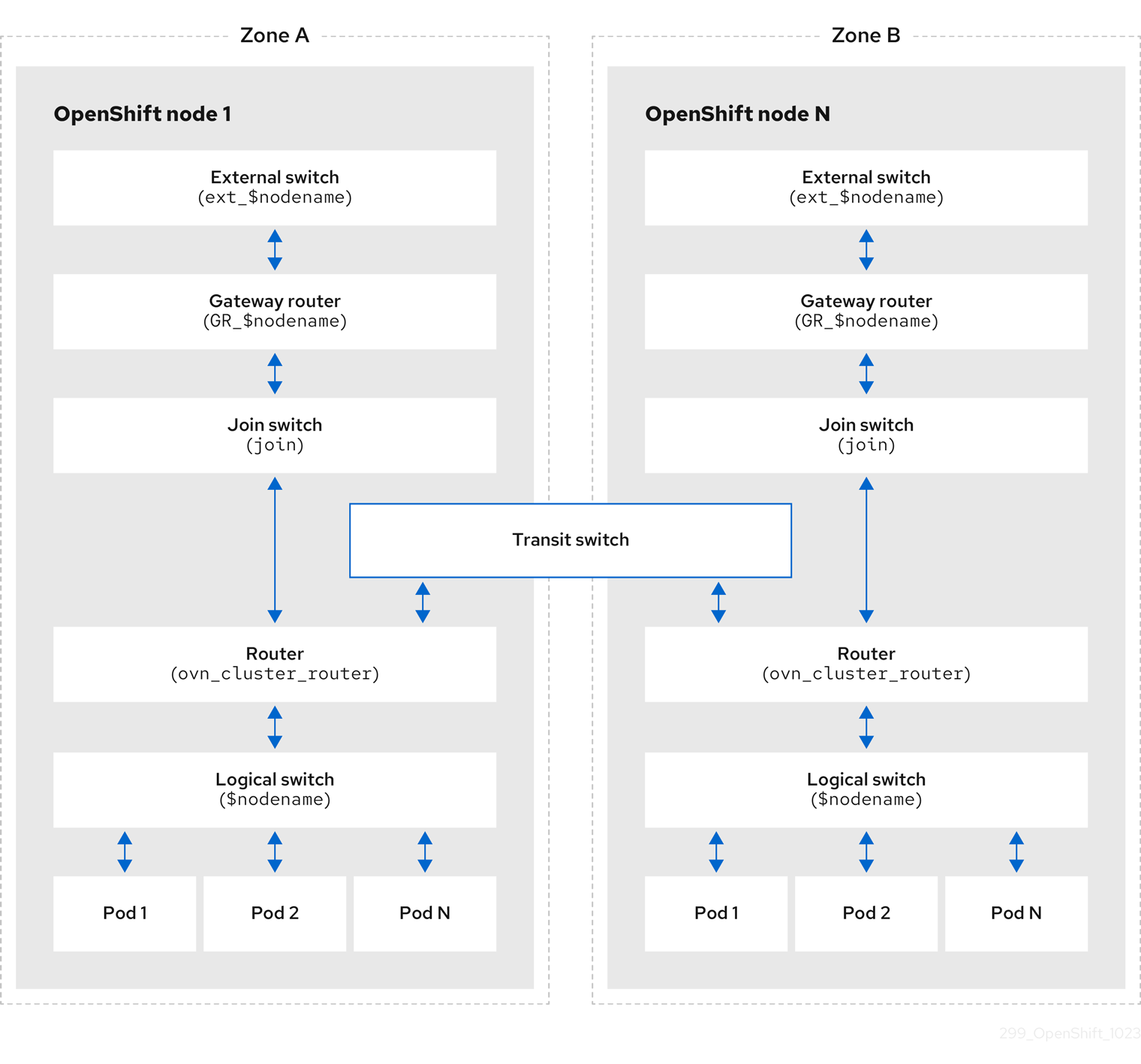
The key components involved in packet processing are:
- Gateway routers
- Gateway routers sometimes called L3 gateway routers, are typically used between the distributed routers and the physical network. Gateway routers including their logical patch ports are bound to a physical location (not distributed), or chassis. The patch ports on this router are known as l3gateway ports in the ovn-southbound database (
ovn-sbdb). - Distributed logical routers
- Distributed logical routers and the logical switches behind them, to which virtual machines and containers attach, effectively reside on each hypervisor.
- Join local switch
- Join local switches are used to connect the distributed router and gateway routers. It reduces the number of IP addresses needed on the distributed router.
- Logical switches with patch ports
- Logical switches with patch ports virtualize the network stack. These components connect remote logical ports through network encapsulation tunnels.
- Logical switches with localnet ports
- Logical switches with localnet ports connect the OVN layout to the physical network. These elements connect remote logical ports by bridging packets to directly attached physical Layer 2 segments.
- Patch ports
- Patch ports provide connectivity between logical switches and logical routers, or between peer logical routers. A single connection uses a pair of patch ports at each connectivity intersection, one on each side.
l3gatewayports- Port binding entries in the
ovn-sbdbfor logical patch ports used in gateway routers. They are calledl3gatewayports rather than patch ports because these ports are bound to a chassis similar to the gateway router itself. - localnet ports
- localnet ports are present on the bridged logical switches that allows a connection to a locally accessible network from each
ovn-controllerinstance. This helps model the direct connectivity to the physical network from the logical switches. A logical switch can only have a single localnet port attached to it.
Executing ovnkube-trace with the log level configuration set to 2 or 5 exposes these internal OVN-Kubernetes logical routing components for analysis.
Installing network-tools on local host
Install network-tools on your local host for debugging OpenShift Container Platform cluster network issues.
Procedure
- Clone the
network-toolsrepository onto your workstation with the following command:$ git clone git@github.com:openshift/network-tools.git - Change into the directory for the repository you just cloned:
$ cd network-tools
- Optional: List all available commands:
$ ./debug-scripts/network-tools -h
Running network-tools
Run network-tools to retrieve configuration status from logical switches and routers when diagnosing internal routing loops and cluster network issues.
Prerequisites
- You installed the OpenShift CLI (
oc). - You are logged in to the cluster as a user with
cluster-adminprivileges. - You have installed
network-toolson local host.
Procedure
-
Display the logical router map by entering the following command:
$ ./debug-scripts/network-tools ovn-db-run-command ovn-nbctl lr-listExample output944a7b53-7948-4ad2-a494-82b55eeccf87 (GR_ci-ln-54932yb-72292-kd676-worker-c-rzj99)84bd4a4c-4b0b-4a47-b0cf-a2c32709fc53 (ovn_cluster_router) -
Locate active port bindings with local network attributes by entering the following command:
$ ./debug-scripts/network-tools ovn-db-run-command "ovn-sbctl find Port_Binding type=localnet"Example output_uuid : d05298f5-805b-4838-9224-1211afc2f199additional_chassis : []additional_encap : []chassis : []datapath : f3c2c959-743b-4037-854d-26627902597cencap : []external_ids : {}gateway_chassis : []ha_chassis_group : []logical_port : br-ex_ci-ln-54932yb-72292-kd676-worker-c-rzj99mac : [unknown]mirror_rules : []nat_addresses : []options : {network_name=physnet}parent_port : []port_security : []requested_additional_chassis: []requested_chassis : []tag : []tunnel_key : 2type : localnetup : falsevirtual_parent : [][...] -
List the
l3gatewayports by entering the following command:$ ./debug-scripts/network-tools ovn-db-run-command "ovn-sbctl find Port_Binding type=l3gateway"Example output_uuid : 5207a1f3-1cf3-42f1-83e9-387bbb06b03cadditional_chassis : []additional_encap : []chassis : ca6eb600-3a10-4372-a83e-e0d957c4cd92datapath : f3c2c959-743b-4037-854d-26627902597cencap : []external_ids : {}gateway_chassis : []ha_chassis_group : []logical_port : etor-GR_ci-ln-54932yb-72292-kd676-worker-c-rzj99mac : ["42:01:0a:00:80:04"]mirror_rules : []nat_addresses : ["42:01:0a:00:80:04 10.0.128.4"]options : {l3gateway-chassis="84737c36-b383-4c83-92c5-2bd5b3c7e772", peer=rtoe-GR_ci-ln-54932yb-72292-kd676-worker-c-rzj99}parent_port : []port_security : []requested_additional_chassis: []requested_chassis : []tag : []tunnel_key : 1type : l3gatewayup : truevirtual_parent : []_uuid : 6088d647-84f2-43f2-b53f-c9d379042679additional_chassis : []additional_encap : []chassis : ca6eb600-3a10-4372-a83e-e0d957c4cd92datapath : dc9cea00-d94a-41b8-bdb0-89d42d13aa2eencap : []external_ids : {}gateway_chassis : []ha_chassis_group : []logical_port : jtor-GR_ci-ln-54932yb-72292-kd676-worker-c-rzj99mac : [router]mirror_rules : []nat_addresses : []options : {l3gateway-chassis="84737c36-b383-4c83-92c5-2bd5b3c7e772", peer=rtoj-GR_ci-ln-54932yb-72292-kd676-worker-c-rzj99}parent_port : []port_security : []requested_additional_chassis: []requested_chassis : []tag : []tunnel_key : 2type : l3gatewayup : truevirtual_parent : [][...] -
List the patch ports by entering the following command:
$ ./debug-scripts/network-tools ovn-db-run-command "ovn-sbctl find Port_Binding type=patch"Example output_uuid : 785fb8b6-ee5a-4792-a415-5b1cb855dac2additional_chassis : []additional_encap : []chassis : []datapath : f1ddd1cc-dc0d-43b4-90ca-12651305acecencap : []external_ids : {}gateway_chassis : []ha_chassis_group : []logical_port : stor-ci-ln-54932yb-72292-kd676-worker-c-rzj99mac : [router]mirror_rules : []nat_addresses : ["0a:58:0a:80:02:01 10.128.2.1 is_chassis_resident(\"cr-rtos-ci-ln-54932yb-72292-kd676-worker-c-rzj99\")"]options : {peer=rtos-ci-ln-54932yb-72292-kd676-worker-c-rzj99}parent_port : []port_security : []requested_additional_chassis: []requested_chassis : []tag : []tunnel_key : 1type : patchup : falsevirtual_parent : []_uuid : c01ff587-21a5-40b4-8244-4cd0425e5d9aadditional_chassis : []additional_encap : []chassis : []datapath : f6795586-bf92-4f84-9222-efe4ac6a7734encap : []external_ids : {}gateway_chassis : []ha_chassis_group : []logical_port : rtoj-ovn_cluster_routermac : ["0a:58:64:40:00:01 100.64.0.1/16"]mirror_rules : []nat_addresses : []options : {peer=jtor-ovn_cluster_router}parent_port : []port_security : []requested_additional_chassis: []requested_chassis : []tag : []tunnel_key : 1type : patchup : falsevirtual_parent : [][...]
Additional resources