Automatically scaling pods with the horizontal pod autoscaler
As a developer, you can use a horizontal pod autoscaler (HPA) to specify how OpenShift Container Platform should automatically increase or decrease the scale of a replication controller or deployment configuration, based on metrics collected from the pods that belong to that replication controller or deployment configuration.
You can create an HPA for any deployment, deployment config, replica set, replication controller, or stateful set.
For information on scaling pods based on custom metrics, see "Automatically scaling pods based on custom metrics".
It is recommended to use a Deployment object or ReplicaSet object unless you need a specific feature or behavior provided by other objects. For more information on these objects, see "Understanding deployments".
Understanding horizontal pod autoscalers
You can create a horizontal pod autoscaler to specify the minimum and maximum number of pods you want to run and the CPU usage or memory usage your pods should target.
After you create a horizontal pod autoscaler, OpenShift Container Platform begins to query the CPU, memory, or both resource metrics on the pods. When these metrics are available, the horizontal pod autoscaler computes the ratio of the current metric use with the intended metric use, and scales up or down as needed. The query and scaling occurs at a regular interval, but can take one to two minutes before metrics become available.
For replication controllers, this scaling corresponds directly to the replicas of the replication controller. For deployment, scaling corresponds directly to the replica count of the deployment. Note that autoscaling applies only to the latest deployment in the Complete phase.
OpenShift Container Platform automatically accounts for resources and prevents unnecessary autoscaling during resource spikes, such as during start up. Pods in the unready state have 0 CPU usage when scaling up and the autoscaler ignores the pods when scaling down. Pods without known metrics have 0% CPU usage when scaling up and 100% CPU when scaling down. This allows for more stability during the HPA decision. To use this feature, you must configure readiness checks to determine if a new pod is ready for use.
To use horizontal pod autoscalers, your cluster administrator must have properly configured cluster metrics.
The following metrics are supported by horizontal pod autoscalers:
Supported metrics
| Metric | Description | API version |
|---|---|---|
| CPU utilization | Number of CPU cores used. You can use this to calculate a percentage of the pod's requested CPU. | autoscaling/v1, autoscaling/v2 |
| Memory utilization | Amount of memory used. You can use this to calculate a percentage of the pod's requested memory. | autoscaling/v2 |
For memory-based autoscaling, memory usage must increase and decrease proportionally to the replica count. On average:
- An increase in replica count must lead to an overall decrease in memory (working set) usage per-pod.
- A decrease in replica count must lead to an overall increase in per-pod memory usage.
Use the OpenShift Container Platform web console to check the memory behavior of your application and ensure that your application meets these requirements before using memory-based autoscaling.
The following example shows autoscaling for the hello-node Deployment object. The initial deployment requires 3 pods. The HPA object increases the minimum to 5. If CPU usage on the pods reaches 75%, the pods increase to 7:
$ oc autoscale deployment/hello-node --min=5 --max=7 --cpu-percent=75
horizontalpodautoscaler.autoscaling/hello-node autoscaled
apiVersion: autoscaling/v1
kind: HorizontalPodAutoscaler
metadata:
  name: hello-node
  namespace: default
spec:
  maxReplicas: 7
  minReplicas: 3
  scaleTargetRef:
    apiVersion: apps/v1
    kind: Deployment
    name: hello-node
  targetCPUUtilizationPercentage: 75
status:
  currentReplicas: 5
  desiredReplicas: 0
After you create the HPA, you can view the new state of the deployment by running the following command:
$ oc get deployment hello-node
There are now 5 pods in the deployment:
NAME         REVISION   DESIRED   CURRENT   TRIGGERED BY
hello-node   1          5         5         config
How does the HPA work?
By using the horizontal pod autoscaler (HPA) you can create and manage a group of load-balanced nodes. The HPA automatically increases or decreases the number of pods when a given CPU or memory threshold is crossed.
Figure 1. High level workflow of the HPA
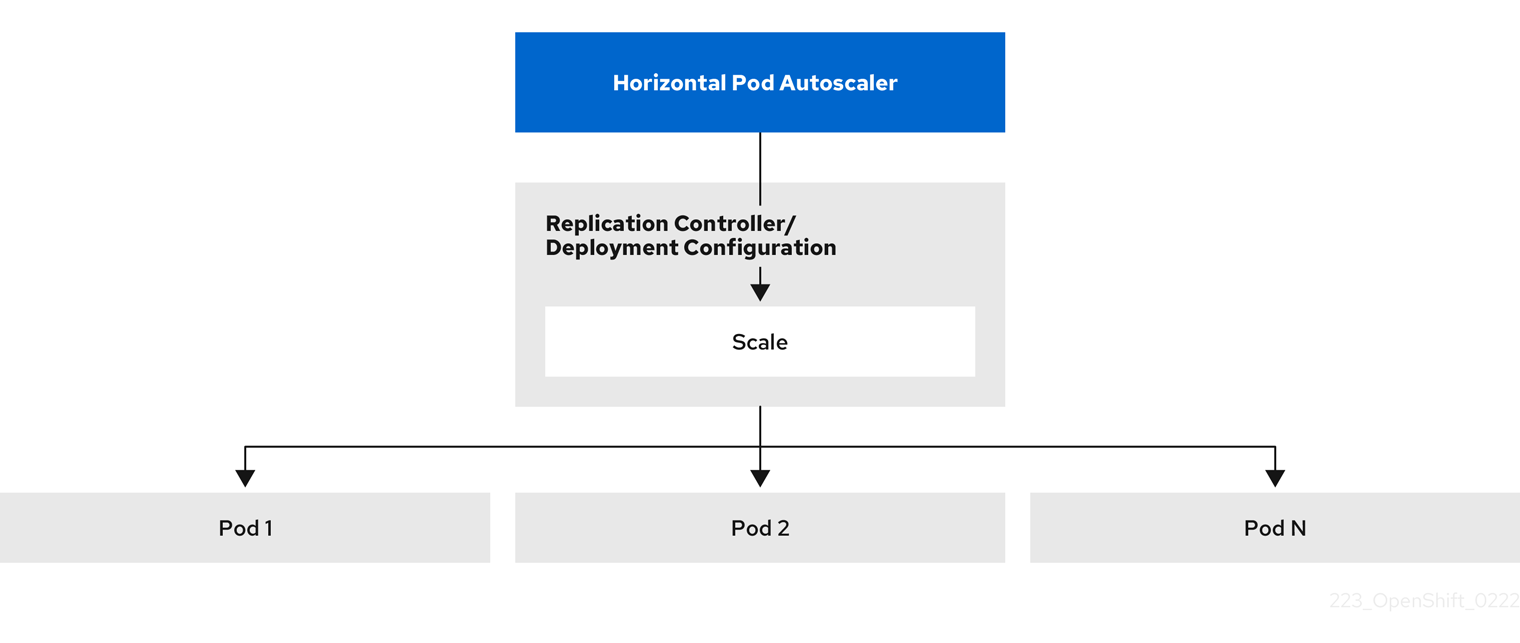
The HPA is an API resource in the Kubernetes autoscaling API group. The autoscaler works as a control loop with a default of 15 seconds for the sync period. During this period, the controller manager queries the CPU, memory utilization, or both, against what is defined in the YAML file for the HPA. The controller manager obtains the utilization metrics from the resource metrics API for per-pod resource metrics like CPU or memory, for each pod that is targeted by the HPA.
If a utilization value target is set, the controller calculates the utilization value as a percentage of the equivalent resource request on the containers in each pod. The controller then takes the average of utilization across all targeted pods and produces a ratio that is used to scale the number of desired replicas. The HPA is configured to fetch metrics from metrics.k8s.io, which is provided by the metrics server. Because of the dynamic nature of metrics evaluation, the number of replicas can fluctuate during scaling for a group of replicas.
To implement the HPA, all targeted pods must have a resource request set on their containers.
About requests and limits
To use resource metrics, you must specify the resource requests, such as CPU and memory, in a pod specification. The HPA uses this specification to determine the resource utilization and then scales the target up or down.
The scheduler uses the resource request that you specify for containers in a pod, to decide which node to place the pod on. The kubelet enforces the resource limit that you specify for a container to ensure that the container is not allowed to use more than the specified limit. The kubelet also reserves the request amount of that system resource specifically for that container to use.
For example, the HPA object uses the following metric source:
type: Resource
resource:
  name: cpu
  target:
    type: Utilization
    averageUtilization: 60
In this example, the HPA keeps the average utilization of the pods in the scaling target at 60%. Utilization is the ratio between the current resource usage to the requested resource of the pod.
Best practices
You can help ensure optimal performance in your cluster by configuring resource requests for all pods. Additionally, you can prevent frequent replica fluctuations by configuring the cooldown period.
- All pods must have resource requests configured
- The HPA makes a scaling decision based on the observed CPU or memory usage values of pods in an OpenShift Container Platform cluster. Utilization values are calculated as a percentage of the resource requests of each pod. Missing resource request values can affect the optimal performance of the HPA.
For more information, see "Understanding resource requests and limits".
- Configure the cool down period
- During horizontal pod autoscaling, there might be a rapid scaling of events without a time gap. Configure the cool down period to prevent frequent replica fluctuations. You can specify a cool down period by configuring the
stabilizationWindowSecondsfield. The stabilization window is used to restrict the fluctuation of replicas count when the metrics used for scaling keep fluctuating. The autoscaling algorithm uses this window to infer a previous required state and avoid unwanted changes to workload scale.
For example, a stabilization window is specified for the scaleDown field:
behavior:
  scaleDown:
    stabilizationWindowSeconds: 300
In the previous example, all intended states for the past 5 minutes are considered. This approximates a rolling maximum, and avoids having the scaling algorithm often remove pods only to trigger recreating an equal pod just moments later.
For more information, see "Scaling policies".
Scaling policies
To control how the OpenShift Container Platform horizontal pod autoscaler (HPA) scales pods you can define a scaling policy to restrict the rate at which scaling occurs and a stabilization window to restrict the fluctuation of replicas count when the metrics used for scaling keep fluctuating.
A scaling policy restricts the rate that HPAs scale pods up or down by setting a specific number or specific percentage to scale in a specified period of time. A stabilization window, which uses previously computed required states to control scaling if the metrics are fluctuating. You can create multiple policies for the same scaling direction, and determine the policy to use, based on the amount of change. You can also restrict the scaling by timed iterations. The HPA scales pods during an iteration, then performs scaling, as needed, in further iterations.
Use the autoscaling/v2 API to add scaling policies to a horizontal pod autoscaler.
apiVersion: autoscaling/v2
kind: HorizontalPodAutoscaler
metadata:
  name: hpa-resource-metrics-memory
  namespace: default
spec:
  behavior:
    scaleDown:
      policies:
      - type: Pods
        value: 4
        periodSeconds: 60
      - type: Percent
        value: 10
        periodSeconds: 60
      selectPolicy: Min
      stabilizationWindowSeconds: 300
    scaleUp:
      policies:
      - type: Pods
        value: 5
        periodSeconds: 70
      - type: Percent
        value: 12
        periodSeconds: 80
      selectPolicy: Max
      stabilizationWindowSeconds: 0
...
where:
spec.behavior.scaleDown- Specifies a policy for scaling down.
spec.behavior.scaleDown.policies- Specifies the parameters for the scaling policy. Set the following values:
type. Specifies whether the policy scales by a specific number of pods or a percentage of pods during each iteration. The default value ispods.value. Specifies the amount of scaling, either the number of pods or percentage of pods, during each iteration. The default value for scaling down by percentage is 100%. There is no default value for scaling down by number of pods.periodSeconds. Specifies the length of a scaling iteration. The default value is15seconds.
spec.behavior.scaleDown.selectPolicy- Specifies the policy to use first, if multiple policies are defined. Specify
Maxto use the policy that allows the highest amount of change,Minto use the policy that allows the lowest amount of change, orDisabledto prevent the HPA from scaling in that policy direction. The default value isMax. spec.behavior.scaleDown.stabilizationWindowSeconds- Specifies the time period the HPA reviews the required states. The default value is
0. spec.behavior.scaleUp- Specifies a policy for scaling up.
spec.behavior.scaleUp.policies- Specifies the parameters for the scaling policy. Set the following values:
type. Specifies whether the policy scales by a specific number of pods or a percentage of pods during each iteration.value. Specifies the amount of scaling, either the number of pods or percentage of pods, during each iteration. The default value for scaling up by percentage is 100%. The default value for scaling up the number of pods is 4%.periodSeconds. Specifies the length of a scaling iteration.
apiVersion: autoscaling/v2
kind: HorizontalPodAutoscaler
metadata:
  name: hpa-resource-metrics-memory
  namespace: default
spec:
...
  minReplicas: 20
...
  behavior:
    scaleDown:
      stabilizationWindowSeconds: 300
      policies:
      - type: Pods
        value: 4
        periodSeconds: 30
      - type: Percent
        value: 10
        periodSeconds: 60
      selectPolicy: Max
    scaleUp:
      selectPolicy: Disabled
In this example, when the number of pods is greater than 40, the percent-based policy is used for scaling down, as that policy results in a larger change, as required by the selectPolicy.
If there are 80 pod replicas, in the first iteration the HPA reduces the pods by 8, which is 10% of the 80 pods (based on the type: Percent and value: 10 parameters), over one minute (periodSeconds: 60). For the next iteration, the number of pods is 72. The HPA calculates that 10% of the remaining pods is 7.2, which it rounds up to 8 and scales down 8 pods. On each subsequent iteration, the number of pods to be scaled is re-calculated based on the number of remaining pods. When the number of pods falls to less than 40, the pods-based policy is applied, because the pod-based number is greater than the percent-based number. The HPA reduces 4 pods at a time (type: Pods and value: 4), over 30 seconds (periodSeconds: 30), until there are 20 replicas remaining (minReplicas).
The selectPolicy: Disabled parameter prevents the HPA from scaling up the pods. You can manually scale up by adjusting the number of replicas in the replica set or deployment set, if needed.
If set, you can view the scaling policy by using the oc edit command:
$ oc edit hpa hpa-resource-metrics-memory
apiVersion: autoscaling/v1
kind: HorizontalPodAutoscaler
metadata:
  annotations:
    autoscaling.alpha.kubernetes.io/behavior:\
'{"ScaleUp":{"StabilizationWindowSeconds":0,"SelectPolicy":"Max","Policies":[{"Type":"Pods","Value":4,"PeriodSeconds":15},{"Type":"Percent","Value":100,"PeriodSeconds":15}]},\
"ScaleDown":{"StabilizationWindowSeconds":300,"SelectPolicy":"Min","Policies":[{"Type":"Pods","Value":4,"PeriodSeconds":60},{"Type":"Percent","Value":10,"PeriodSeconds":60}]}}'
...
Create a horizontal pod autoscaler by using the web console
You can use the web console to create a horizontal pod autoscaler (HPA) that specifies the minimum and maximum number of pods you want to run on a Deployment or DeploymentConfig object. You can also define the amount of CPU or memory usage that your pods should target.
An HPA cannot be added to deployments that are part of an Operator-backed service, Knative service, or Helm chart.
The following procedure creates an HPA in the web console.
Procedure
-
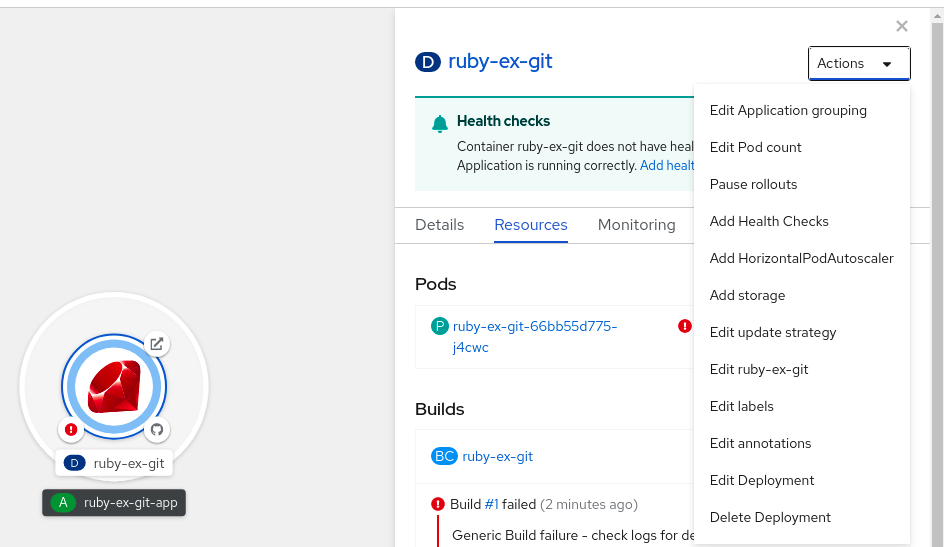
In the Topology view, click the node to reveal the side pane.
-
From the Actions drop-down list, select Add HorizontalPodAutoscaler to open the Add HorizontalPodAutoscaler form. Figure 2. Add HorizontalPodAutoscaler
-
From the Add HorizontalPodAutoscaler form, define the name, minimum and maximum pod limits, the CPU and memory usage, and click Save.
noteIf any of the values for CPU and memory usage are missing, a warning is displayed.
Edit a horizontal pod autoscaler by using the web console
You can use the web console to modify a horizontal pod autoscaler (HPA) that specifies the minimum and maximum number of pods you want to run on a Deployment or DeploymentConfig object. You can also define the amount of CPU or memory usage that your pods should target.
Procedure
-
In the Topology view, click the node to reveal the side pane.
-
From the Actions drop-down list, select Edit HorizontalPodAutoscaler to open the Edit Horizontal Pod Autoscaler form.
-
From the Edit Horizontal Pod Autoscaler form, edit the minimum and maximum pod limits and the CPU and memory usage, and click Save.
noteWhile creating or editing the horizontal pod autoscaler in the web console, you can switch from Form view to YAML view.
Remove a horizontal pod autoscaler by using the web console
You can use the web console to remove a horizontal pod autoscaler (HPA).
Procedure
- In the Topology view, click the node to reveal the side panel.
- From the Actions drop-down list, select Remove HorizontalPodAutoscaler.
- In the confirmation window, click Remove to remove the HPA.
Creating a horizontal pod autoscaler by using the CLI
By using the OpenShift Container Platform CLI, you can create a horizontal pod autoscaler (HPA) to automatically scale an existing Deployment, DeploymentConfig, ReplicaSet, ReplicationController, or StatefulSet object. The HPA scales the pods associated with that object to maintain the CPU or memory resources that you specify.
You can autoscale based on CPU or memory use by specifying a percentage of resource usage or a specific value, as described in the following sections.
The HPA increases and decreases the number of replicas between the minimum and maximum numbers to maintain the specified resource use across all pods.
Create a horizontal pod autoscaler for a percent of CPU use
You can use the OpenShift Container Platform CLI to create a horizontal pod autoscaler (HPA) that automatically scales an existing object based on percent of CPU use. The HPA scales the pods associated with that object to maintain the CPU use that you specify.
When autoscaling for a percent of CPU use, you can use the oc autoscale command to specify the minimum and maximum number of pods that you want to run at any given time and the average CPU use your pods should target. If you do not specify a minimum, the pods are given default values from the OpenShift Container Platform server.
Use a Deployment object or ReplicaSet object unless you need a specific feature or behavior provided by other objects.
Prerequisites
To use horizontal pod autoscalers, your cluster administrator must have properly configured cluster metrics. You can use the oc describe PodMetrics <pod-name> command to determine if metrics are configured. If metrics are configured, the output appears similar to the following, with Cpu and Memory displayed under Usage.
$ oc describe PodMetrics openshift-kube-scheduler-ip-10-0-135-131.ec2.internal
Name:         openshift-kube-scheduler-ip-10-0-135-131.ec2.internal
Namespace:    openshift-kube-scheduler
Labels:       <none>
Annotations:  <none>
API Version:  metrics.k8s.io/v1beta1
Containers:
  Name:  wait-for-host-port
  Usage:
    Memory:  0
  Name:      scheduler
  Usage:
    Cpu:     8m
    Memory:  45440Ki
Kind:        PodMetrics
Metadata:
  Creation Timestamp:  2019-05-23T18:47:56Z
  Self Link:           /apis/metrics.k8s.io/v1beta1/namespaces/openshift-kube-scheduler/pods/openshift-kube-scheduler-ip-10-0-135-131.ec2.internal
Timestamp:             2019-05-23T18:47:56Z
Window:                1m0s
Events:                <none>
Procedure
-
Create a
HorizontalPodAutoscalerobject for an existing object:$ oc autoscale <object_type>/<name> \--min <number> \--max <number> \--cpu-percent=<percent>where:
<object_type>/<name>- Specifies the type and name of the object to autoscale. The object must exist and be a
Deployment,DeploymentConfig/dc,ReplicaSet/rs,ReplicationController/rc, orStatefulSet. min- Specifies the minimum number of replicas when scaling down. Replace
<number>with the minimum number of replicas. This parameter is optional. max- Specifies the maximum number of replicas when scaling up. Replace
<number>with the maximum number of replicas. cpu-percent- Specifies the target average CPU use over all the pods, represented as a percent of requested CPU. Replace
<percent>with requested percentage. If not specified or negative, a default autoscaling policy is used.
For example, the following command shows autoscaling for the
hello-nodedeployment object. The initial deployment requires 3 pods. The HPA object increases the minimum to 5. If CPU usage on the pods reaches 75%, the pods will increase to 7:$ oc autoscale deployment/hello-node --min=5 --max=7 --cpu-percent=75 -
Create the horizontal pod autoscaler:
$ oc create -f <file-name>.yaml
Verification
-
Ensure that the horizontal pod autoscaler was created:
$ oc get hpa cpu-autoscaleExample outputNAME REFERENCE TARGETS MINPODS MAXPODS REPLICAS AGEcpu-autoscale Deployment/example 173m/500m 1 10 1 20m
Create a horizontal pod autoscaler for a specific CPU value
You can use the OpenShift Container Platform CLI to create a horizontal pod autoscaler (HPA) that automatically scales an existing object based on a specific CPU value by creating a HorizontalPodAutoscaler object with the target CPU and pod limits. The HPA scales the pods associated with that object to maintain the CPU use that you specify.
Use a Deployment object or ReplicaSet object unless you need a specific feature or behavior provided by other objects.
Prerequisites
To use horizontal pod autoscalers, your cluster administrator must have properly configured cluster metrics. You can use the oc describe PodMetrics <pod-name> command to determine if metrics are configured. If metrics are configured, the output appears similar to the following, with Cpu and Memory displayed under Usage.
$ oc describe PodMetrics openshift-kube-scheduler-ip-10-0-135-131.ec2.internal
Name:         openshift-kube-scheduler-ip-10-0-135-131.ec2.internal
Namespace:    openshift-kube-scheduler
Labels:       <none>
Annotations:  <none>
API Version:  metrics.k8s.io/v1beta1
Containers:
  Name:  wait-for-host-port
  Usage:
    Memory:  0
  Name:      scheduler
  Usage:
    Cpu:     8m
    Memory:  45440Ki
Kind:        PodMetrics
Metadata:
  Creation Timestamp:  2019-05-23T18:47:56Z
  Self Link:           /apis/metrics.k8s.io/v1beta1/namespaces/openshift-kube-scheduler/pods/openshift-kube-scheduler-ip-10-0-135-131.ec2.internal
Timestamp:             2019-05-23T18:47:56Z
Window:                1m0s
Events:                <none>
Procedure
-
Create a YAML file similar to the following for an existing object:
apiVersion: autoscaling/v2kind: HorizontalPodAutoscalermetadata:name: cpu-autoscalenamespace: defaultspec:scaleTargetRef:apiVersion: apps/v1kind: Deploymentname: exampleminReplicas: 1maxReplicas: 10metrics:- type: Resourceresource:name: cputarget:type: AverageValueaverageValue: 500mwhere:
apiVersionSpecifies the
autoscaling/v2API.metadata.nameSpecifies a name for this horizontal pod autoscaler object.
spec.scaleTargetRef.apiVersionSpecifies the API version of the object to scale:
- For a
Deployment,ReplicaSet,Statefulsetobject, useapps/v1. - For a
ReplicationController, usev1. - For a
DeploymentConfig, useapps.openshift.io/v1.
spec.scaleTargetRef.kindSpecifies the type of object. The object must be a
Deployment,DeploymentConfig/dc,ReplicaSet/rs,ReplicationController/rc, orStatefulSet.spec.scaleTargetRef.nameSpecifies the name of the object to scale. The object must exist.
spec.minReplicasSpecifies the minimum number of replicas when scaling down.
spec.maxReplicasSpecifies the maximum number of replicas when scaling up.
spec.metricsSpecifies the parameters to calculate the desired replica count.
spec.metrics.resource.nameSpecifies a name for the resource.
spec.metrics.resource.target.typeSpecifies the type of target, here
AverageValuefor a specific CPU value.spec.metrics.resource.target.averageValueSpecifies the targeted CPU value.
- For a
-
Create the horizontal pod autoscaler:
$ oc create -f <file-name>.yaml
Verification
-
Check that the horizontal pod autoscaler was created:
$ oc get hpa cpu-autoscaleExample outputNAME REFERENCE TARGETS MINPODS MAXPODS REPLICAS AGEcpu-autoscale Deployment/example 173m/500m 1 10 1 20m
Create a horizontal pod autoscaler object for a percent of memory use
You can use the OpenShift Container Platform CLI to create a horizontal pod autoscaler (HPA) that automatically scales an existing object based on a percent of memory use. The HPA scales the pods associated with that object to maintain the memory use that you specify.
Use a Deployment object or ReplicaSet object unless you need a specific feature or behavior provided by other objects.
You can specify the minimum and maximum number of pods and the average memory use that your pods should target. If you do not specify a minimum, the pods are given default values from the OpenShift Container Platform server.
Prerequisites
To use horizontal pod autoscalers, your cluster administrator must have properly configured cluster metrics. You can use the oc describe PodMetrics <pod-name> command to determine if metrics are configured. If metrics are configured, the output appears similar to the following, with Cpu and Memory displayed under Usage.
$ oc describe PodMetrics openshift-kube-scheduler-ip-10-0-135-131.ec2.internal
Name:         openshift-kube-scheduler-ip-10-0-135-131.ec2.internal
Namespace:    openshift-kube-scheduler
Labels:       <none>
Annotations:  <none>
API Version:  metrics.k8s.io/v1beta1
Containers:
  Name:  wait-for-host-port
  Usage:
    Memory:  0
  Name:      scheduler
  Usage:
    Cpu:     8m
    Memory:  45440Ki
Kind:        PodMetrics
Metadata:
  Creation Timestamp:  2019-05-23T18:47:56Z
  Self Link:           /apis/metrics.k8s.io/v1beta1/namespaces/openshift-kube-scheduler/pods/openshift-kube-scheduler-ip-10-0-135-131.ec2.internal
Timestamp:             2019-05-23T18:47:56Z
Window:                1m0s
Events:                <none>
Procedure
-
Create a
HorizontalPodAutoscalerobject similar to the following for an existing object:apiVersion: autoscaling/v2kind: HorizontalPodAutoscalermetadata:name: memory-autoscalenamespace: defaultspec:scaleTargetRef:apiVersion: apps/v1kind: Deploymentname: exampleminReplicas: 1maxReplicas: 10metrics:- type: Resourceresource:name: memorytarget:type: UtilizationaverageUtilization: 50behavior:scaleUp:stabilizationWindowSeconds: 180policies:- type: Podsvalue: 6periodSeconds: 120- type: Percentvalue: 10periodSeconds: 120selectPolicy: Maxwhere:
apiVersionSpecifies the
autoscaling/v2API.metadata.nameSpecifies a name for this horizontal pod autoscaler object.
spec.scaleTargetRef.apiVersionSpecifies the API version of the object to scale:
- For a
Deployment,ReplicaSet,Statefulsetobject, useapps/v1. - For a
ReplicationController, usev1. - For a
DeploymentConfig, useapps.openshift.io/v1.
spec.scaleTargetRef.kindSpecifies the type of object. The object must be a
Deployment,DeploymentConfig/dc,ReplicaSet/rs,ReplicationController/rc, orStatefulSet.spec.scaleTargetRef.nameSpecifies the name of the object to scale. The object must exist.
spec.minReplicasSpecifies the minimum number of replicas when scaling down.
spec.maxReplicasSpecifies the maximum number of replicas when scaling up.
spec.metricsSpecifies the parameters to calculate the desired replica count.
spec.metrics.resource.nameSpecifies a name for the resource.
spec.metrics.resource.target.typeSpecifies the type of target, here
Utilizationfor a percentage value.spec.metrics.resource.target.averageUtilizationSpecifies the targeted average memory usage over all the pods, represented as a percent of requested memory. The target pods must have memory requests configured.
spec.behaviorOptional: Specifies a scaling policy to control the rate of scaling up or down.
- For a
-
Create the horizontal pod autoscaler by using a command similar to the following:
$ oc create -f <file-name>.yamlFor example:
$ oc create -f hpa.yamlExample outputhorizontalpodautoscaler.autoscaling/hpa-resource-metrics-memory created
Verification
-
Check that the horizontal pod autoscaler was created by using a command similar to the following:
$ oc get hpa hpa-resource-metrics-memoryExample outputNAME REFERENCE TARGETS MINPODS MAXPODS REPLICAS AGEhpa-resource-metrics-memory Deployment/example 2441216/500Mi 1 10 1 20m -
Check the details of the horizontal pod autoscaler by using a command similar to the following:
$ oc describe hpa hpa-resource-metrics-memoryExample outputName: hpa-resource-metrics-memoryNamespace: defaultLabels: <none>Annotations: <none>CreationTimestamp: Wed, 04 Mar 2020 16:31:37 +0530Reference: Deployment/exampleMetrics: ( current / target )resource memory on pods: 2441216 / 500MiMin replicas: 1Max replicas: 10ReplicationController pods: 1 current / 1 desiredConditions:Type Status Reason Message---- ------ ------ -------AbleToScale True ReadyForNewScale recommended size matches current sizeScalingActive True ValidMetricFound the HPA was able to successfully calculate a replica count from memory resourceScalingLimited False DesiredWithinRange the desired count is within the acceptable rangeEvents:Type Reason Age From Message---- ------ ---- ---- -------Normal SuccessfulRescale 6m34s horizontal-pod-autoscaler New size: 1; reason: All metrics below target
Create a horizontal pod autoscaler object for specific memory use
You can use the OpenShift Container Platform CLI to create a horizontal pod autoscaler (HPA) that automatically scales an existing object. The HPA scales the pods associated with that object to maintain the average memory use that you specify.
Use a Deployment object or ReplicaSet object unless you need a specific feature or behavior provided by other objects.
You can specify the minimum and maximum number of pods and the average memory use that your pods should target. If you do not specify a minimum, the pods are given default values from the OpenShift Container Platform server.
Prerequisites
To use horizontal pod autoscalers, your cluster administrator must have properly configured cluster metrics. You can use the oc describe PodMetrics <pod-name> command to determine if metrics are configured. If metrics are configured, the output appears similar to the following, with Cpu and Memory displayed under Usage.
$ oc describe PodMetrics openshift-kube-scheduler-ip-10-0-135-131.ec2.internal
Name:         openshift-kube-scheduler-ip-10-0-135-131.ec2.internal
Namespace:    openshift-kube-scheduler
Labels:       <none>
Annotations:  <none>
API Version:  metrics.k8s.io/v1beta1
Containers:
  Name:  wait-for-host-port
  Usage:
    Memory:  0
  Name:      scheduler
  Usage:
    Cpu:     8m
    Memory:  45440Ki
Kind:        PodMetrics
Metadata:
  Creation Timestamp:  2019-05-23T18:47:56Z
  Self Link:           /apis/metrics.k8s.io/v1beta1/namespaces/openshift-kube-scheduler/pods/openshift-kube-scheduler-ip-10-0-135-131.ec2.internal
Timestamp:             2019-05-23T18:47:56Z
Window:                1m0s
Events:                <none>
Procedure
-
Create a
HorizontalPodAutoscalerobject similar to the following for an existing object:apiVersion: autoscaling/v2kind: HorizontalPodAutoscalermetadata:name: hpa-resource-metrics-memorynamespace: defaultspec:scaleTargetRef:apiVersion: apps/v1kind: Deploymentname: exampleminReplicas: 1maxReplicas: 10metrics:- type: Resourceresource:name: memorytarget:type: AverageValueaverageValue: 500Mibehavior:scaleDown:stabilizationWindowSeconds: 300policies:- type: Podsvalue: 4periodSeconds: 60- type: Percentvalue: 10periodSeconds: 60selectPolicy: Maxwhere:
apiVersionSpecifies the
autoscaling/v2API.metadata.nameSpecifies a name for this horizontal pod autoscaler object.
spec.scaleTargetRef.apiVersionSpecifies the API version of the object to scale:
- For a
Deployment,ReplicaSet,Statefulsetobject, useapps/v1. - For a
ReplicationController, usev1. - For a
DeploymentConfig, useapps.openshift.io/v1.
spec.scaleTargetRef.kindSpecifies the type of object. The object must be a
Deployment,DeploymentConfig/dc,ReplicaSet/rs,ReplicationController/rc, orStatefulSet.spec.scaleTargetRef.nameSpecifies the name of the object to scale. The object must exist.
spec.minReplicasSpecifies the minimum number of replicas when scaling down.
spec.maxReplicasSpecifies the maximum number of replicas when scaling up.
spec.metricsSpecifies the parameters to calculate the desired replica count. Set the
spec.metrics.resource.nameSpecifies a name for the resource.
spec.metrics.resource.target.typeSpecifies the type of target, here
AverageValuefor a specific memory value.spec.metrics.resource.target.averageValueSpecifies the targeted memory value.
spec.behaviorOptional: Specifies a scaling policy to control the rate of scaling up or down.
- For a
-
Create the horizontal pod autoscaler by using a command similar to the following:
$ oc create -f <file-name>.yamlFor example:
$ oc create -f hpa.yamlExample outputhorizontalpodautoscaler.autoscaling/hpa-resource-metrics-memory created
Verification
-
Check that the horizontal pod autoscaler was created by using a command similar to the following:
$ oc get hpa hpa-resource-metrics-memoryExample outputNAME REFERENCE TARGETS MINPODS MAXPODS REPLICAS AGEhpa-resource-metrics-memory Deployment/example 2441216/500Mi 1 10 1 20m -
Check the details of the horizontal pod autoscaler by using a command similar to the following:
$ oc describe hpa hpa-resource-metrics-memoryExample outputName: hpa-resource-metrics-memoryNamespace: defaultLabels: <none>Annotations: <none>CreationTimestamp: Wed, 04 Mar 2020 16:31:37 +0530Reference: Deployment/exampleMetrics: ( current / target )resource memory on pods: 2441216 / 500MiMin replicas: 1Max replicas: 10ReplicationController pods: 1 current / 1 desiredConditions:Type Status Reason Message---- ------ ------ -------AbleToScale True ReadyForNewScale recommended size matches current sizeScalingActive True ValidMetricFound the HPA was able to successfully calculate a replica count from memory resourceScalingLimited False DesiredWithinRange the desired count is within the acceptable rangeEvents:Type Reason Age From Message---- ------ ---- ---- -------Normal SuccessfulRescale 6m34s horizontal-pod-autoscaler New size: 1; reason: All metrics below target
Understanding horizontal pod autoscaler status conditions by using the CLI
You can review the horizontal pod autoscaler (HPA) status conditions set to determine if the HPA is able to scale or if it is currently restricted in any way.
The HPA status conditions are available with the v2 version of the autoscaling API.
The HPA responds with the following status conditions:
- The
AbleToScalecondition indicates whether HPA is able to fetch and update metrics, as well as whether any backoff-related conditions could prevent scaling.- A
Truecondition indicates scaling is allowed. - A
Falsecondition indicates scaling is not allowed for the reason specified.
- A
- The
ScalingActivecondition indicates whether the HPA is enabled (for example, the replica count of the target is not zero) and is able to calculate desired metrics.- A
Truecondition indicates metrics is working properly. - A
Falsecondition generally indicates a problem with fetching metrics.
- A
- The
ScalingLimitedcondition indicates that the desired scale was capped by the maximum or minimum of the horizontal pod autoscaler.-
A
Truecondition indicates that you need to raise or lower the minimum or maximum replica count in order to scale. -
A
Falsecondition indicates that the requested scaling is allowed.$ oc describe hpa cm-testExample outputName: cm-testNamespace: promLabels: <none>Annotations: <none>CreationTimestamp: Fri, 16 Jun 2017 18:09:22 +0000Reference: ReplicationController/cm-testMetrics: ( current / target )"http_requests" on pods: 66m / 500mMin replicas: 1Max replicas: 4ReplicationController pods: 1 current / 1 desiredConditions: (1)Type Status Reason Message---- ------ ------ -------AbleToScale True ReadyForNewScale the last scale time was sufficiently old as to warrant a new scaleScalingActive True ValidMetricFound the HPA was able to successfully calculate a replica count from pods metric http_requestScalingLimited False DesiredWithinRange the desired replica count is within the acceptable rangeEvents:The horizontal pod autoscaler status messages appear in the
Conditionsstanza.
-
The following is an example of a pod that is unable to scale:
Conditions:
  Type         Status  Reason          Message
  ----         ------  ------          -------
  AbleToScale  False   FailedGetScale  the HPA controller was unable to get the target's current scale: no matches for kind "ReplicationController" in group "apps"
Events:
  Type     Reason          Age               From                       Message
  ----     ------          ----              ----                       -------
  Warning  FailedGetScale  6s (x3 over 36s)  horizontal-pod-autoscaler  no matches for kind "ReplicationController" in group "apps"
The following is an example of a pod that could not obtain the needed metrics for scaling:
Conditions:
  Type                  Status    Reason                    Message
  ----                  ------    ------                    -------
  AbleToScale           True     SucceededGetScale          the HPA controller was able to get the target's current scale
  ScalingActive         False    FailedGetResourceMetric    the HPA was unable to compute the replica count: failed to get cpu utilization: unable to get metrics for resource cpu: no metrics returned from resource metrics API
The following is an example of a pod where the requested autoscaling was less than the required minimums:
Conditions:
  Type              Status    Reason              Message
  ----              ------    ------              -------
  AbleToScale       True      ReadyForNewScale    the last scale time was sufficiently old as to warrant a new scale
  ScalingActive     True      ValidMetricFound    the HPA was able to successfully calculate a replica count from pods metric http_request
  ScalingLimited    False     DesiredWithinRange  the desired replica count is within the acceptable range
View horizontal pod autoscaler status conditions by using the CLI
You can view the status conditions set on a pod by the horizontal pod autoscaler (HPA).
The horizontal pod autoscaler status conditions are available with the v2 version of the autoscaling API.
Prerequisites
To use horizontal pod autoscalers, your cluster administrator must have properly configured cluster metrics. You can use the oc describe PodMetrics <pod-name> command to determine if metrics are configured. If metrics are configured, the output appears similar to the following, with Cpu and Memory displayed under Usage.
$ oc describe PodMetrics openshift-kube-scheduler-ip-10-0-135-131.ec2.internal
The output appears similar to the following example:
Name:         openshift-kube-scheduler-ip-10-0-135-131.ec2.internal
Namespace:    openshift-kube-scheduler
Labels:       <none>
Annotations:  <none>
API Version:  metrics.k8s.io/v1beta1
Containers:
  Name:  wait-for-host-port
  Usage:
    Memory:  0
  Name:      scheduler
  Usage:
    Cpu:     8m
    Memory:  45440Ki
Kind:        PodMetrics
Metadata:
  Creation Timestamp:  2019-05-23T18:47:56Z
  Self Link:           /apis/metrics.k8s.io/v1beta1/namespaces/openshift-kube-scheduler/pods/openshift-kube-scheduler-ip-10-0-135-131.ec2.internal
Timestamp:             2019-05-23T18:47:56Z
Window:                1m0s
Events:                <none>
Procedure
-
To view the status conditions on a pod, use the following command with the name of the pod:
$ oc describe hpa <pod-name>For example:
$ oc describe hpa cm-testThe conditions appear in the
Conditionsfield in the output.Name: cm-testNamespace: promLabels: <none>Annotations: <none>CreationTimestamp: Fri, 16 Jun 2017 18:09:22 +0000Reference: ReplicationController/cm-testMetrics: ( current / target )"http_requests" on pods: 66m / 500mMin replicas: 1Max replicas: 4ReplicationController pods: 1 current / 1 desiredConditions: (1)Type Status Reason Message---- ------ ------ -------AbleToScale True ReadyForNewScale the last scale time was sufficiently old as to warrant a new scaleScalingActive True ValidMetricFound the HPA was able to successfully calculate a replica count from pods metric http_requestScalingLimited False DesiredWithinRange the desired replica count is within the acceptable range
Additional resources