Using the Node Tuning Operator
Learn about the Node Tuning Operator and how you can use it to manage node-level tuning by orchestrating the tuned daemon.
Node Tuning Operator
The Node Tuning Operator helps you manage node-level tuning by orchestrating the TuneD daemon and achieves low latency performance by using the Performance Profile controller. The majority of high-performance applications require some level of kernel tuning. The Node Tuning Operator provides a unified management interface to users of node-level sysctls and more flexibility to add custom tuning specified by user needs.
The Operator manages the containerized TuneD daemon for OpenShift Container Platform as a Kubernetes daemon set. It ensures the custom tuning specification is passed to all containerized TuneD daemons running in the cluster in the format that the daemons understand. The daemons run on all nodes in the cluster, one per node.
Node-level settings applied by the containerized TuneD daemon are rolled back on an event that triggers a profile change or when the containerized TuneD daemon is terminated gracefully by receiving and handling a termination signal.
The Node Tuning Operator uses the Performance Profile controller to implement automatic tuning to achieve low latency performance for OpenShift Container Platform applications.
The cluster administrator configures a performance profile to define node-level settings such as the following:
- Updating the kernel to kernel-rt.
- Choosing CPUs for housekeeping.
- Choosing CPUs for running workloads.
The Node Tuning Operator is part of a standard OpenShift Container Platform installation in version 4.1 and later.
In earlier versions of OpenShift Container Platform, the Performance Addon Operator was used to implement automatic tuning to achieve low latency performance for OpenShift applications. In OpenShift Container Platform 4.11 and later, this functionality is part of the Node Tuning Operator.
Access an example Node Tuning Operator specification
Use this process to access an example Node Tuning Operator specification.
Procedure
-
Run the following command to access an example Node Tuning Operator specification:
oc get tuned.tuned.openshift.io/default -o yaml -n openshift-cluster-node-tuning-operatorThe default CR is meant for delivering standard node-level tuning for the OpenShift Container Platform platform and it can only be modified to set the Operator Management state. Any other custom changes to the default CR will be overwritten by the Operator. For custom tuning, create your own Tuned CRs. Newly created CRs will be combined with the default CR and custom tuning applied to OpenShift Container Platform nodes based on node or pod labels and profile priorities.
warningWhile in certain situations the support for pod labels can be a convenient way of automatically delivering required tuning, this practice is discouraged and strongly advised against, especially in large-scale clusters. The default Tuned CR ships without pod label matching. If a custom profile is created with pod label matching, then the functionality will be enabled at that time. The pod label functionality will be deprecated in future versions of the Node Tuning Operator.
Default profiles set on a cluster
The following are the default profiles set on a cluster.
apiVersion: tuned.openshift.io/v1
kind: Tuned
metadata:
  name: default
  namespace: openshift-cluster-node-tuning-operator
spec:
  profile:
  - data: |
      [main]
      summary=Optimize systems running OpenShift (provider specific parent profile)
      include=-provider-${f:exec:cat:/var/lib/ocp-tuned/provider},openshift
    name: openshift
  recommend:
  - profile: openshift-control-plane
    priority: 30
    match:
    - label: node-role.kubernetes.io/master
    - label: node-role.kubernetes.io/infra
  - profile: openshift-node
    priority: 40
Starting with OpenShift Container Platform 4.9, all OpenShift TuneD profiles are shipped with the TuneD package. You can use the oc exec command to view the contents of these profiles:
$ oc exec $tuned_pod -n openshift-cluster-node-tuning-operator -- find /usr/lib/tuned/openshift{,-control-plane,-node} -name tuned.conf -exec grep -H ^ {} \;
Verify that the TuneD profiles are applied
Verify the TuneD profiles that are applied to your cluster node.
Procedure
-
Run the following command to verify the TuneD profiles that are applied to your cluster node:
$ oc get profile.tuned.openshift.io -n openshift-cluster-node-tuning-operatorExample outputNAME TUNED APPLIED DEGRADED AGEmaster-0 openshift-control-plane True False 6h33mmaster-1 openshift-control-plane True False 6h33mmaster-2 openshift-control-plane True False 6h33mworker-a openshift-node True False 6h28mworker-b openshift-node True False 6h28mwhere:
NAME: Name of the Profile object. There is one Profile object per node and their names match.TUNED: Name of the desired TuneD profile to apply.APPLIED:Trueif the TuneD daemon applied the desired profile. (True/False/Unknown).DEGRADED:Trueif any errors were reported during application of the TuneD profile (True/False/Unknown).AGE: Time elapsed since the creation of Profile object.
-
Run the following command to get status information about the
ClusterOperator/node-tuningobject:$ oc get co/node-tuning -n openshift-cluster-node-tuning-operatorExample outputNAME VERSION AVAILABLE PROGRESSING DEGRADED SINCE MESSAGEnode-tuning 4.22.1 True False True 60m 1/5 Profiles with bootcmdline conflictThe
ClusterOperator/node-tuningobject also contains useful information about the Operator and its node agents' health. For example, Operator misconfiguration is reported byClusterOperator/node-tuningstatus messages.If either the
ClusterOperator/node-tuningor a profile object’s status isDEGRADED, additional information is provided in the Operator or operand logs.
Custom tuning specification
The custom resource (CR) for the Operator has two major sections. The first section, profile:, is a list of TuneD profiles and their names. The second, recommend:, defines the profile selection logic.
Multiple custom tuning specifications can co-exist as multiple CRs in the Operator’s namespace. The existence of new CRs or the deletion of old CRs is detected by the Operator. All existing custom tuning specifications are merged and appropriate objects for the containerized TuneD daemons are updated.
Management state
The Operator Management state is set by adjusting the default Tuned CR. By default, the Operator is in the Managed state and the spec.managementState field is not present in the default Tuned CR. Valid values for the Operator Management state are as follows:
- Managed: the Operator will update its operands as configuration resources are updated
- Unmanaged: the Operator will ignore changes to the configuration resources
- Removed: the Operator will remove its operands and resources the Operator provisioned
Profile data
The profile: section lists TuneD profiles and their names.
profile:
- name: tuned_profile_1
  data: |
    # TuneD profile specification
    [main]
    summary=Description of tuned_profile_1 profile

    [sysctl]
    net.ipv4.ip_forward=1
    # ... other sysctl's or other TuneD daemon plugins supported by the containerized TuneD

# ...

- name: tuned_profile_n
  data: |
    # TuneD profile specification
    [main]
    summary=Description of tuned_profile_n profile

    # tuned_profile_n profile settings
Recommended profiles
The profile: selection logic is defined by the recommend: section of the CR. The recommend: section is a list of items to recommend the profiles based on a selection criteria.
recommend:
<recommend-item-1>
# ...
<recommend-item-n>
The individual items of the list:
- machineConfigLabels:
    <mcLabels>
  match:
    <match>
  priority: <priority>
  profile: <tuned_profile_name>
  operand:
    debug: <bool>
    tunedConfig:
      reapply_sysctl: <bool>
where:
machineConfigLabels- Optional.
<mcLabels>- A dictionary of key/value
MachineConfiglabels. The keys must be unique. match- If omitted, profile match is assumed unless a profile with a higher priority matches first or
machineConfigLabelsis set. <match>- An optional list.
<priority>- Profile ordering priority. Lower numbers mean higher priority (
0is the highest priority). <tuned_profile_name>- A TuneD profile to apply on a match. For example
tuned_profile_1. operand- Optional operand configuration.
debug- Turn debugging on or off for the TuneD daemon. Options are
truefor on orfalsefor off. The default isfalse. reapply_sysctl- Turn
reapply_sysctlfunctionality on or off for the TuneD daemon. Options aretruefor on andfalsefor off.
The <match> parameter is an optional list recursively defined as follows:
- label: <label_name>
  value: <label_value>
  type: <label_type>
    <match>
where:
<label_name>- Node or pod label name.
<label_value>- Optional node or pod label value. If omitted, the presence of
<label_name>is enough to match. <label_type>- Optional object type (
nodeorpod). If omitted,nodeis assumed. <match>- An optional
<match>list.
If <match> is not omitted, all nested <match> sections must also evaluate to true. Otherwise, false is assumed and the profile with the respective <match> section will not be applied or recommended. Therefore, the nesting (child <match> sections) works as logical AND operator. Conversely, if any item of the <match> list matches, the entire <match> list evaluates to true. Therefore, the list acts as logical OR operator.
If machineConfigLabels is defined, machine config pool based matching is turned on for the given recommend: list item. <mcLabels> specifies the labels for a machine config. The machine config is created automatically to apply host settings, such as kernel boot parameters, for the profile <tuned_profile_name>. This involves finding all machine config pools with machine config selector matching <mcLabels> and setting the profile <tuned_profile_name> on all nodes that are assigned the found machine config pools. To target nodes that have both master and worker roles, you must use the master role.
The list items match and machineConfigLabels are connected by the logical OR operator. The match item is evaluated first in a short-circuit manner. Therefore, if it evaluates to true, the machineConfigLabels item is not considered.
When using machine config pool based matching, it is advised to group nodes with the same hardware configuration into the same machine config pool. Not following this practice might result in TuneD operands calculating conflicting kernel parameters for two or more nodes sharing the same machine config pool.
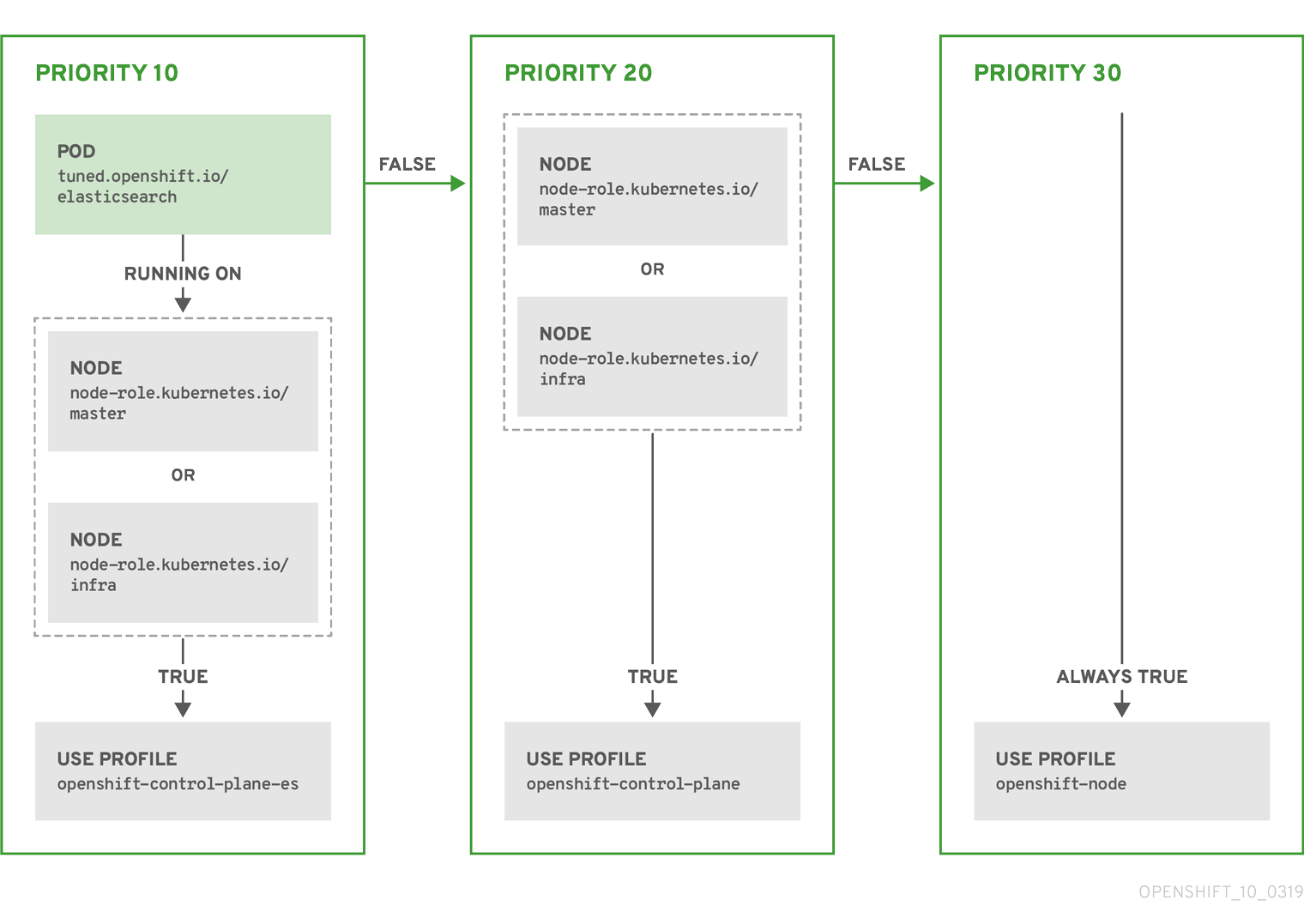
- match:
  - label: tuned.openshift.io/elasticsearch
    match:
    - label: node-role.kubernetes.io/master
    - label: node-role.kubernetes.io/infra
    type: pod
  priority: 10
  profile: openshift-control-plane-es
- match:
  - label: node-role.kubernetes.io/master
  - label: node-role.kubernetes.io/infra
  priority: 20
  profile: openshift-control-plane
- priority: 30
  profile: openshift-node
The CR above is translated for the containerized TuneD daemon into its recommend.conf file based on the profile priorities. The profile with the highest priority (10) is openshift-control-plane-es and, therefore, it is considered first. The containerized TuneD daemon running on a given node looks to see if there is a pod running on the same node with the tuned.openshift.io/elasticsearch label set. If not, the entire <match> section evaluates as false. If there is such a pod with the label, in order for the <match> section to evaluate to true, the node label also needs to be node-role.kubernetes.io/master or node-role.kubernetes.io/infra.
If the labels for the profile with priority 10 matched, openshift-control-plane-es profile is applied and no other profile is considered. If the node/pod label combination did not match, the second highest priority profile (openshift-control-plane) is considered. This profile is applied if the containerized TuneD pod runs on a node with labels node-role.kubernetes.io/master or node-role.kubernetes.io/infra.
Finally, the profile openshift-node has the lowest priority of 30. It lacks the <match> section and, therefore, will always match. It acts as a profile catch-all to set openshift-node profile, if no other profile with higher priority matches on a given node.
apiVersion: tuned.openshift.io/v1
kind: Tuned
metadata:
  name: openshift-node-custom
  namespace: openshift-cluster-node-tuning-operator
spec:
  profile:
  - data: |
      [main]
      summary=Custom OpenShift node profile with an additional kernel parameter
      include=openshift-node
      [bootloader]
      cmdline_openshift_node_custom=+skew_tick=1
    name: openshift-node-custom

  recommend:
  - machineConfigLabels:
      machineconfiguration.openshift.io/role: "worker-custom"
    priority: 20
    profile: openshift-node-custom
To minimize node reboots, label the target nodes with a label the machine config pool’s node selector will match, then create the Tuned CR above and finally create the custom machine config pool itself.
Cloud provider-specific TuneD profiles
With this functionality, all Cloud provider-specific nodes can conveniently be assigned a TuneD profile specifically tailored to a given Cloud provider on a OpenShift Container Platform cluster. This can be accomplished without adding additional node labels or grouping nodes into machine config pools.
This functionality takes advantage of spec.providerID node object values in the form of <cloud-provider>://<cloud-provider-specific-id> and writes the file /var/lib/ocp-tuned/provider with the value <cloud-provider> in NTO operand containers. The content of this file is then used by TuneD to load provider-<cloud-provider> profile if such profile exists.
The openshift profile that both openshift-control-plane and openshift-node profiles inherit settings from is now updated to use this functionality through the use of conditional profile loading. Neither NTO nor TuneD currently include any Cloud provider-specific profiles. However, it is possible to create a custom profile provider-<cloud-provider> that will be applied to all Cloud provider-specific cluster nodes.
apiVersion: tuned.openshift.io/v1
kind: Tuned
metadata:
  name: provider-gce
  namespace: openshift-cluster-node-tuning-operator
spec:
  profile:
  - data: |
      [main]
      summary=GCE Cloud provider-specific profile
      # Your tuning for GCE Cloud provider goes here.
    name: provider-gce
Due to profile inheritance, any setting specified in the provider-<cloud-provider> profile will be overwritten by the openshift profile and its child profiles.
Custom tuning examples
The following examples demonstrate custom tuning configurations for OpenShift Container Platform nodes using the Node Tuning Operator.
Using TuneD profiles from the default CR
The following CR applies custom node-level tuning for OpenShift Container Platform nodes with label tuned.openshift.io/ingress-node-label set to any value.
apiVersion: tuned.openshift.io/v1
kind: Tuned
metadata:
  name: ingress
  namespace: openshift-cluster-node-tuning-operator
spec:
  profile:
  - data: |
      [main]
      summary=A custom OpenShift ingress profile
      include=openshift-control-plane
      [sysctl]
      net.ipv4.ip_local_port_range="1024 65535"
      net.ipv4.tcp_tw_reuse=1
    name: openshift-ingress
  recommend:
  - match:
    - label: tuned.openshift.io/ingress-node-label
    priority: 10
    profile: openshift-ingress
Custom profile writers are strongly encouraged to include the default TuneD daemon profiles shipped within the default Tuned CR. The example above uses the default openshift-control-plane profile to accomplish this.
Using built-in TuneD profiles
Given the successful rollout of the NTO-managed daemon set, the TuneD operands all manage the same version of the TuneD daemon. To list the built-in TuneD profiles supported by the daemon, query any TuneD pod in the following way:
$ oc exec $tuned_pod -n openshift-cluster-node-tuning-operator -- find /usr/lib/tuned/ -name tuned.conf -printf '%h\n' | sed 's|^.*/||'
You can use the profile names retrieved by this in your custom tuning specification.
apiVersion: tuned.openshift.io/v1
kind: Tuned
metadata:
  name: openshift-node-hpc-compute
  namespace: openshift-cluster-node-tuning-operator
spec:
  profile:
  - data: |
      [main]
      summary=Custom OpenShift node profile for HPC compute workloads
      include=openshift-node,hpc-compute
    name: openshift-node-hpc-compute

  recommend:
  - match:
    - label: tuned.openshift.io/openshift-node-hpc-compute
    priority: 20
    profile: openshift-node-hpc-compute
In addition to the built-in hpc-compute profile, the example above includes the openshift-node TuneD daemon profile shipped within the default Tuned CR to use OpenShift-specific tuning for compute nodes.
Overriding host-level sysctls
Various kernel parameters can be changed at runtime by using /run/sysctl.d/, /etc/sysctl.d/, and /etc/sysctl.conf host configuration files. OpenShift Container Platform adds several host configuration files which set kernel parameters at runtime; for example, net.ipv[4-6]., fs.inotify., and vm.max_map_count. These runtime parameters provide basic functional tuning for the system prior to the kubelet and the Operator start.
The Operator does not override these settings unless the reapply_sysctl option is set to false. Setting this option to false results in TuneD not applying the settings from the host configuration files after it applies its custom profile.
apiVersion: tuned.openshift.io/v1
kind: Tuned
metadata:
  name: openshift-no-reapply-sysctl
  namespace: openshift-cluster-node-tuning-operator
spec:
  profile:
  - data: |
      [main]
      summary=Custom OpenShift profile
      include=openshift-node
      [sysctl]
      vm.max_map_count=>524288
    name: openshift-no-reapply-sysctl
  recommend:
  - match:
    - label: tuned.openshift.io/openshift-no-reapply-sysctl
    priority: 15
    profile: openshift-no-reapply-sysctl
    operand:
      tunedConfig:
        reapply_sysctl: false
Deferring application of tuning changes
As an administrator, use the Node Tuning Operator (NTO) to update custom resources (CRs) on a running system and make tuning changes.
For example, they can update or add a sysctl parameter to the [sysctl] section of the tuned object. When administrators apply a tuning change, the NTO prompts TuneD to reprocess all configurations, causing the tuned process to roll back all tuning and then reapply it.
Latency-sensitive applications may not tolerate the removal and reapplication of the tuned profile, as it can briefly disrupt performance. This is particularly critical for configurations that partition CPUs and manage process or interrupt affinity using the performance profile. To avoid this issue, OpenShift Container Platform introduced new methods for applying tuning changes. Before OpenShift Container Platform 4.17, the only available method, immediate, applied changes instantly, often triggering a tuned restart.
The following additional methods are supported:
always: Every change is applied at the next node restart.update: When a tuning change modifies a tuned profile, it is applied immediately by default and takes effect as soon as possible. When a tuning change does not cause a tuned profile to change and its values are modified in place, it is treated as always.
Enable this feature by adding the annotation tuned.openshift.io/deferred. The following table summarizes the possible values for the annotation:
| Annotation value | Description |
|---|---|
| missing | The change is applied immediately. |
| always | The change is applied at the next node restart. |
| update | The change is applied immediately if it causes a profile change, otherwise at the next node restart. |
The following example demonstrates how to apply a change to the kernel.shmmni sysctl parameter by using the always method:
apiVersion: tuned.openshift.io/v1
kind: Tuned
metadata:
  name: performance-patch
  namespace: openshift-cluster-node-tuning-operator
  annotations:
    tuned.openshift.io/deferred: "always"
spec:
  profile:
    - name: performance-patch
      data: |
        [main]
        summary=Configuration changes profile inherited from performance created tuned
        include=openshift-node-performance-performance
        [sysctl]
        kernel.shmmni=8192
  recommend:
    - machineConfigLabels:
        machineconfiguration.openshift.io/role: worker-cnf
      priority: 19
      profile: performance-patch
where:
- The
includedirective is used to inherit theopenshift-node-performance-performanceprofile. This is a best practice to ensure that the profile is not missing any required settings. - The
kernel.shmmnisysctl parameter is being changed to8192. - The
machineConfigLabelsfield is used to target theworker-cnfrole. Configure aMachineConfigPoolresource to ensure the profile is applied only to the correct nodes.
You can use Topology Aware Lifecycle Manager to perform a controlled reboot across a fleet of spoke clusters to apply a deferred tuning change. For more information about coordinated reboots, see "Coordinating reboots for configuration changes".
Additional resources
Defer application of tuning changes: An example
The following worked example describes how to defer the application of tuning changes by using the Node Tuning Operator.
Prerequisites
- You have
cluster-adminrole access. - You have applied a performance profile to your cluster.
- A
MachineConfigPoolresource, for example,worker-cnfis configured to ensure that the profile is only applied to the designated nodes.
Procedure
-
Check what profiles are currently applied to your cluster by running the following command:
$ oc -n openshift-cluster-node-tuning-operator get tunedExample outputNAME AGEdefault 63mopenshift-node-performance-performance 21m -
Check the machine config pools in your cluster by running the following command:
$ oc get mcpExample outputNAME CONFIG UPDATED UPDATING DEGRADED MACHINECOUNT READYMACHINECOUNT UPDATEDMACHINECOUNT DEGRADEDMACHINECOUNT AGEmaster rendered-master-79a26af9f78ced61fa8ccd309d3c859c True False False 3 3 3 0 157mworker rendered-worker-d9352e91a1b14de7ef453fa54480ce0e True False False 2 2 2 0 157mworker-cnf rendered-worker-cnf-f398fc4fcb2b20104a51e744b8247272 True False False 1 1 1 0 92m -
Describe the current applied performance profile by running the following command:
$ oc describe performanceprofile performance | grep TunedExample outputTuned: openshift-cluster-node-tuning-operator/openshift-node-performance-performance -
Verify the existing value of the
kernel.shmmnisysctl parameter:-
Run the following command to display the node names:
$ oc get nodesExample outputNAME STATUS ROLES AGE VERSIONip-10-0-26-151.ec2.internal Ready worker,worker-cnf 116m v1.30.6ip-10-0-46-60.ec2.internal Ready worker 115m v1.30.6ip-10-0-52-141.ec2.internal Ready control-plane,master 123m v1.30.6ip-10-0-6-97.ec2.internal Ready control-plane,master 121m v1.30.6ip-10-0-86-145.ec2.internal Ready worker 117m v1.30.6ip-10-0-92-228.ec2.internal Ready control-plane,master 123m v1.30.6 -
Run the following command to display the current value of the
kernel.shmmnisysctl parameters on the nodeip-10-0-32-74.ec2.internal:$ oc debug node/ip-10-0-26-151.ec2.internal -q -- chroot host sysctl kernel.shmmniExample outputkernel.shmmni = 4096
-
-
Create a profile patch, for example,
perf-patch.yamlthat changes thekernel.shmmnisysctl parameter to8192. Defer the application of the change to a new manual restart by using thealwaysmethod by applying the following configuration:apiVersion: tuned.openshift.io/v1kind: Tunedmetadata:name: performance-patchnamespace: openshift-cluster-node-tuning-operatorannotations:tuned.openshift.io/deferred: "always"spec:profile:- name: performance-patchdata: |[main]summary=Configuration changes profile inherited from performance created tunedinclude=openshift-node-performance-performance[sysctl]kernel.shmmni=8192recommend:- machineConfigLabels:machineconfiguration.openshift.io/role: worker-cnfpriority: 19profile: performance-patchwhere:
- The
includedirective is used to inherit theopenshift-node-performance-performanceprofile. This is a best practice to ensure that the profile is not missing any required settings. - The
kernel.shmmnisysctl parameter is being changed to8192. - The
machineConfigLabelsfield is used to target theworker-cnfrole.
- The
-
Apply the profile patch by running the following command:
$ oc apply -f perf-patch.yaml -
Run the following command to verify that the profile patch is waiting for the next node restart:
$ oc -n openshift-cluster-node-tuning-operator get profileExample outputNAME TUNED APPLIED DEGRADED MESSAGE AGEip-10-0-26-151.ec2.internal performance-patch False True The TuneD daemon profile is waiting for the next node restart: performance-patch 126mip-10-0-46-60.ec2.internal openshift-node True False TuneD profile applied. 125mip-10-0-52-141.ec2.internal openshift-control-plane True False TuneD profile applied. 130mip-10-0-6-97.ec2.internal openshift-control-plane True False TuneD profile applied. 130mip-10-0-86-145.ec2.internal openshift-node True False TuneD profile applied. 126mip-10-0-92-228.ec2.internal openshift-control-plane True False TuneD profile applied. 130m -
Confirm the value of the
kernel.shmmnisysctl parameter remain unchanged before a restart:-
Run the following command to confirm that the application of the
performance-patchchange to thekernel.shmmnisysctl parameter on the nodeip-10-0-26-151.ec2.internalis not applied:$ oc debug node/ip-10-0-26-151.ec2.internal -q -- chroot host sysctl kernel.shmmniExample outputkernel.shmmni = 4096
-
-
Restart the node
ip-10-0-26-151.ec2.internalto apply the required changes by running the following command:$ oc debug node/ip-10-0-26-151.ec2.internal -q -- chroot host reboot& -
In another terminal window, run the following command to verify that the node has restarted:
$ watch oc get nodesWait for the node
ip-10-0-26-151.ec2.internalto transition back to theReadystate. -
Run the following command to verify that the profile patch is waiting for the next node restart:
$ oc -n openshift-cluster-node-tuning-operator get profileExample outputNAME TUNED APPLIED DEGRADED MESSAGE AGEip-10-0-20-251.ec2.internal performance-patch True False TuneD profile applied. 3h3mip-10-0-30-148.ec2.internal openshift-control-plane True False TuneD profile applied. 3h8mip-10-0-32-74.ec2.internal openshift-node True True TuneD profile applied. 179mip-10-0-33-49.ec2.internal openshift-control-plane True False TuneD profile applied. 3h8mip-10-0-84-72.ec2.internal openshift-control-plane True False TuneD profile applied. 3h8mip-10-0-93-89.ec2.internal openshift-node True False TuneD profile applied. 179m -
Check that the value of the
kernel.shmmnisysctl parameter have changed after the restart:-
Run the following command to verify that the
kernel.shmmnisysctl parameter change has been applied on the nodeip-10-0-32-74.ec2.internal:$ oc debug node/ip-10-0-32-74.ec2.internal -q -- chroot host sysctl kernel.shmmniExample outputkernel.shmmni = 8192noteAn additional restart results in the restoration of the original value of the
kernel.shmmnisysctl parameter.
-
Supported TuneD daemon plugins
Excluding the [main] section, the following TuneD plugins are supported when using custom profiles defined in the profile: section of the Tuned CR:
- audio
- cpu
- disk
- eeepc_she
- modules
- mounts
- net
- scheduler
- scsi_host
- selinux
- sysctl
- sysfs
- usb
- video
- vm
- bootloader
There is some dynamic tuning functionality provided by some of these plugins that is not supported. The following TuneD plugins are currently not supported:
- script
- systemd
The TuneD bootloader plugin only supports Red Hat Enterprise Linux CoreOS (RHCOS) worker nodes.
Additional resources
Configure node tuning in a hosted cluster
To set node-level tuning on the nodes in your hosted cluster, you can use the Node Tuning Operator. In hosted control planes, you can configure node tuning by creating config maps that contain Tuned objects and referencing those config maps in your node pools.
Procedure
-
Create a config map that contains a valid tuned manifest, and reference the manifest in a node pool. In the following example, a
Tunedmanifest defines a profile that setsvm.dirty_ratioto 55 on nodes that contain thetuned-1-node-labelnode label with any value. Save the followingConfigMapmanifest in a file namedtuned-1.yaml:apiVersion: v1kind: ConfigMapmetadata:name: tuned-1namespace: clustersdata:tuning: |apiVersion: tuned.openshift.io/v1kind: Tunedmetadata:name: tuned-1namespace: openshift-cluster-node-tuning-operatorspec:profile:- data: |[main]summary=Custom OpenShift profileinclude=openshift-node[sysctl]vm.dirty_ratio="55"name: tuned-1-profilerecommend:- priority: 20profile: tuned-1-profilenoteIf you do not add any labels to an entry in the
spec.recommendsection of the Tuned spec, node-pool-based matching is assumed, so the highest priority profile in thespec.recommendsection is applied to nodes in the pool. Although you can achieve more fine-grained node-label-based matching by setting a label value in the Tuned.spec.recommend.matchsection, node labels will not persist during an upgrade unless you set the.spec.management.upgradeTypevalue of the node pool toInPlace. -
Create the
ConfigMapobject in the management cluster:$ oc --kubeconfig="$MGMT_KUBECONFIG" create -f tuned-1.yaml -
Reference the
ConfigMapobject in thespec.tuningConfigfield of the node pool, either by editing a node pool or creating one. In this example, assume that you have only oneNodePool, namednodepool-1, which contains 2 nodes.apiVersion: hypershift.openshift.io/v1alpha1kind: NodePoolmetadata:...name: nodepool-1namespace: clusters...spec:...tuningConfig:- name: tuned-1status:...noteYou can reference the same config map in multiple node pools. In hosted control planes, the Node Tuning Operator appends a hash of the node pool name and namespace to the name of the Tuned CRs to distinguish them. Outside of this case, do not create multiple TuneD profiles of the same name in different Tuned CRs for the same hosted cluster.
Verification
Now that you have created the ConfigMap object that contains a Tuned manifest and referenced it in a NodePool, the Node Tuning Operator syncs the Tuned objects into the hosted cluster. You can verify which Tuned objects are defined and which TuneD profiles are applied to each node.
-
List the
Tunedobjects in the hosted cluster:$ oc --kubeconfig="$HC_KUBECONFIG" get tuned.tuned.openshift.io \-n openshift-cluster-node-tuning-operatorExample outputNAME AGEdefault 7m36srendered 7m36stuned-1 65s -
List the
Profileobjects in the hosted cluster:$ oc --kubeconfig="$HC_KUBECONFIG" get profile.tuned.openshift.io \-n openshift-cluster-node-tuning-operatorExample outputNAME TUNED APPLIED DEGRADED AGEnodepool-1-worker-1 tuned-1-profile True False 7m43snodepool-1-worker-2 tuned-1-profile True False 7m14snoteIf no custom profiles are created, the
openshift-nodeprofile is applied by default. -
To confirm that the tuning was applied correctly, start a debug shell on a node and check the sysctl values:
$ oc --kubeconfig="$HC_KUBECONFIG" \debug node/nodepool-1-worker-1 -- chroot /host sysctl vm.dirty_ratioExample outputvm.dirty_ratio = 55
Advanced node tuning for hosted clusters by setting kernel boot parameters
For more advanced tuning in hosted control planes, which requires setting kernel boot parameters, you can also use the Node Tuning Operator. The following example shows how you can create a node pool with huge pages reserved.
Procedure
-
Create a
ConfigMapobject that contains aTunedobject manifest for creating 10 huge pages that are 2 MB in size. Save thisConfigMapmanifest in a file namedtuned-hugepages.yaml:apiVersion: v1kind: ConfigMapmetadata:name: tuned-hugepagesnamespace: clustersdata:tuning: |apiVersion: tuned.openshift.io/v1kind: Tunedmetadata:name: hugepagesnamespace: openshift-cluster-node-tuning-operatorspec:profile:- data: |[main]summary=Boot time configuration for hugepagesinclude=openshift-node[bootloader]cmdline_openshift_node_hugepages=hugepagesz=2M hugepages=50name: openshift-node-hugepagesrecommend:- priority: 20profile: openshift-node-hugepagesnoteThe
.spec.recommend.matchfield is intentionally left blank. In this case, thisTunedobject is applied to all nodes in the node pool where thisConfigMapobject is referenced. Group nodes with the same hardware configuration into the same node pool. Otherwise, TuneD operands can calculate conflicting kernel parameters for two or more nodes that share the same node pool. -
Create the
ConfigMapobject in the management cluster:$ oc --kubeconfig="<management_cluster_kubeconfig>" create -f tuned-hugepages.yamlReplace
<management_cluster_kubeconfig>with the name of your management clusterkubeconfigfile. -
Create a
NodePoolmanifest YAML file, customize the upgrade type of theNodePool, and reference theConfigMapobject that you created in thespec.tuningConfigsection. Create theNodePoolmanifest and save it in a file namedhugepages-nodepool.yamlby using thehcpCLI:$ hcp create nodepool aws \--cluster-name <hosted_cluster_name> \--name <nodepool_name> \--node-count <nodepool_replicas> \--instance-type <instance_type> \--render > hugepages-nodepool.yamlwhere:
<hosted_cluster_name>: The name of your hosted cluster.<nodepool_name>: The name of your node pool.<nodepool_replicas>: The number of your node pool replicas, for example,2.<instance_type>: The instance type, for example,m5.2xlarge.
noteThe
--renderflag in thehcp createcommand does not render the secrets. To render the secrets, you must use both the--renderand the--render-sensitiveflags in thehcp createcommand. -
In the
hugepages-nodepool.yamlfile, set.spec.management.upgradeTypetoInPlace, and set.spec.tuningConfigto reference thetuned-hugepagesConfigMapobject that you created.apiVersion: hypershift.openshift.io/v1alpha1kind: NodePoolmetadata:name: hugepages-nodepoolnamespace: clusters...spec:management:...upgradeType: InPlace...tuningConfig:- name: tuned-hugepagesnoteTo avoid the unnecessary re-creation of nodes when you apply the new
MachineConfigobjects, set.spec.management.upgradeTypetoInPlace. If you use theReplaceupgrade type, nodes are fully deleted and new nodes can replace them when you apply the new kernel boot parameters that the TuneD operand calculated. -
Create the
NodePoolin the management cluster:$ oc --kubeconfig="<management_cluster_kubeconfig>" create -f hugepages-nodepool.yaml
Verification
After the nodes are available, the containerized TuneD daemon calculates the required kernel boot parameters based on the applied TuneD profile. After the nodes are ready and reboot once to apply the generated MachineConfig object, you can verify that the TuneD profile is applied and that the kernel boot parameters are set.
-
List the
Tunedobjects in the hosted cluster:$ oc --kubeconfig="<hosted_cluster_kubeconfig>" get tuned.tuned.openshift.io \-n openshift-cluster-node-tuning-operatorExample outputNAME AGEdefault 123mhugepages-8dfb1fed 1m23srendered 123m -
List the
Profileobjects in the hosted cluster:$ oc --kubeconfig="<hosted_cluster_kubeconfig>" get profile.tuned.openshift.io \-n openshift-cluster-node-tuning-operatorExample outputNAME TUNED APPLIED DEGRADED AGEnodepool-1-worker-1 openshift-node True False 132mnodepool-1-worker-2 openshift-node True False 131mhugepages-nodepool-worker-1 openshift-node-hugepages True False 4m8shugepages-nodepool-worker-2 openshift-node-hugepages True False 3m57sBoth of the worker nodes in the new
NodePoolhave theopenshift-node-hugepagesprofile applied. -
To confirm that the tuning was applied correctly, start a debug shell on a node and check
/proc/cmdline.$ oc --kubeconfig="<hosted_cluster_kubeconfig>" \debug node/nodepool-1-worker-1 -- chroot /host cat /proc/cmdlineExample outputBOOT_IMAGE=(hd0,gpt3)/ostree/rhcos-... hugepagesz=2M hugepages=50