Configuring and managing Tang servers using the NBDE Tang Server Operator
With the NBDE Tang Server Operator, you can deploy and quickly configure Tang servers. On the deployed Tang servers, you can list existing keys and rotate them.
Deploy a Tang server using the NBDE Tang Server Operator
You can deploy and quickly configure one or more Tang servers using the NBDE Tang Server Operator in the web console.
Prerequisites
- You must have
cluster-adminprivileges on an OpenShift Container Platform cluster. - You have installed the NBDE Tang Server Operator on your OCP cluster.
Procedure
- In the OpenShift Container Platform web console, navigate to Ecosystem → Software Catalog.
- Select Project, and click Create Project:
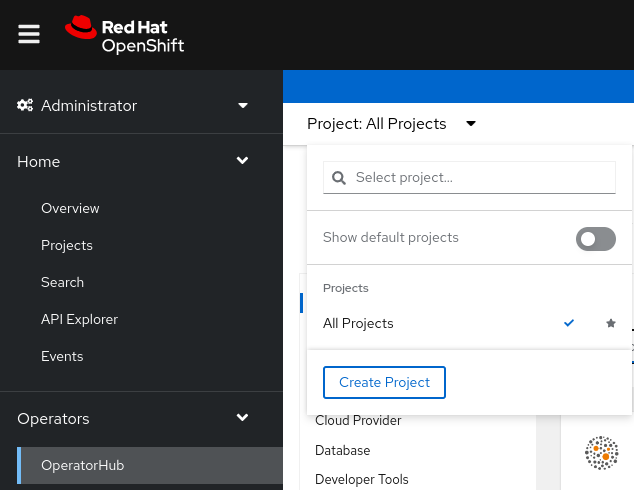
- On the
Create Projectpage, fill in the required information, for example: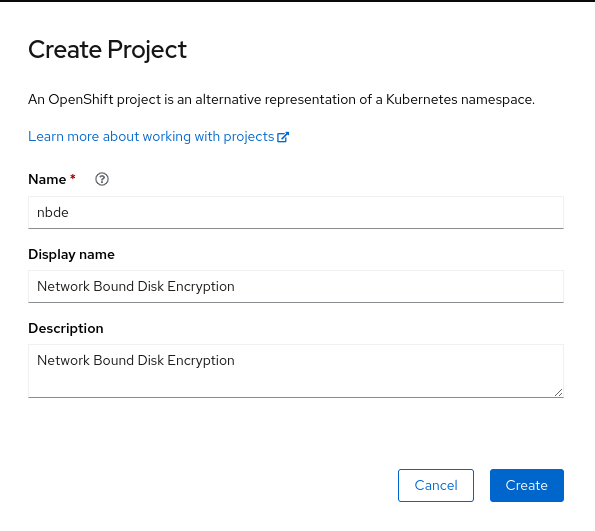
- Click Create.
- NBDE Tang Server replicas require a Persistent Volume Claim (PVC) for storing encryption keys. In the web console, navigate to Storage → PersistentVolumeClaims:
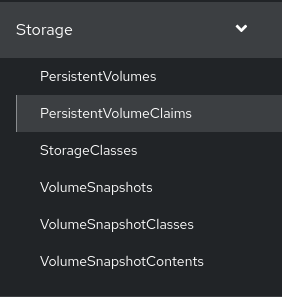
- On the following
PersistentVolumeClaimsscreen, click Create PersistentVolumeClaim. - On the
Create PersistentVolumeClaimpage, select a storage that fits your deployment scenario. Consider how often you want to rotate the encryption keys. Name your PVC and choose the claimed storage capacity, for example: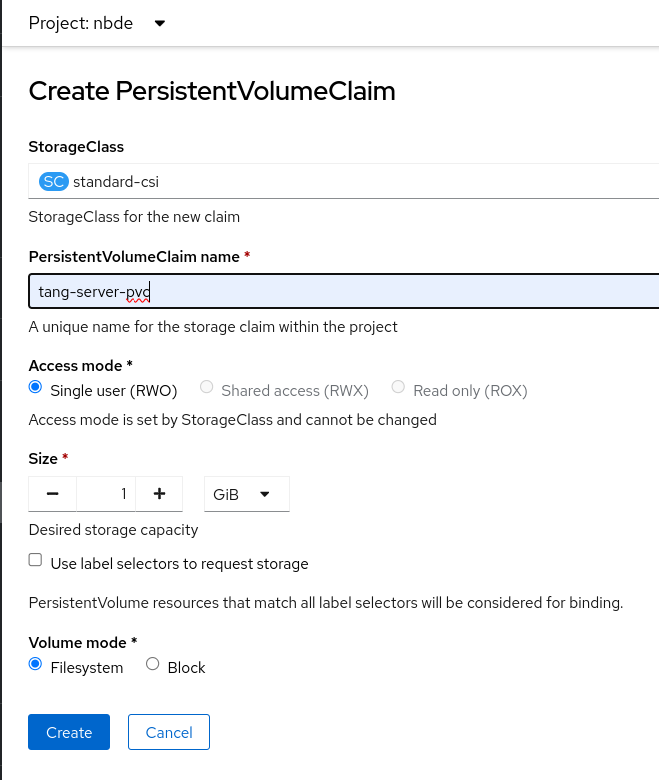
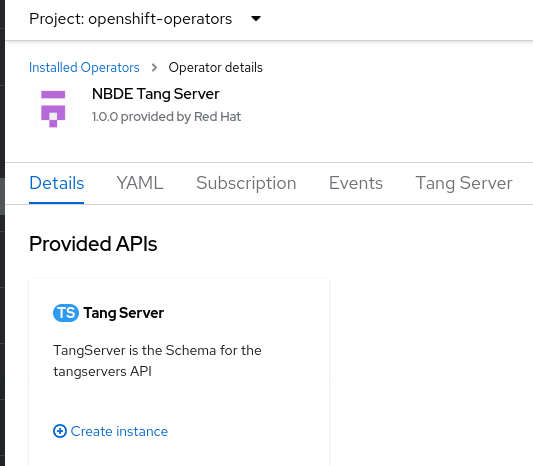
- Navigate to Ecosystem → Installed Operators, and click NBDE Tang Server.
- Click Create instance.
- On the
Create TangServerpage, choose the name of the Tang Server instance, amount of replicas, and specify the name of the previously created Persistent Volume Claim, for example: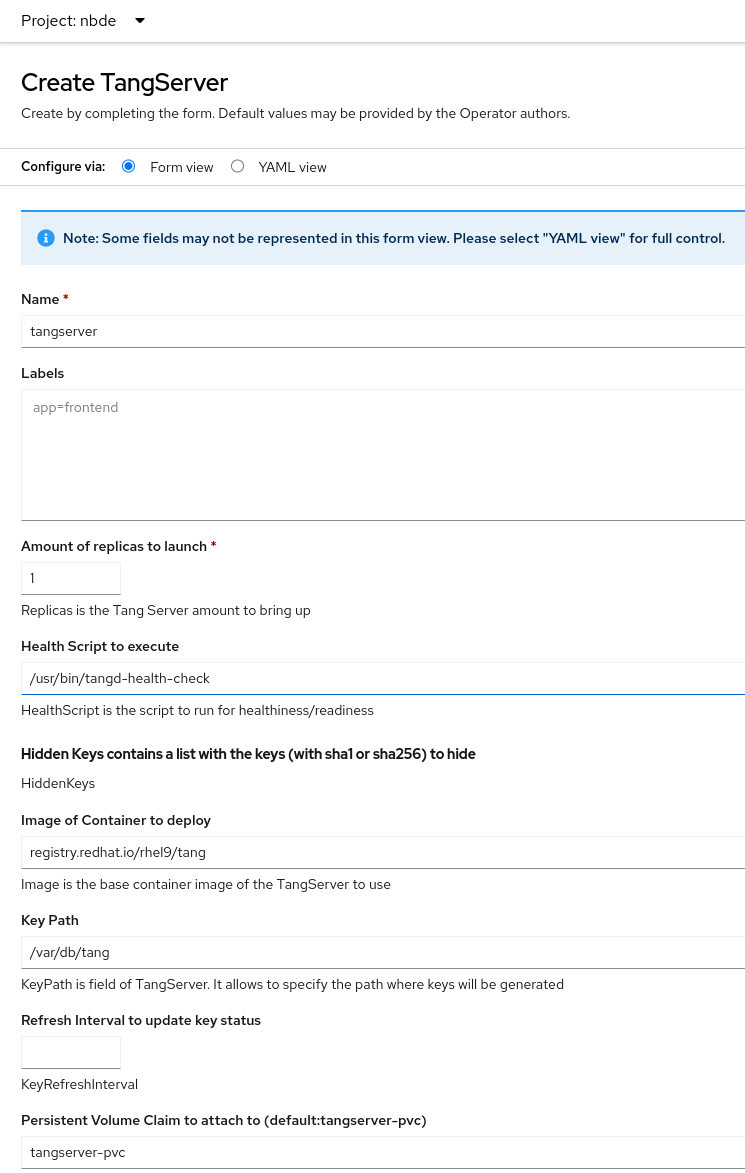
- After you enter the required values a change settings that differ from the default values in your scenario, click Create.
Rotate keys using the NBDE Tang Server Operator
With the NBDE Tang Server Operator, you also can rotate your Tang server keys. The precise interval at which you should rotate them depends on your application, key sizes, and institutional policy.
Prerequisites
- You must have
cluster-adminprivileges on an OpenShift Container Platform cluster. - You deployed a Tang server using the NBDE Tang Server Operator on your OpenShift cluster.
- You have installed the OpenShift CLI (
oc).
Procedure
-
List the existing keys on your Tang server, for example:
$ oc -n nbde describe tangserverExample output…Status:Active Keys:File Name: QS82aXnPKA4XpfHr3umbA0r2iTbRcpWQ0VI2Qdhi6xgGenerated: 2022-02-08 15:44:17.030090484 +0000sha1: PvYQKtrTuYsMV2AomUeHrUWkCGgsha256: QS82aXnPKA4XpfHr3umbA0r2iTbRcpWQ0VI2Qdhi6xg… -
Create a YAML file for moving your active keys to hidden keys, for example,
minimal-keyretrieve-rotate-tangserver.yaml. Specify the SHA-1 thumbprint of your active key in thehiddenKeysentry:Example key-rotation YAML for tang-operatorapiVersion: daemons.redhat.com/v1alpha1kind: TangServermetadata:name: tangservernamespace: nbdefinalizers:- finalizer.daemons.tangserver.redhat.comspec:replicas: 1hiddenKeys:- sha1: "PvYQKtrTuYsMV2AomUeHrUWkCGg" -
Apply the YAML file:
$ oc apply -f minimal-keyretrieve-rotate-tangserver.yaml
Verification
-
After a certain amount of time depending on your configuration, check that the previous
activeKeyvalue is the newhiddenKeyvalue and theactiveKeykey file is newly generated, for example:$ oc -n nbde describe tangserverExample output…Spec:Hidden Keys:sha1: PvYQKtrTuYsMV2AomUeHrUWkCGgReplicas: 1Status:Active Keys:File Name: T-0wx1HusMeWx4WMOk4eK97Q5u4dY5tamdDs7_ughnY.jwkGenerated: 2023-10-25 15:38:18.134939752 +0000sha1: vVxkNCNq7gygeeA9zrHrbc3_NZ4sha256: T-0wx1HusMeWx4WMOk4eK97Q5u4dY5tamdDs7_ughnYHidden Keys:File Name: .QS82aXnPKA4XpfHr3umbA0r2iTbRcpWQ0VI2Qdhi6xg.jwkGenerated: 2023-10-25 15:37:29.126928965 +0000Hidden: 2023-10-25 15:38:13.515467436 +0000sha1: PvYQKtrTuYsMV2AomUeHrUWkCGgsha256: QS82aXnPKA4XpfHr3umbA0r2iTbRcpWQ0VI2Qdhi6xg…
Delete hidden keys with the NBDE Tang Server Operator
After you rotate your Tang server keys, the previously active keys become hidden and are no longer advertised by the Tang instance. You can use the NBDE Tang Server Operator to remove encryption keys no longer used.
- WARNING
- Do not remove any hidden keys unless you are sure that all bound Clevis clients already use new keys.
Prerequisites
- You must have
cluster-adminprivileges on an OpenShift Container Platform cluster. - You deployed a Tang server using the NBDE Tang Server Operator on your OpenShift cluster.
- You have installed the OpenShift CLI (
oc).
Procedure
-
List the existing keys on your Tang server, for example:
$ oc -n nbde describe tangserverExample output…Status:Active Keys:File Name: PvYQKtrTuYsMV2AomUeHrUWkCGg.jwkGenerated: 2022-02-08 15:44:17.030090484 +0000sha1: PvYQKtrTuYsMV2AomUeHrUWkCGgsha256: QS82aXnPKA4XpfHr3umbA0r2iTbRcpWQ0VI2Qdhi6xg… -
Create a YAML file for removing all hidden keys, for example,
hidden-keys-deletion-tangserver.yaml. Set thehiddenKeysentry to an empty array to preserve no hidden keys on your Tang server:Example hidden-keys-deletion YAML for tang-operatorapiVersion: daemons.redhat.com/v1alpha1kind: TangServermetadata:name: tangservernamespace: nbdefinalizers:- finalizer.daemons.tangserver.redhat.comspec:replicas: 1hiddenKeys: [] -
Apply the YAML file:
$ oc apply -f hidden-keys-deletion-tangserver.yaml
Verification
-
After a certain amount of time depending on your configuration, check that the previous active key still exists, but no hidden key is available, for example:
$ oc -n nbde describe tangserverExample output…Spec:Hidden Keys:sha1: PvYQKtrTuYsMV2AomUeHrUWkCGgReplicas: 1Status:Active Keys:File Name: T-0wx1HusMeWx4WMOk4eK97Q5u4dY5tamdDs7_ughnY.jwkGenerated: 2023-10-25 15:38:18.134939752 +0000sha1: vVxkNCNq7gygeeA9zrHrbc3_NZ4sha256: T-0wx1HusMeWx4WMOk4eK97Q5u4dY5tamdDs7_ughnYStatus:Ready: 1Running: 1Service External URL: http://35.222.247.84:7500/advTang Server Error: NoEvents:…