Using the must-gather tool
Collect logs and information about OADP custom resources by using the must-gather tool. The must-gather data must be attached to all customer cases.
The must-gather tool is a container and does not run all the time. The tool runs for a few minutes only after you start the tool by running the must-gather command.
Using the must-gather tool
Run the must-gather tool with the default configuration, timeout, and insecure TLS options. To use an option, add a flag corresponding to that option in the must-gather command.
- Default configuration
This configuration collects pod logs, OADP, and
Velerocustom resource (CR) information for all namespaces where the OADP Operator is installed.- Timeout
Data collection can take a long time if there are many failed
BackupCRs. You can improve performance by setting a timeout value.- Insecure TLS connections
If a custom CA certificate is used, use the
must-gathertool with insecure TLS connections.
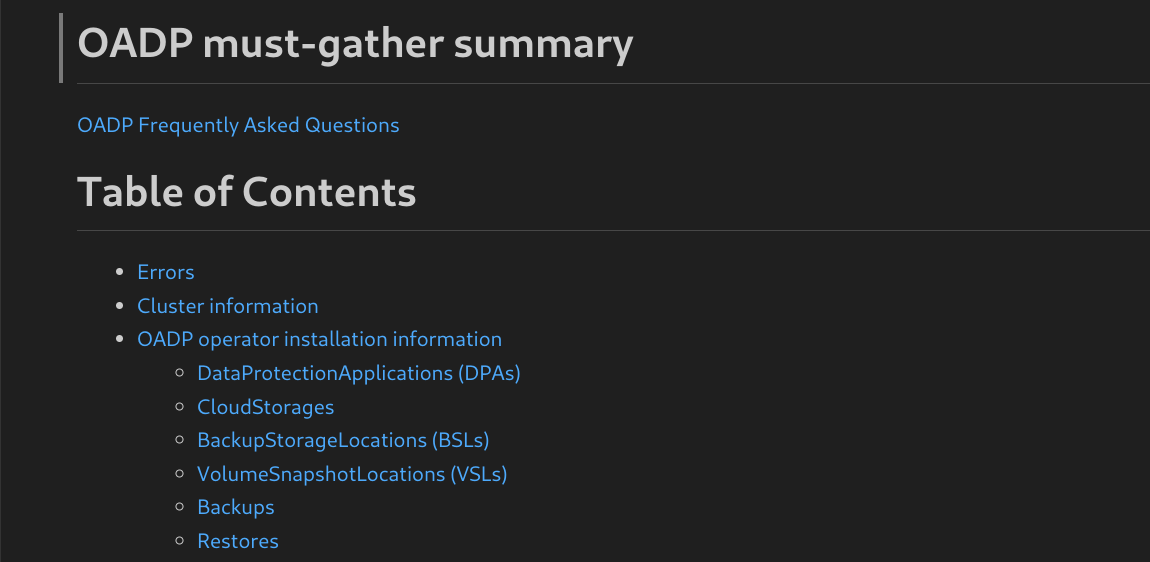
The must-gather tool generates a Markdown output file with the collected information. The Markdown file is located in a cluster directory.
For more information about the supported flags, use the help flag with the must-gather tool as shown in the following example:
$ oc adm must-gather --image=registry.redhat.io/oadp/oadp-mustgather-rhel9:v1.5 -- /usr/bin/gather -hPrerequisites
- You have logged in to the OpenShift Container Platform cluster as a user with the
cluster-adminrole. - You have installed the OpenShift CLI (
oc).
Procedure
- Navigate to the directory where you want to store the
must-gatherdata. - Run the
oc adm must-gathercommand for one of the following data collection options:- To use the default configuration of the
must-gathertool, run the following command:terminal$ oc adm must-gather --image=registry.redhat.io/oadp/oadp-mustgather-rhel9:v1.5 - To use the timeout flag with the
must-gathertool, run the following command:terminal$ oc adm must-gather --image=registry.redhat.io/oadp/oadp-mustgather-rhel9:v1.5 -- /usr/bin/gather --request-timeout 1mIn this example, the timeout is 1 minute.
- To use the insecure TLS connection flag with the
must-gathertool, run the following command:terminal$ oc adm must-gather --image=registry.redhat.io/oadp/oadp-mustgather-rhel9:v1.5 -- /usr/bin/gather --skip-tls - To use a combination of the insecure TLS connection and the timeout flags with the
must-gathertool, run the following command:terminal$ oc adm must-gather --image=registry.redhat.io/oadp/oadp-mustgather-rhel9:v1.5 -- /usr/bin/gather --request-timeout 15s --skip-tlsIn this example, the timeout is 15 seconds. By default, the
--skip-tlsflag value isfalse. Set the value totrueto allow insecure TLS connections.
- To use the default configuration of the
Verification
- Verify that the Markdown output file is generated at the following location:
must-gather.local.89...054550/registry.redhat.io/oadp/oadp-mustgather-rhel9:v1.5-sha256-0...84/clusters/a4...86/oadp-must-gather-summary.md - Review the
must-gatherdata in the Markdown file by opening the file in a Markdown previewer. For an example output, refer to the following image. You can upload this output file to a support case on the Red Hat Customer Portal.Figure 1. Example markdown output of must-gather tool