About-user-defined networks
User-defined networks (UDNs) extend OVN-Kubernetes to enable custom layer 2 and layer 3 network segments with default isolation, providing enhanced network flexibility, security, and segmentation capabilities for multi-tenant deployments and custom network architectures.
Overview of user-defined networks
To secure and improve network segmentation and isolation, cluster administrators can create primary or secondary networks that span namespaces at the cluster level using the ClusterUserDefinedNetwork custom resource (CR) while a developer can define secondary networks at the namespace level using the UserDefinedNetwork CR.
Before the implementation of user-defined networks (UDN), the OVN-Kubernetes CNI plugin for OpenShift Container Platform only supported a layer 3 topology on the primary or main network. Due to Kubernetes design principles: all pods are attached to the main network, all pods communicate with each other by their IP addresses, and inter-pod traffic is restricted according to network policy.
While the Kubernetes design is useful for simple deployments, this layer 3 topology restricts customization of primary network segment configurations, especially for modern multi-tenant deployments.
UDN improves the flexibility and segmentation capabilities of the default layer 3 topology for a Kubernetes pod network by enabling custom layer 2 and layer 3 network segments, where all these segments are isolated by default. These segments act as either primary or secondary networks for container pods and virtual machines that use the default OVN-Kubernetes CNI plugin. UDNs enable a wide range of network architectures and topologies, enhancing network flexibility, security, and performance.
The following sections further emphasize the benefits and limitations of user-defined networks, the best practices when creating a ClusterUserDefinedNetwork or UserDefinedNetwork CR, how to create the CR, and additional configuration details that might be relevant to your deployment.
Benefits of a user-defined network
User-defined networks enable tenant isolation by providing each namespace with its own isolated primary network, reducing cross-tenant traffic risks and simplifying network management by eliminating the need for complex network policies.
User-defined networks offer the following benefits:
-
Enhanced network isolation for security
- Tenant isolation: Namespaces can have their own isolated primary network, similar to how tenants are isolated in Red Hat OpenStack Platform (RHOSP). This improves security by reducing the risk of cross-tenant traffic.
-
Network flexibility
- Layer 2 and layer 3 support: Cluster administrators can configure primary networks as layer 2 or layer 3 network types.
-
Simplified network management
- Reduced network configuration complexity: With user-defined networks, the need for complex network policies are eliminated because isolation can be achieved by grouping workloads in different networks.
-
Advanced capabilities
- Consistent and selectable IP addressing: Users can specify and reuse IP subnets across different namespaces and clusters, providing a consistent networking environment.
- Support for multiple networks: The user-defined networking feature allows administrators to connect multiple namespaces to a single network, or to create distinct networks for different sets of namespaces.
- Virtual machine reachability over CUDN: When you attach virtual machines (VM)s to a layer 2
ClusterUserDefinedNetworkwith BGP route advertisements enabled, you can publish VM routes to the provider network and import routes back, avoiding per‑node static routes while improving VM ingress and egress reachability.
-
Simplification of application migration from Red Hat OpenStack Platform (RHOSP)
- Network parity: With user-defined networking, the migration of applications from OpenStack to OpenShift Container Platform is simplified by providing similar network isolation and configuration options.
Developers and administrators can create a user-defined network that is namespace scoped using the custom resource. An overview of the process is as follows:
- An administrator creates a namespace for a user-defined network with the
k8s.ovn.org/primary-user-defined-networklabel. - The
UserDefinedNetworkCR is created by either the cluster administrator or the user. - The user creates pods in the namespace.
Limitations of a user-defined network
To deploy a successful user-defined networks (UDN), you must consider their limitations including DNS resolution behavior, restricted access to default network services such as the image registry, network policy constraints between isolated networks, and the requirement to create namespaces and networks before pods.
Consider the following limitations before implementing a UDN.
-
DNS limitations:
- DNS lookups for pods resolve to the pod’s IP address on the cluster default network. Even if a pod is part of a user-defined network, DNS lookups will not resolve to the pod’s IP address on that user-defined network. However, DNS lookups for services and external entities will function as expected.
- When a pod is assigned to a primary UDN, it can access the Kubernetes API (KAPI) and DNS services on the cluster’s default network.
-
Initial network assignment: You must create the namespace and network before creating pods. Assigning a namespace with pods to a new network or creating a UDN in an existing namespace will not be accepted by OVN-Kubernetes.
-
Health check limitations: Kubelet health checks are performed by the cluster default network, which does not confirm the network connectivity of the primary interface on the pod. Consequently, scenarios where a pod appears healthy by the default network, but has broken connectivity on the primary interface, are possible with user-defined networks.
-
Network policy limitations: Network policies that enable traffic between namespaces connected to different user-defined primary networks are not effective. These traffic policies do not take effect because there is no connectivity between these isolated networks.
-
Creation and modification limitation: The
ClusterUserDefinedNetworkCR and theUserDefinedNetworkCR cannot be modified after being created. -
Default network service access: A user-defined network pod is isolated from the default network, which means that most default network services are inaccessible. For example, a user-defined network pod cannot currently access the OpenShift Container Platform image registry. Because of this limitation, source-to-image builds do not work in a user-defined network namespace. Additionally, other functions do not work, including functions to create applications based on the source code in a Git repository, such as
oc new-app <command>, and functions to create applications from an OpenShift Container Platform template that use source-to-image builds. This limitation might also affect otheropenshift-*.svcservices. -
Connectivity limitation: NodePort services on user-defined networks are not guaranteed isolation. For example, NodePort traffic from a pod to a service on the same node is not accessible, whereas traffic from a pod on a different node succeeds.
-
Unclear error message for IP address exhaustion: When the subnet of a user-defined network runs out of available IP addresses, new pods fail to start. When this occurs, the following error is returned:
Warning: Failed to create pod sandbox. This error message does not clearly specify that IP depletion is the cause. To confirm the issue, you can check the Events page in the pod’s namespace on the OpenShift Container Platform web console, where an explicit message about subnet exhaustion is reported. -
Layer2 egress IP limitations (
UserDefinedNetworkCRs only):- Egress IP does not work without a default gateway.
- Egress IP does not work on Google Cloud.
- Egress IP does not work with multiple gateways and instead will forward all traffic to a single gateway.
Layer 2 and layer 3 topologies
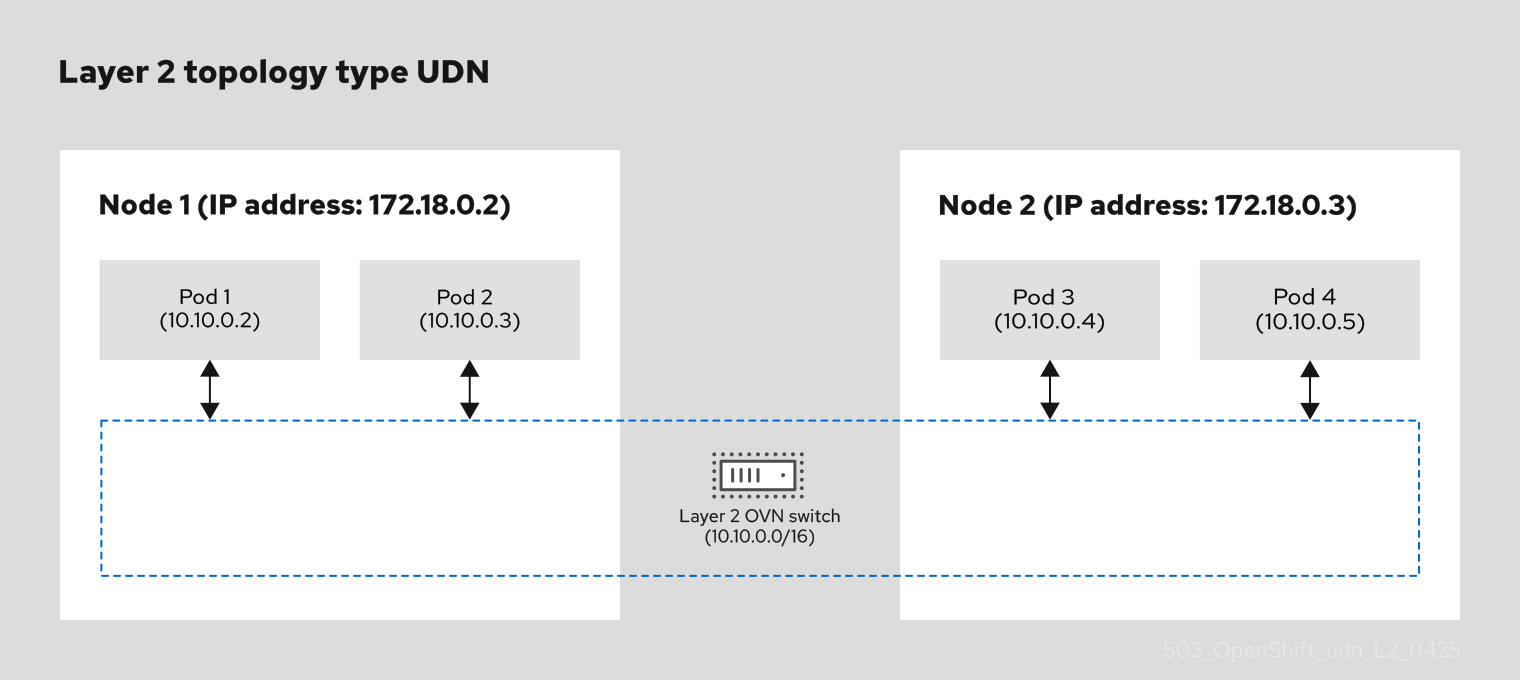
A layer 2 topology creates a distributed virtual switch across cluster nodes, this network topology provides a smooth live migration of virtual machine (VM) within the same subnet. A layer 3 topology creates unique segments per node with routing between them, this network topology effectively manages large broadcast domains.
In a flat layer 2 topology, virtual machines and pods connect to the virtual switch so that all these components can communicate with each other within the same subnet. This topology is useful for the live migration of VMs across nodes in the cluster. The following diagram shows a flat layer 2 topology with two nodes that use the virtual switch for live migration purposes:
Figure 1. A flat layer 2 topology that uses a virtual switch for component communication
If you decide not to specify a layer 2 subnet, then you must manually configure IP addresses for each pod in your cluster. When you do not specify a layer 2 subnet, port security is limited to preventing Media Access Control (MAC) spoofing only, and does not include IP spoofing. A layer 2 topology creates a single broadcast domain that can be challenging in large network environments, where the topology might cause a broadcast storm that can degrade network performance.
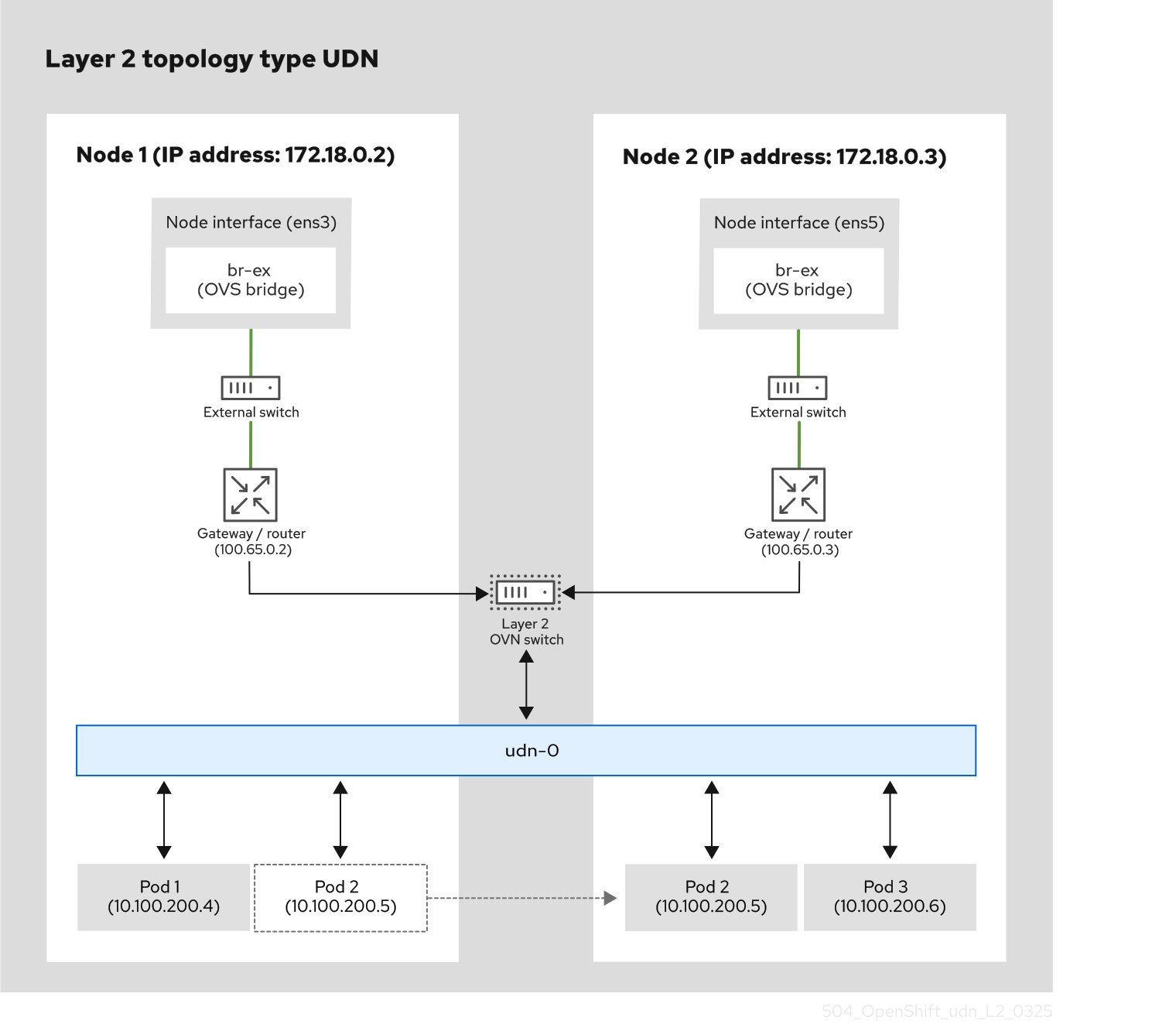
To access more configurable options for your network, you can integrate a layer 2 topology with a user-defined network (UDN). The following diagram shows two nodes that use a UDN with a layer 2 topology that includes pods that exist on each node. Each node includes two interfaces:
- A node interface, which is a compute node that connects networking components to the node.
- An Open vSwitch (OVS) bridge such as
br-ex, which creates an layer 2 OVN switch so that pods can communicate with each other and share resources.
An external switch connects these two interfaces, while the gateway or router handles routing traffic between the external switch and the layer 2 OVN switch. VMs and pods in a node can use the UDN to communicate with each other. The layer 2 OVN switch handles node traffic over a UDN so that live migrate of a VM from one node to another is possible.
Figure 2. A user-defined network (UDN) that uses a layer 2 topology
A layer 3 topology creates a unique layer 2 segment for each node in a cluster. The layer 3 routing mechanism interconnects these segments so that virtual machines and pods that are hosted on different nodes can communicate with each other. A layer 3 topology can effectively manage large broadcast domains by assigning each domain to a specific node, so that broadcast traffic has a reduced scope. To configure a layer 3 topology, you must configure cidr and hostSubnet parameters.
About the ClusterUserDefinedNetwork CR
The ClusterUserDefinedNetwork (CUDN) custom resource (CR) provides cluster-scoped network segmentation in OpenShift Container Platform and isolation for administrators only. Defining this resource ensures that network traffic is securely partitioned across the entire cluster.
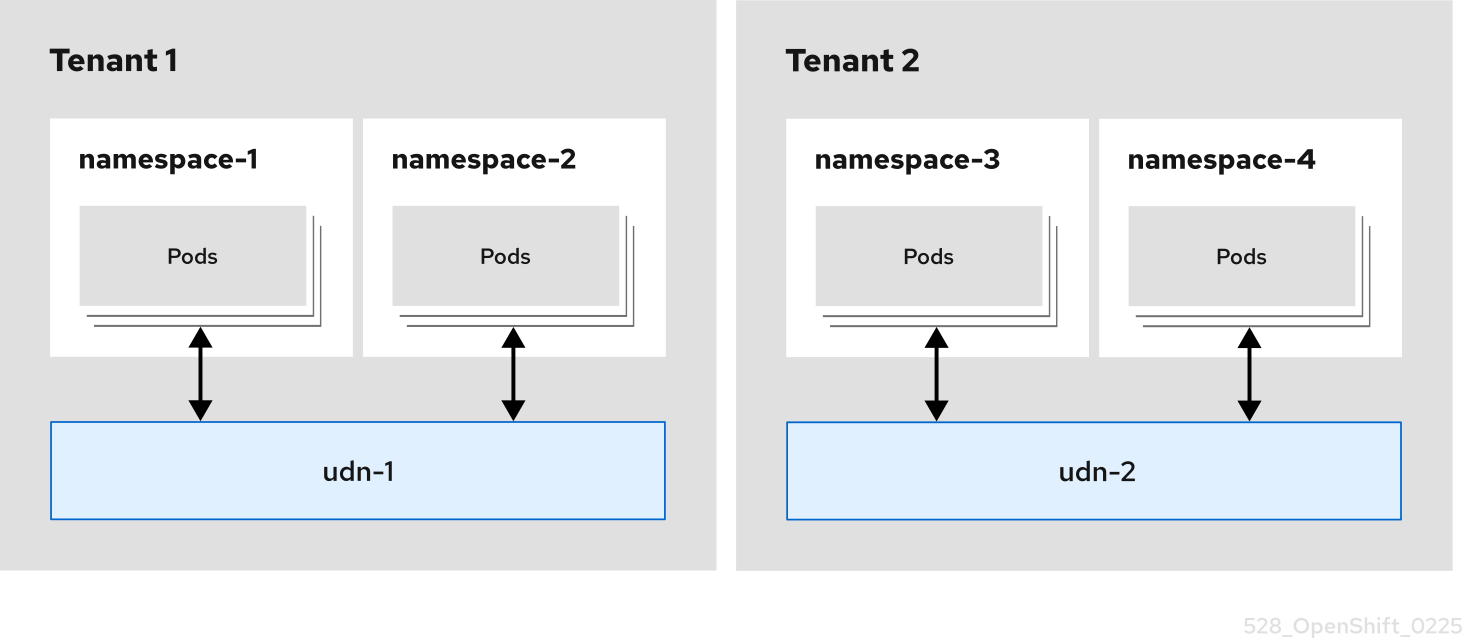
The following diagram demonstrates how a cluster administrator can use the CUDN CR to create network isolation between tenants. This network configuration allows a network to span across many namespaces. In the diagram, network isolation is achieved through the creation of two user-defined networks, udn-1 and udn-2. These networks are not connected and the spec.namespaceSelector.matchLabels field is used to select different namespaces. For example, udn-1 configures and isolates communication for namespace-1 and namespace-2, while udn-2 configures and isolates communication for namespace-3 and namespace-4. Isolated tenants (Tenants 1 and Tenants 2) are created by separating namespaces while also allowing pods in the same namespace to communicate.
Figure 3. Tenant isolation using a ClusterUserDefinedNetwork CR
Considerations for ClusterUserDefinedNetwork transport
Unlike the UserDefinedNetwork (UDN) custom resource (CR), the ClusterUserDefinedNetwork CR gives you more control over how pod traffic is carried on the cluster infrastructure and how it relates to networks outside the cluster.
By default, pod-to-pod traffic on the CUDN CR uses a Geneve overlay. Pod IP addresses are not directly reachable from outside of the cluster. When workload traffic leaves the cluster through the designated egress gateway, source addresses are masqueraded to the node IP address of the node that forwards the traffic, similar to other pod networks.
You can use route advertisements and the RouteAdvertisements CR so that routes for the CUDN are advertised on the provider network by using Border Gateway Protocol (BGP). Collectively, this configuration makes pod IP addresses reachable from outside the cluster. For information, see "About route advertisements".
Additionally, you can set spec.network.transport to NoOverlay to route layer 3 pod traffic on the underlay with BGP instead of Geneve encapsulation, or to EVPN to attach a primary CUDN to an external BGP EVPN fabric instead of using only the default overlay behavior. Configuring either transport requires additional objects and node networking beyond the CUDN CR. For more information, see "Improve east-west performance by routing pods on the underlay with BGP" and "About BGP EVPN for primary cluster user-defined networks".
Additional resources
- About route advertisements
- About BGP EVPN for primary cluster user-defined networks
- Improve east-west performance by routing pods on the underlay with BGP
Best practices for ClusterUserDefinedNetwork CRs
To create and deploy a successful instance of the ClusterUserDefinedNetwork (CUDN) CR, administrators must follow best practices such as avoiding default and openshift-* namespaces, use the proper namespace selector configuration, and ensure physical network parameter matching.
The following details provide administrators with a best practice for designing a CUDN CR:
-
A
ClusterUserDefinedNetworkCR is intended for use by cluster administrators and should not be used by non-administrators. If used incorrectly, it might result in security issues with your deployment, cause disruptions, or break the cluster network. -
ClusterUserDefinedNetworkCRs should not select thedefaultnamespace. This can result in no isolation and, as a result, could introduce security risks to the cluster. -
ClusterUserDefinedNetworkCRs should not selectopenshift-*namespaces. -
OpenShift Container Platform administrators should be aware that all namespaces of a cluster are selected when one of the following conditions are met:
- The
matchLabelsselector is left empty. - The
matchExpressionsselector is left empty. - The
namespaceSelectoris initialized, but does not specifymatchExpressionsormatchLabel. For example:namespaceSelector: {}.
- The
-
For primary networks, the namespace used for the
ClusterUserDefinedNetworkCR must include thek8s.ovn.org/primary-user-defined-networklabel. This label cannot be updated, and can only be added when the namespace is created. The following conditions apply with thek8s.ovn.org/primary-user-defined-networknamespace label:- If the namespace is missing the
k8s.ovn.org/primary-user-defined-networklabel and a pod is created, the pod attaches itself to the default network. - If the namespace is missing the
k8s.ovn.org/primary-user-defined-networklabel and a primaryClusterUserDefinedNetworkCR is created that matches the namespace, an error is reported and the network is not created. - If the namespace is missing the
k8s.ovn.org/primary-user-defined-networklabel and a primaryClusterUserDefinedNetworkCR already exists, a pod in the namespace is created and attached to the default network. - If the namespace has the label, and a primary
ClusterUserDefinedNetworkCR does not exist, a pod in the namespace is not created until theClusterUserDefinedNetworkCR is created.
- If the namespace is missing the
-
When using the
ClusterUserDefinedNetworkCR to createlocalnettopology, the following are best practices for administrators:- You must make sure that the
spec.network.physicalNetworkNameparameter matches the parameter that you configured in the Open vSwitch (OVS) bridge mapping when you create your CUDN CR. This ensures that you are bridging to the intended segment of your physical network. If you intend to deploy multiple CUDN CR using the same bridge mapping, you must ensure that the samephysicalNetworkNameparameter is used. - Avoid overlapping subnets between your physical network and your other network interfaces. Overlapping network subnets can cause routing conflicts and network instability. To prevent conflicts when using the
spec.network.localnet.subnetsparameter, you might use thespec.network.localnet.excludeSubnetsparameter. - When you configure a Virtual Local Area Network (VLAN), you must ensure that both your underlying physical infrastructure (switches, routers, and so on) and your nodes are properly configured to accept VLAN IDs (VIDs). This means that you configure the physical network interface, for example
eth1, as an access port for the VLAN, for example20, that you are connecting to through the physical switch. In addition, you must verify that an OVS bridge mapping, for exampleeth1, exists on your nodes to ensure that the physical interface is properly connected with OVN-Kubernetes.
- You must make sure that the
Create a ClusterUserDefinedNetwork CR by using the CLI
To implement cluster-wide network segmentation and isolation across multiple namespaces, supporting either layer 2 or layer 3 in OpenShift Container Platform, create a ClusterUserDefinedNetwork CR by using the CLI. Defining this resource ensures that network traffic is securely partitioned across the cluster.
Based upon your use case, create your request by using either the cluster-layer-two-udn.yaml example for a Layer2 topology type or the cluster-layer-three-udn.yaml example for a Layer3 topology type.
Warning
- The
ClusterUserDefinedNetworkCR is intended for use by cluster administrators and should not be used by non-administrators. If used incorrectly, it might result in security issues with your deployment, cause disruptions, or break the cluster network. - OpenShift Virtualization only supports the
Layer2andLocalnettopologies.
Prerequisites
- You have logged in as a user with
cluster-adminprivileges.
Procedure
-
Optional: For a
ClusterUserDefinedNetworkCR that uses a primary network, create a namespace with thek8s.ovn.org/primary-user-defined-networklabel by entering the following command: -
Create a cluster-wide user-defined network for either a
Layer2orLayer3topology type:-
Create a YAML file, such as
cluster-layer-two-udn.yaml, to define your request for aLayer2topology as in the following example:apiVersion: k8s.ovn.org/v1 kind: ClusterUserDefinedNetwork metadata: name: <cudn_name> spec: namespaceSelector: matchLabels: "<label_1_key>": "<label_1_value>" "<label_2_key>": "<label_2_value>" network: topology: Layer2 layer2: role: Primary subnets: - "2001:db8::/64" - "10.100.0.0/16" transport: <transport_protocol>where:
Name- Specifies the name of your
ClusterUserDefinedNetworkCR. namespaceSelector- Specifies a label query over the set of namespaces that the CUDN CR applies to. Uses the standard Kubernetes
MatchLabelselector. Must not point todefaultoropenshift-*namespaces. matchLabels- Uses the
matchLabelsselector type, where terms are evaluated with anANDrelationship. In this example, the CUDN CR is deployed to namespaces that contain both<label_1_key>=<label_1_value>and<label_2_key>=<label_2_value>labels. network- Describes the network configuration.
topology- This field describes the network configuration; accepted values are
Layer2andLayer3. Specifying aLayer2topology type creates one logical switch that is shared by all nodes. This field specifies the topology configuration. It can belayer2orlayer3. role- Specifies
PrimaryorSecondary.Primaryis the onlyrolespecification supported in 4.22. subnets- For
Layer2topology types the following specifies config details for the field:
-
The subnets field is optional.
-
The subnets field is of type
stringand accepts standard CIDR formats for both IPv4 and IPv6. -
The subnets field accepts one or two items. For two items, they must be of a different family. For example, subnets values of
10.100.0.0/16and2001:db8::/64. -
Layer2subnets can be omitted. If omitted, users must configure static IP addresses for the pods. As a consequence, port security only prevents MAC spoofing. For more information, see "Configuring pods with a static IP address".spec.network.transport- Specifies how pod traffic is carried on the cluster infrastructure for the
ClusterUserDefinedNetworkCR. Accepted value isEVPN. Additional configuration is required when setting thespec.network.transportfield. This field is optional. For more information, see "About BGP EVPN for primary cluster user-defined networks".
-
Create a YAML file, such as
cluster-layer-three-udn.yaml, to define your request for aLayer3topology as in the following example:apiVersion: k8s.ovn.org/v1 kind: ClusterUserDefinedNetwork metadata: name: <cudn_name> spec: namespaceSelector: matchExpressions: - key: kubernetes.io/metadata.name operator: In values: ["<example_namespace_one>", "<example_namespace_two>"] network: topology: Layer3 layer3: role: Primary subnets: - cidr: 10.100.0.0/16 hostSubnet: 24 transport: <transport_protocol>where:
Name- Specifies the name of your
ClusterUserDefinedNetworkCR. namespaceSelector- Specifies a label query over the set of namespaces that the CUDN CR applies to. Uses the standard Kubernetes
MatchLabelselector. Must not point todefaultoropenshift-*namespaces. Uses thematchExpressionsselector type, where terms are evaluated with anORrelationship. Key- Specifies the label key to match. Takes an operator value; valid values include:
In,NotIn,Exists, andDoesNotExist. Because thematchExpressionstype is used, provisions namespaces matching either<example_namespace_one>or<example_namespace_two>. network- Describes the network configuration.
topology- The
topologyfield describes the network configuration; accepted values areLayer2andLayer3. Specifying aLayer3topology type creates a layer 2 segment per node, each with a different subnet. Layer 3 routing is used to interconnect node subnets. role- Specifies
PrimaryorSecondary.Primaryis the onlyrolespecification supported in 4.22. subnets- For
Layer3topology types the following specifies config details for thesubnetfield:
-
The
subnetsfield is mandatory. -
The type for the
subnetsfield iscidrandhostSubnet:cidris the cluster subnet and accepts a string value.hostSubnetspecifies the nodes subnet prefix that the cluster subnet is split to.- For IPv6, only a
/64length is supported forhostSubnet.
spec.network.transport- Specifies how pod traffic is carried on the cluster infrastructure for the
ClusterUserDefinedNetworkCR. Accepted value isEVPN. Additional configuration is required when setting thespec.network.transportfield. This field is optional. For more information, see "About BGP EVPN for primary cluster user-defined networks".
-
-
Apply your request by running the following command:
Where
<example_cluster_udn>.yamlis the name of yourLayer2orLayer3configuration file. -
Verify that your request is successful by running the following command:
Where
<cudn_name>is the name you created of your cluster-wide user-defined network.Example outputapiVersion: k8s.ovn.org/v1 kind: ClusterUserDefinedNetwork metadata: creationTimestamp: "2024-12-05T15:53:00Z" finalizers: - k8s.ovn.org/user-defined-network-protection generation: 1 name: my-cudn resourceVersion: "47985" uid: 16ee0fcf-74d1-4826-a6b7-25c737c1a634 spec: namespaceSelector: matchExpressions: - key: custom.network.selector operator: In values: - example-namespace-1 - example-namespace-2 - example-namespace-3 network: layer3: role: Primary subnets: - cidr: 10.100.0.0/16 topology: Layer3 status: conditions: - lastTransitionTime: "2024-11-19T16:46:34Z" message: 'NetworkAttachmentDefinition has been created in following namespaces: [example-namespace-1, example-namespace-2, example-namespace-3]' reason: NetworkAttachmentDefinitionReady status: "True" type: NetworkCreated
Create a ClusterUserDefinedNetwork CR for a Localnet topology
You deploy a Localnet topology to connect the secondary network to the physical underlay. This enables both east-west cluster traffic and access to services running outside the cluster. This topology type requires the additional configuration of the underlying Open vSwitch (OVS) system on cluster nodes.
Prerequisites
- You are logged in as a user with
cluster-adminprivileges. - You created and configured the Open vSwitch (OVS) bridge mapping to associate the logical OVN-Kubernetes network with the physical node network through the OVS bridge. For more information, see "Configuration for a localnet switched topology".
Procedure
-
Create a cluster-wide user-defined network with a
Localnettopology:-
Create a YAML file, such as
cluster-udn-localnet.yaml, to define your request for aLocalnettopology as in the following example:apiVersion: k8s.ovn.org/v1 kind: ClusterUserDefinedNetwork metadata: name: <cudn_name> spec: namespaceSelector: matchLabels: "<label_1_key>": "<label_1_value>" "<label_2_key>": "<label_2_value>" network: topology: Localnet localnet: role: Secondary physicalNetworkName: test ipam: {lifecycle: Persistent} subnets: ["192.168.0.0/16", "2001:dbb::/64"]where:
Name- Specifies the name of your
ClusterUserDefinedNetworkCR. namespaceSelector- Specifies a label query over the set of namespaces that the CUDN CR applies to. Uses the standard Kubernetes
MatchLabelselector. Must not point todefaultoropenshift-*namespaces. matchLabels- Uses the
matchLabelsselector type, where terms are evaluated with anANDrelationship. In this example, the CUDN CR is deployed to namespaces that contain both<label_1_key>=<alabel_1_value>and<label_2_key>=<label_2_value>labels. network- Describes the network configuration.
topology- Specifying a
Localnettopology type creates one logical switch that is directly bridged to one provider network. role- Specifies the
rolefor the network configuration.Secondaryis the onlyrolespecification supported for thelocalnettopology. subnets- For
Localnettopology types the following specifies config details for thesubnetfield:
- The subnets field is optional.
- The subnets field is of type
stringand accepts standard CIDR formats for both IPv4 and IPv6. - The subnets field accepts one or two items. For two items, they must be of a different IP family. For example, subnets values of
10.100.0.0/16and2001:db8::/64. localnetsubnets can be omitted. If omitted, users must configure static IP addresses for the pods. As a consequence, port security only prevents MAC spoofing. For more information, see "Configuring pods with a static IP address".
-
-
Apply your request by running the following command:
where:
<example_cluster_udn>.yaml- Is the name of your
Localnetconfiguration file.
-
Verify that your request is successful by running the following command:
where:
<cudn_name>- Is the name you created of your cluster-wide user-defined network.
Example output
apiVersion: k8s.ovn.org/v1
kind: ClusterUserDefinedNetwork
metadata:
  creationTimestamp: "2025-05-28T19:30:38Z"
  finalizers:
  - k8s.ovn.org/user-defined-network-protection
  generation: 1
  name: cudn-test
  resourceVersion: "140936"
  uid: 7ff185fa-d852-4196-858a-8903b58f6890
spec:
  namespaceSelector:
    matchLabels:
      "1": "1"
      "2": "2"
  network:
    localnet:
      ipam:
        lifecycle: Persistent
      physicalNetworkName: test
      role: Secondary
      subnets:
      - 192.168.0.0/16
      - 2001:dbb::/64
    topology: Localnet
status:
  conditions:
  - lastTransitionTime: "2025-05-28T19:30:38Z"
    message: 'NetworkAttachmentDefinition has been created in following namespaces:
      [test1, test2]'
    reason: NetworkAttachmentDefinitionCreated
    status: "True"
    type: NetworkCreated
Additional resources
Create a ClusterUserDefinedNetwork CR by using the web console
To implement isolated network segments with layer 2 connectivity in OpenShift Container Platform, create a ClusterUserDefinedNetwork custom resource (CR) by using the web console. Defining this resource ensures that your cluster workloads can communicate directly at the data link layer.
Note
Currently, creation of a ClusterUserDefinedNetwork CR with a Layer3 topology is not supported when using the OpenShift Container Platform web console.
Prerequisites
- You have access to the OpenShift Container Platform web console as a user with
cluster-adminpermissions. - You have created a namespace and applied the
k8s.ovn.org/primary-user-defined-networklabel.
Procedure
- From the Administrator perspective, click Networking → UserDefinedNetworks.
- Click ClusterUserDefinedNetwork.
- In the Name field, specify a name for the cluster-scoped UDN.
- Specify a value in the Subnet field.
- In the Project(s) Match Labels field, add the appropriate labels to select namespaces that the cluster UDN applies to.
- Click Create. The cluster-scoped UDN serves as the default primary network for pods located in namespaces that contain the labels that you specified in step 5.
Additional resources
About the UserDefinedNetwork CR
To create advanced network segmentation and isolation, users and administrators create UserDefinedNetwork (UDN) custom resource (CR)s. UDNs provide granular control over network traffic within specific namespaces.
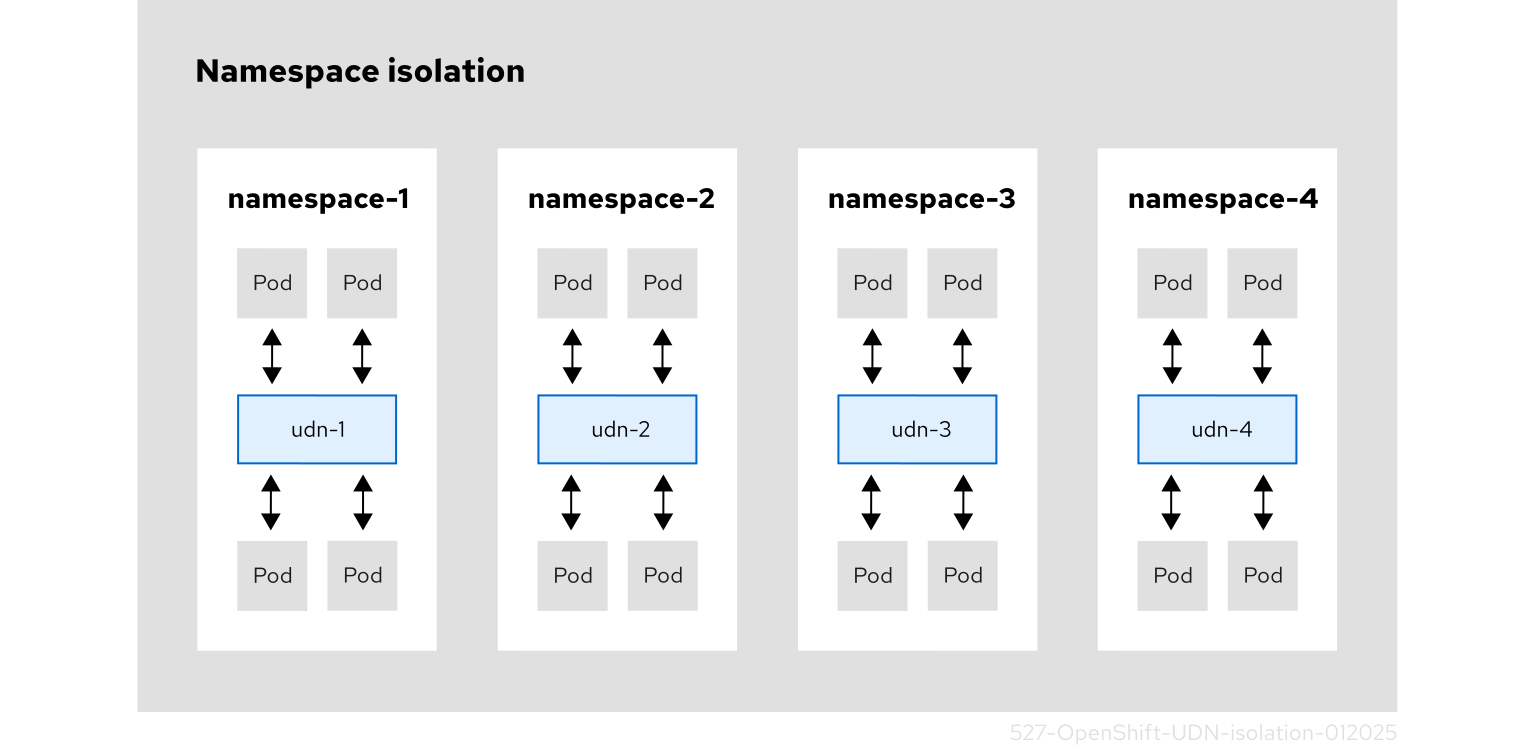
The following diagram shows four cluster namespaces, where each namespace has a single assigned user-defined network (UDN), and each UDN has an assigned custom subnet for its pod IP allocations. The OVN-Kubernetes handles any overlapping UDN subnets. Without using the Kubernetes network policy, a pod attached to a UDN can communicate with other pods in that UDN. By default, these pods are isolated from communicating with pods that exist in other UDNs. For microsegmentation, you can apply network policy within a UDN. You can assign one or more UDNs to a namespace, with a limitation of only one primary UDN to a namespace, and one or more namespaces to a UDN.
Figure 4. Namespace isolation using a UserDefinedNetwork CR
Best practices for UserDefinedNetwork CRs
To deploy a successful instance of the UserDefinedNetwork (UDN) CR, you must follow masquerade IP address requirements, avoid default and openshift-* namespaces, set a proper namespace selector configuration, and ensure physical network parameter matching.
The following details provide a best practice for designing a UDN CR:
-
openshift-*namespaces should not be used to set up aUserDefinedNetworkCR. -
UserDefinedNetworkCRs should not be created in the default namespace. This can result in no isolation and, as a result, could introduce security risks to the cluster. -
For primary networks, the namespace used for the
UserDefinedNetworkCR must include thek8s.ovn.org/primary-user-defined-networklabel. This label cannot be updated, and can only be added when the namespace is created. The following conditions apply with thek8s.ovn.org/primary-user-defined-networknamespace label:- If the namespace is missing the
k8s.ovn.org/primary-user-defined-networklabel and a pod is created, the pod attaches itself to the default network. - If the namespace is missing the
k8s.ovn.org/primary-user-defined-networklabel and a primaryUserDefinedNetworkCR is created that matches the namespace, a status error is reported and the network is not created. - If the namespace is missing the
k8s.ovn.org/primary-user-defined-networklabel and a primaryUserDefinedNetworkCR already exists, a pod in the namespace is created and attached to the default network. - If the namespace has the label, and a primary
UserDefinedNetworkCR does not exist, a pod in the namespace is not created until theUserDefinedNetworkCR is created.
- If the namespace is missing the
-
2 masquerade IP addresses are required for user defined networks. You must reconfigure your masquerade subnet to be large enough to hold the required number of networks.
Warning
- For OpenShift Container Platform 4.17 and later, clusters use
169.254.0.0/17for IPv4 andfd69::/112for IPv6 as the default masquerade subnet. These ranges should be avoided by users. For updated clusters, there is no change to the default masquerade subnet. - Changing the cluster’s masquerade subnet is unsupported after a user-defined network has been configured for a project. Attempting to modify the masquerade subnet after a
UserDefinedNetworkCR has been set up can disrupt the network connectivity and cause configuration issues.
- For OpenShift Container Platform 4.17 and later, clusters use
-
Ensure tenants are using the
UserDefinedNetworkresource and not theNetworkAttachmentDefinition(NAD) CR. This can create security risks between tenants. -
When creating network segmentation, you should only use the
NetworkAttachmentDefinitionCR if user-defined network segmentation cannot be completed using theUserDefinedNetworkCR. -
The cluster subnet and services CIDR for a
UserDefinedNetworkCR cannot overlap with the default cluster subnet CIDR. OVN-Kubernetes network plugin uses100.64.0.0/16as the default join subnet for the network. You must not use that value to configure aUserDefinedNetworkCR’sjoinSubnetsfield. If the default address values are used anywhere in the network for the cluster you must override the default values by setting thejoinSubnetsfield. For more information, see "Additional configuration details for user-defined networks".
Create a UserDefinedNetwork CR by using the CLI
Create a UserDefinedNetwork CR by using the CLI to enable namespace-scoped network segmentation and isolation, allowing you to define custom Layer 2 or Layer 3 network topologies for pods within specific namespaces.
The following procedure creates a UserDefinedNetwork CR that is namespace scoped. Based upon your use case, create your request by using either the my-layer-two-udn.yaml example for a Layer2 topology type or the my-layer-three-udn.yaml example for a Layer3 topology type.
Note
When deploying a UserDefinedNetwork custom resource (CR) on IBM Power(R) Virtual Server with installer-provisioned infrastructure (IPI), you must set the MTU size to 1300 or 1250.
Prerequisites
-
As a cluster administrator, you have created a namespace.
- During namespace creation, ensure you also applied the
k8s.ovn.org/primary-user-defined-networklabel to the namespace. - After you create the namespace, a user that has
viewandeditrole-based access control (RBAC) permissions can create aUserDefinedNetworkCR in the namespace.
- During namespace creation, ensure you also applied the
Procedure
-
Optional: For a
UserDefinedNetworkCR that uses a primary network, create a namespace with thek8s.ovn.org/primary-user-defined-networklabel by entering the following command: -
Create a user-defined network for either a
Layer2orLayer3topology type:-
Create a YAML file, such as
my-layer-two-udn.yaml, to define your request for aLayer2topology as in the following example:apiVersion: k8s.ovn.org/v1 kind: UserDefinedNetwork metadata: name: udn-1 namespace: <some_custom_namespace> spec: topology: Layer2 layer2: (3) role: Primary subnets: - "10.0.0.0/24" - "2001:db8::/60"where:
name- Name of your
UserDefinedNetworkresource. This should not bedefaultor duplicate any global namespaces created by the Cluster Network Operator (CNO). topology- Specifies the network configuration; accepted values are
Layer2andLayer3. Specifying aLayer2topology type creates one logical switch that is shared by all nodes. role- Specifies a
PrimaryorSecondaryrole. subnets- For
Layer2topology types the following specifies config details for thesubnetfield:
- The subnets field is optional.
- The subnets field is of type
stringand accepts standard CIDR formats for both IPv4 and IPv6. - The subnets field accepts one or two items. For two items, they must be of a different family. For example, subnets values of
10.100.0.0/16and2001:db8::/64. Layer2subnets can be omitted. If omitted, users must configure IP addresses for the pods. As a consequence, port security only prevents MAC spoofing.- The
Layer2subnetsfield is mandatory when theipamLifecyclefield is specified.
-
Create a YAML file, such as
my-layer-three-udn.yaml, to define your request for aLayer3topology as in the following example:apiVersion: k8s.ovn.org/v1 kind: UserDefinedNetwork metadata: name: udn-2-primary namespace: <some_custom_namespace> spec: topology: Layer3 layer3: role: Primary subnets: - cidr: 10.150.0.0/16 hostSubnet: 24 - cidr: 2001:db8::/60 hostSubnet: 64 # ...where:
name- Name of your
UserDefinedNetworkresource. This should not bedefaultor duplicate any global namespaces created by the Cluster Network Operator (CNO). topology- Specifies the network configuration; accepted values are
Layer2andLayer3. Specifying aLayer2topology type creates one logical switch that is shared by all nodes. role- Specifies a
PrimaryorSecondaryrole. subnets- For
Layer3topology types the following specifies config details for thesubnetfield:
-
The
subnetsfield is mandatory. -
The type for the
subnetsfield iscidrandhostSubnet:cidris equivalent to theclusterNetworkconfiguration settings of a cluster. The IP addresses in the CIDR are distributed to pods in the user defined network. This parameter accepts a string value.hostSubnetdefines the per-node subnet prefix.- For IPv6, only a
/64length is supported forhostSubnet.
- Apply your request by running the following command:
Where
<my_layer_two_udn>.yamlis the name of yourLayer2orLayer3configuration file. -
-
Verify that your request is successful by running the following command:
Where
some_custom_namespaceis the namespace you created for your user-defined network.Example outputapiVersion: k8s.ovn.org/v1 kind: UserDefinedNetwork metadata: creationTimestamp: "2024-08-28T17:18:47Z" finalizers: - k8s.ovn.org/user-defined-network-protection generation: 1 name: udn-1 namespace: some-custom-namespace resourceVersion: "53313" uid: f483626d-6846-48a1-b88e-6bbeb8bcde8c spec: layer2: role: Primary subnets: - 10.0.0.0/24 - 2001:db8::/60 topology: Layer2 status: conditions: - lastTransitionTime: "2024-08-28T17:18:47Z" message: NetworkAttachmentDefinition has been created reason: NetworkAttachmentDefinitionReady status: "True" type: NetworkCreated
Additional resources
Create a UserDefinedNetwork CR by using the web console
To implement isolated network segments with layer 2 connectivity in OpenShift Container Platform, create a UserDefinedNetwork custom resource (CR) by using the web console. Defining this resource ensures that your cluster workloads can communicate directly at the data link layer.
Note
Currently, creation of a UserDefinedNetwork CR with a Layer3 topology or a Secondary role are not supported when using the OpenShift Container Platform web console.
Prerequisites
-
As a cluster administrator, you have created a namespace.
- During namespace creation, ensure you also applied the
k8s.ovn.org/primary-user-defined-networklabel to the namespace. - After you create the namespace, a user that has
viewandeditrole-based access control (RBAC) permissions can create aUserDefinedNetworkCR in the namespace.
- During namespace creation, ensure you also applied the
Procedure
- From the Administrator perspective, click Networking → UserDefinedNetworks.
- Click Create UserDefinedNetwork.
- From the Project name list, select the namespace that you previously created.
- Specify a value in the Subnet field.
- Click Create. The user-defined network serves as the default primary network for pods that you create in this namespace.
Additional configuration details for user-defined networks
Configure optional advanced settings for ClusterUserDefinedNetwork and UserDefinedNetwork CRs when default values conflict with your network topology or when you need persistent IP addresses, custom gateways, or specific subnet configurations.
It is not recommended to set these fields without explicit need and understanding of OVN-Kubernetes network topology.
Optional configurations for user-defined networks
| CUDN field | UDN field | Type |
|---|---|---|
| Description | spec.network.<topology>.joinSubnets |
spec.<topology>.joinSubnets |
| object | When omitted, the platform sets default values for the joinSubnets field of 100.65.0.0/16 for IPv4 and fd99::/64 for IPv6. If the default address values are used anywhere in the cluster's network you must override it by setting the joinSubnets field. If you choose to set this field, ensure it does not conflict with other subnets in the cluster such as the cluster subnet, the default network cluster subnet, and the masquerade subnet. The joinSubnets field configures the routing between different segments within a user-defined network. Dual-stack clusters can set 2 subnets, one for each IP family; otherwise, only 1 subnet is allowed. This field is only allowed for the Primary network. |
spec.network.<topology>.excludeSubnets |
spec.<topology>.excludeSubnets |
string | Specifies a list of CIDRs to be removed from the CIDRs specified in the subnets field. The CIDRs in this list must be in range of at least one subnet specified in the subnets field. When omitted, OVN-Kubernetes assigns all IP addresses specified in the subnets field. You must use standard CIDR notation. For example, 10.128.0.0/16. You must omit this field if the subnets field is not set or if the ipam.mode field is set to Disabled. You can only set 25 values for the excludeSubnets field.When deploying a secondary network with Localnet topology, the IP ranges used in your physical network must be explicitly listed in the excludeSubnets field to prevent IP duplication in your subnet. |
spec.network.layer2.reservedSubnets |
spec.layer2.reservedSubnets |
object |
This optional field specifies a list of CIDRs reserved for static IP assignment, which therefore excludes it from automatic allocation. When omitted, all IP addresses in the subnets field are available for automatic assignment. All IP addresses in the listed ranges are available to request through static IP assignment in pod annotations. Each address must be in the CIDR range specified in the subnets field. The field only accepts 25 entries. The format should match standard CIDR notation (for example, 10.128.0.0/16). You must omit this field if the subnets field is unset or the ipam.mode field is Disabled. Specifies a reserved list of addresses for workloads. You can set this field to reserve IP addresses that pods can then request in the future. |
spec.network.layer2.infrastructureSubnets |
spec.layer2.infrastructureSubnets |
| object | This optional field specifies addresses used for OVN-Kubernetes internal network infrastructure. You cannot assign any IP addresses within these ranges to workloads. When omitted, OVN-Kubernetes automatically assigns IP addresses from the subnets field for its infrastructure needs. When the reservedSubnets field are also specified, the CIDRs cannot overlap. Additionally when the defaultGatewayIPs field are also specified, the default gateway IP addresses must belong to one of the CIDRs. Each address must be in the CIDR range specified in subnets. The maximum number of entries allowed is 10. The format should match standard CIDR notation (for example, 10.128.0.0/16). You must omit this field if the subnets field is unset or the ipam.mode field is Disabled. |
spec.network.layer2.defaultGatewayIPs |
spec.layer2.defaultGatewayIPs |
object | This field is optional and specifies an IP address that overrides the addresses assigned by default for the gateway. Acceptable values are both IPv4 and IPv6 addresses for dual stack clusters. Specifies the default gateway IP address used in the internal OVN-Kubernetes topology. Dual-stack clusters can set two IP addresses (one for each IP family), otherwise only one IP address can be used. This field is only allowed when the role field is set to Primary. It is not recommended to set this field without explicit need and understanding of the OVN-Kubernetes network topology. When omitted, OVN-Kubernetes assigns the first IP address from the network's subnet field. |
spec.network.<topology>.ipam.lifecycle |
spec.layer2.ipam.lifecycle |
object |
The spec.ipam.lifecycle field configures the IP address management system (IPAM). You might use this field for virtual workloads to ensure persistent IP addresses. The only allowed value is Persistent, which ensures that your virtual workloads have persistent IP addresses across reboots and migration. These are assigned by the container network interface (CNI) and used by OVN-Kubernetes to program pod IP addresses. You must not change this for pod annotations. Setting a value of Persistent is only supported when ipam.mode parameter is set to Enabled. |
spec.network.<topology>.ipam.mode |
spec.<topology>ipam.mode` |
| object | The mode parameter controls how much of the IP configuration is managed by OVN-Kubernetes. The following options are available:
|
spec.network.<topology>.mtu |
spec.<topology>.mtu |
integer | The maximum transmission units (MTU). The default value is 1400. The boundary for IPv4 is 576, and for IPv6 it is 1280. |
spec.network.localnet.vlan |
N/A | object |
| This field is optional and configures the virtual local area network (VLAN) tagging and allows you to segment the physical network into multiple independent broadcast domains. | spec.network.localnet.vlan.mode |
N/A |
| object | Acceptable values are Access. A value of Access specifies that the network interface belongs to a single VLAN and all traffic will be labelled with an id that is configured in the spec.network.localnet.vlan.mode.access.id field. The id specifies the VLAN id (VID) for access ports. Values must be an integer between 1 and 4094. |
spec.network.localnet.physicalNetworkName |
| N/A | string | Specifies the name for a physical network interface. The value you specify must match the network-name parameter that you provided in your Open vSwitch (OVS) bridge mapping. |
spec.network.transport |
N/A | string |
Specifies how pod traffic is carried on the cluster infrastructure for the ClusterUserDefinedNetwork CR. Accepted values are EVPN and NoOverlay. Additional configuration is required when setting the spec.network.transport field. For more information, see "About BGP EVPN for primary cluster user-defined networks" and "Improve east-west performance by routing pods on the underlay with BGP". |
where:
<topology>- Can be either
layer2orlayer3for theUserDefinedNetworkCR. For theClusterUserDefinedNetworkCR the topology can also beLocalnet.
User-defined network status condition types
To troubleshoot your network deployment in OpenShift Container Platform, evaluate the status condition types returned for ClusterUserDefinedNetwork and UserDefinedNetwork custom resources (CRs). Reviewing these conditions ensures that you can identify and resolve configuration errors.
NetworkCreated condition types (ClusterDefinedNetwork and UserDefinedNetwork CRs)
| Condition type | Status | Reason and Message | |
|---|---|---|---|
NetworkCreated |
True |
When True, the following reason and message is returned: |
|
| Reason | Message | ||
NetworkAttachmentDefinitionCreated |
'NetworkAttachmentDefinition has been created in following namespaces: [example-namespace-1, example-namespace-2, example-namespace-3]'` | ||
NetworkCreated |
False |
When False, one of the following messages is returned: |
|
| Reason | Message | ||
SyncError |
failed to generate NetworkAttachmentDefinition |
||
SyncError |
failed to update NetworkAttachmentDefinition |
||
SyncError |
primary network already exist in namespace "<namespace_name>": "<primary_network_name>" |
||
SyncError |
failed to create NetworkAttachmentDefinition: create NAD error |
||
SyncError |
foreign NetworkAttachmentDefinition with the desired name already exist |
||
SyncError |
failed to add finalizer to UserDefinedNetwork |
||
NetworkAttachmentDefinitionDeleted |
NetworkAttachmentDefinition is being deleted: [<namespace>/<nad_name>] |
||
NetworkAllocationSucceeded condition types (UserDefinedNetwork CRs)
| Condition type | Status | Reason and Message | |
|---|---|---|---|
NetworkAllocationSucceeded |
True |
When True, the following reason and message is returned: |
|
| Reason | Message | ||
NetworkAllocationSucceeded |
Network allocation succeeded for all synced nodes. |
||
NetworkAllocationSucceeded |
False |
When False, the following message is returned: |
|
| Reason | Message | ||
InternalError |
Network allocation failed for at least one node: [<node_name>], check UDN events for more info. |
||
Invalid mtu scenarios types for the ClusterUserDefinedNetwork CR
| Condition type | Reason, Message, Resolution | ||
|---|---|---|---|
invalid mtu |
One of the following messages is returned when the mtu is set incorrect: |
||
| Reason | Message | Resolution | |
The mtu field is set higher than 65536. |
spec.network.localnet.mtu in body should be less than 65536. |
You must set the mtu field lower than 65536. |
|
The mtu field is set lower than 576. |
spec.network.localnet.mtu in body should be greater than or equal to 576. |
You must set the mtu field greater than or equal to 576. |
|
The mtu field must be at least 1280 when using the IPv6 subnet. |
MTU should be greater than or equal to 1280 when an IPv6 subnet is used |
You must set the mtu field higher than or equal to 1280 when you have an IPv6 subnet defined on your user-defined network configuration. |
|
Invalid PhysicalNetworkName scenarios types for the ClusterUserDefinedNetwork CR
| Condition type | Reason, Message, Resolution | ||
|---|---|---|---|
invalid PhysicalNetworkName |
One of the following messages is returned when the PhysicalNetworkName is set incorrect: |
||
| Reason | Message | Resolution | |
| The name of the physical network is not set. | spec.network.localnet.physicalNetworkName: Required value |
You must set the physicalNetworkName field. |
|
| The name of the physical network does not meet minimum length requirements. | spec.network.localnet.physicalNetworkName in body should be at least 1 chars long |
You must set physical network name to be at least one character in length. | |
| The name of the physical network exceeds the maximum character limit of 253. | spec.network.localnet.physicalNetworkName: Too long: may not be more than 253 bytes |
You must set physical network name to not exceed the 253 character in length. | |
The name of the physical network must not contain , or :. |
physicalNetworkName cannot contain "," or ":" characters. |
You must remove the , or : from the physical network name. |
|
Invalid role scenarios types for the ClusterUserDefinedNetwork CR
| Condition type | Reason, Message, Resolution | ||
|---|---|---|---|
role unset or role is primary |
One of the following messages is returned when the spec.network.localnet.role is set incorrect: |
||
| Reason | Message | Resolution | |
The role field must be set for your localnet topology. |
spec.network.localnet.role: Required value |
You must set the role field. |
|
Primary is not a supported value for the Localnet topology. |
spec.network.localnet.role: Unsupported value: "Primary": supported values: "Secondary" |
You must set the role field for your Localnet topology to Secondary-the accepted value. |
|
Invalid subnets and ipam scenarios types for the ClusterUserDefinedNetwork CR
| Condition type | Reason, Message, Resolution | ||
|---|---|---|---|
LocalnetInvalidSubnets |
One of the following messages is returned when either the spec.network.localnet.subnets or spec.network.localnet.ipam is set incorrect: |
||
| Reason | Message | Resolution | |
The optional fields, subnets and ipam.mode, have to be set together. |
Subnets is required with ipam.mode is Enabled or unset, and forbidden otherwise |
You must set the subnets field unless the spec.network.localnet.ipam.mode is explicitly disabled. |
|
The spec.network.localnet.subnets must have an acceptable value when using this optional field. |
The ClusterUserDefinedNetwork "localnet-empty-subnets-fail" is invalid: spec.network.localnet.subnets: Invalid value: 0: spec.network.localnet.subnets in body should have at least 1 items |
You must set an acceptable value for spec.network.localnet.subnets. Acceptable values are IPv4 and IPv6 Classless Inter-Domain Routing (CIDR) ranges that do not overlap with any CIDR ranges used by OpenShift Container Platform. |
|
The subnet field must be set when using the optional spec.network.localnet.excludeSubnets field. |
excludeSubnets must be unset when subnets is unset |
You must set the spec.network.localnet.subnets field when using the spec.network.localnet.excludeSubnet field. |
|
The excludeSubnets must be a value within the subnets field. |
excludeSubnets must be subnetworks of the networks specified in the subnets field |
You must set the value for the excludeSubnets field to be within the subnets field. For example, a subnets value of 192.168.100.0/24 and an excludeSubnets value of 192.168.200.1/32 is invalid. |
|
| The CIDR range is invalid. | The ClusterUserDefinedNetwork "localnet-subnets-invalid-ipv4-cidr-fail" is invalid: spec.network.localnet.subnets[0]: Invalid value: "string": CIDR is invalid |
You must set an acceptable CIDR range for spec.network.localnet.subnets field. Acceptable values are IPv4 and IPv6 CIDR ranges which are not in use or reserved by OpenShift Container Platform. |
|
You must set the subnets field when the ipam.mode is Enabled or when the IPAM mode is unset because the default value is Enabled. |
Subnets is required with ipam.mode is Enabled or unset, and forbidden otherwise. |
You must set the spec.network.localnet.subnets field unless the spec.network.localnet.ipam.mode is explicitly disabled. |
|
Setting two CIDR ranges for spec.network.localnet.subnets field requires that one be IPv4 and the other be IPv6. |
Invalid value...When 2 CIDRs are set, they must be from different IP families. |
You must change one of your CIDR ranges to a different IP family. | |
The spec.network.localnet.ipam.mode is Disabled but the spec.network.localnet.lifecycle has a value of Persistent. |
lifecycle Persistent is only supported when ipam.mode is Enabled |
You must set the ipam.mode to Enabled when the optional field lifecycle has a value of Persistent. |
|
Invalid vlan scenarios types for the ClusterUserDefinedNetwork CR
| Condition type | Reason, Message, Resolution | ||
|---|---|---|---|
invalid vlan or invalid mode |
One of the following messages is returned when the spec.network.localnet.vlan is set incorrect: |
||
| Reason | Message | Resolution | |
The spec.network.localnet.vlan.mode field must be set. |
spec.network.localnet.vlan.mode: Unsupported value: "Disabled": supported values: "Access |
You must set the spec.network.localnet.vlan.mode field to Access mode. |
|
The spec.network.localnet.vlan field must be set when spec.network.localnet.vlan.mode is set to Access mode. |
vlan access config is required when vlan mode is 'Access', and forbidden otherwise. |
You must set spec.network.localnet.vlan.mode.access field when using Access mode. |
|
The spec.network.localnet.vlan.access.id value must be set when using Access mode. |
spec.network.localnet.vlan.access.id: Required value |
You must set a value for spec.network.localnet.mode.access.id. |
|
Acceptable values for access.id are greater than or equal to 1. |
spec.network.localnet.vlan.access.id in body should be greater than or equal to 1 |
You must set a value of 1 or greater for access.id field. |
|
Acceptable values for access.id are less than or equal to 4094. |
spec.network.localnet.vlan.access.id in body should be less than or equal to 4094 |
You must set a value of 4094 or less for access.id field. |
|
Open default network ports on user-defined network pods
To allow default network pods to connect to a user-defined network pod, you can use the k8s.ovn.org/open-default-ports annotation. This annotation opens specific ports on the user-defined network pod for access from the default network.
By default, pods on a user-defined network (UDN) are isolated from the default network. This means that default network pods, such as those running monitoring services (Prometheus or Alertmanager) or the OpenShift Container Platform image registry, cannot initiate connections to UDN pods.
The following pod specification allows incoming TCP connections on port 80 and UDP traffic on port 53 from the default network:
apiVersion: v1
kind: Pod
metadata:
  annotations:
    k8s.ovn.org/open-default-ports: |
      - protocol: tcp
        port: 80
      - protocol: udp
        port: 53
# ...
Note
Open ports are accessible on the pod’s default network IP, not its UDN network IP.
Additional resources