Tang server encryption key management
The cryptographic mechanism to recreate the encryption key is based on the blinded key stored on the node and the private key of the involved Tang servers.
Note
To protect against the possibility of an attacker who has obtained both the Tang server private key and the node’s encrypted disk, periodic rekeying is advisable.
You must perform the rekeying operation for every node before you can delete the old key from the Tang server.
The following sections provide procedures for rekeying and deleting old keys.
Back up keys for a Tang server
To recover a Tang server after a failure, back up the /var/db/tang directory that stores its keys.
The Tang server uses /usr/libexec/tangd-keygen to generate new keys and stores them in the /var/db/tang directory by default. The keys are sensitive and because they are able to perform the boot disk decryption of all hosts that have used them, the keys must be protected accordingly.
Procedure
- Copy the backup key from the
/var/db/tangdirectory to the temp directory from which you can restore the key.
Recover keys for a Tang server
You can recover the keys for a Tang server by accessing the keys from a backup.
Procedure
-
Restore the key from your backup folder to the
/var/db/tang/directory.When the Tang server starts up, it advertises and uses these restored keys.
Rekey Tang servers
This procedure uses a set of three Tang servers, each with unique keys, as an example.
Using redundant Tang servers reduces the chances of nodes failing to boot automatically.
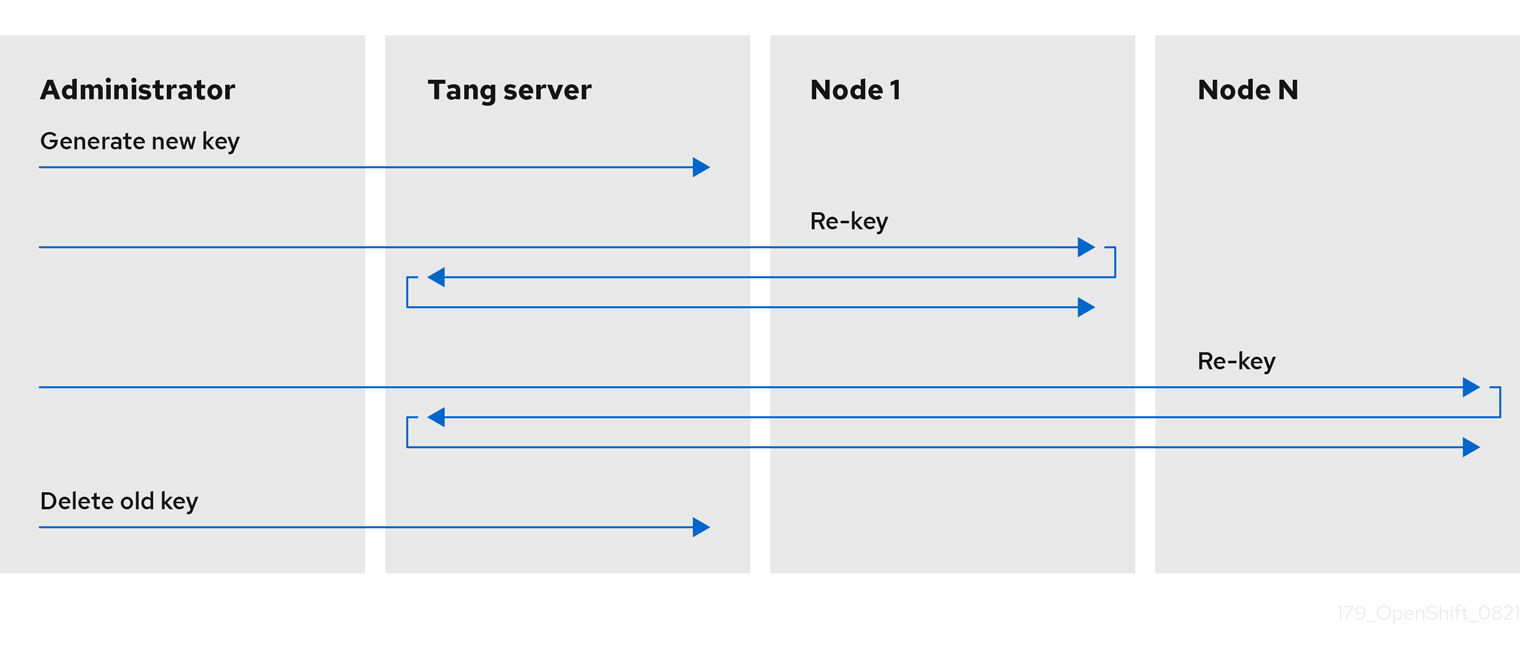
Rekeying a Tang server, and all associated NBDE-encrypted nodes, is a three-step procedure.
Prerequisites
- A working Network-Bound Disk Encryption (NBDE) installation on one or more nodes.
Procedure
-
Generate a new Tang server key.
-
Rekey all NBDE-encrypted nodes so they use the new key.
-
Delete the old Tang server key.
Note
Deleting the old key before all NBDE-encrypted nodes have completed their rekeying causes those nodes to become overly dependent on any other configured Tang servers.
Figure 1. Example workflow for rekeying a Tang server
Generate a new Tang server key
Generate a new Tang server key to rotate the key material advertised by the server. Keep the old key available for decryption until all clients have completed rekeying.
Prerequisites
-
A root shell on the Linux machine running the Tang server.
-
To facilitate verification of the Tang server key rotation, encrypt a small test file with the old key:
-
Verify that the encryption succeeded and the file can be decrypted to produce the same string
plaintext:
Procedure
-
Locate and access the directory that stores the Tang server key. This is usually the
/var/db/tangdirectory. Check the currently advertised key thumbprint: -
Enter the Tang server key directory:
-
List the current Tang server keys:
During normal Tang server operations, there are two
.jwkfiles in this directory: one for signing and verification, and another for key derivation. -
Disable advertisement of the old keys:
New clients setting up Network-Bound Disk Encryption (NBDE) or requesting keys will no longer see the old keys. Existing clients can still access and use the old keys until they are deleted. The Tang server reads but does not advertise keys stored in UNIX hidden files, which start with the
.character. -
Generate a new key:
-
List the current Tang server keys to verify the old keys are no longer advertised, as they are now hidden files, and new keys are present:
Example output.36AHjNH3NZDSnlONLz1-V4ie6t8.jwk .gJZiNPMLRBnyo_ZKfK4_5SrnHYo.jwk Bp8XjITceWSN_7XFfW7WfJDTomE.jwk WOjQYkyK7DxY_T5pMncMO5w0f6E.jwkTang automatically advertises the new keys.
Note
More recent Tang server installations include a helper
/usr/libexec/tangd-rotate-keysdirectory that takes care of disabling advertisement and generating the new keys simultaneously. -
If you are running multiple Tang servers behind a load balancer that share the same key material, ensure the changes made here are properly synchronized across the entire set of servers before proceeding.
Verification
-
Verify that the Tang server is advertising the new key, and not advertising the old key:
-
Verify that the old key, while not advertised, is still available to decryption requests:
Rekey all NBDE nodes
You can rekey all of the nodes on a remote cluster by using a DaemonSet object without incurring any downtime to the remote cluster.
Note
If a node loses power during the rekeying, it is possible that it might become unbootable, and must be redeployed via Red Hat Advanced Cluster Management (RHACM) or a GitOps pipeline.
Prerequisites
cluster-adminaccess to all clusters with Network-Bound Disk Encryption (NBDE) nodes.- All Tang servers must be accessible to every NBDE node undergoing rekeying, even if the keys of a Tang server have not changed.
- Obtain the Tang server URL and key thumbprint for every Tang server.
Procedure
-
Create a
DaemonSetobject based on the following template. This template sets up three redundant Tang servers, but can be easily adapted to other situations. Change the Tang server URLs and thumbprints in theNEW_TANG_PINenvironment to suit your environment:apiVersion: apps/v1 kind: DaemonSet metadata: name: tang-rekey namespace: openshift-machine-config-operator spec: selector: matchLabels: name: tang-rekey template: metadata: labels: name: tang-rekey spec: containers: - name: tang-rekey image: registry.access.redhat.com/ubi9/ubi-minimal:latest imagePullPolicy: IfNotPresent command: - "/sbin/chroot" - "/host" - "/bin/bash" - "-ec" args: - | rm -f /tmp/rekey-complete || true echo "Current tang pin:" clevis-luks-list -d $ROOT_DEV -s 1 echo "Applying new tang pin: $NEW_TANG_PIN" clevis-luks-edit -f -d $ROOT_DEV -s 1 -c "$NEW_TANG_PIN" echo "Pin applied successfully" touch /tmp/rekey-complete sleep infinity readinessProbe: exec: command: - cat - /host/tmp/rekey-complete initialDelaySeconds: 30 periodSeconds: 10 env: - name: ROOT_DEV value: /dev/disk/by-partlabel/root - name: NEW_TANG_PIN value: >- {"t":1,"pins":{"tang":[ {"url":"http://tangserver01:7500","thp":"WOjQYkyK7DxY_T5pMncMO5w0f6E"}, {"url":"http://tangserver02:7500","thp":"I5Ynh2JefoAO3tNH9TgI4obIaXI"}, {"url":"http://tangserver03:7500","thp":"38qWZVeDKzCPG9pHLqKzs6k1ons"} ]}} volumeMounts: - name: hostroot mountPath: /host securityContext: privileged: true volumes: - name: hostroot hostPath: path: / nodeSelector: kubernetes.io/os: linux priorityClassName: system-node-critical restartPolicy: Always serviceAccount: machine-config-daemon serviceAccountName: machine-config-daemonIn this case, even though you are rekeying
tangserver01, you must specify not only the new thumbprint fortangserver01, but also the current thumbprints for all other Tang servers. Failure to specify all thumbprints for a rekeying operation opens up the opportunity for a man-in-the-middle attack. -
To distribute the daemon set to every cluster that must be rekeyed, run the following command:
However, to run at scale, wrap the daemon set in an ACM policy. This ACM configuration must contain one policy to deploy the daemon set, a second policy to check that all the daemon set pods are READY, and a placement rule to apply it to the appropriate set of clusters.
Note
After validating that the daemon set has successfully rekeyed all servers, delete the daemon set. If you do not delete the daemon set, it must be deleted before the next rekeying operation.
Verification
After you distribute the daemon set, monitor the daemon sets to ensure that the rekeying has completed successfully. The script in the example daemon set terminates with an error if the rekeying failed, and remains in the CURRENT state if successful. There is also a readiness probe that marks the pod as READY when the rekeying has completed successfully.
-
This is an example of the output listing for the daemon set before the rekeying has completed:
-
This is an example of the output listing for the daemon set after the rekeying has completed successfully:
Rekeying usually takes a few minutes to complete.
Note
If you use ACM policies to distribute the daemon sets to multiple clusters, you must include a compliance policy that checks every daemon set’s READY count is equal to the DESIRED count. In this way, compliance to such a policy demonstrates that all daemon set pods are READY and the rekeying has completed successfully. You could also use an ACM search to query all of the daemon sets' states.
Troubleshoot temporary rekeying errors for Tang servers
To determine if the error condition from rekeying the Tang servers is temporary, perform the following procedure.
Temporary error conditions might include:
- Temporary network outages
- Tang server maintenance
Generally, when these types of temporary error conditions occur, you can wait until the daemon set succeeds in resolving the error or you can delete the daemon set and not try again until the temporary error condition has been resolved.
Procedure
- Restart the pod that performs the rekeying operation using the normal Kubernetes pod restart policy.
- If any of the associated Tang servers are unavailable, try rekeying until all the servers are back online.
Troubleshoot permanent rekeying errors for Tang servers
If, after rekeying the Tang servers, the READY count does not equal the DESIRED count after an extended period of time, it might indicate a permanent failure condition.
In this case, the following conditions might apply:
- A typographical error in the Tang server URL or thumbprint in the
NEW_TANG_PINdefinition. - The Tang server is decommissioned or the keys are permanently lost.
Prerequisites
- The commands shown in this procedure can be run on the Tang server or on any Linux system that has network access to the Tang server.
Procedure
-
Validate the Tang server configuration by performing a simple encrypt and decrypt operation on each Tang server’s configuration as defined in the daemon set.
This is an example of an encryption and decryption attempt with a bad thumbprint:
$ echo "okay" | clevis encrypt tang \ '{"url":"http://tangserver02:7500","thp":"badthumbprint"}' | \ clevis decryptThis is an example of an encryption and decryption attempt with a good thumbprint:
-
After you identify the root cause, remedy the underlying situation:
-
Delete the non-working daemon set.
-
Edit the daemon set definition to fix the underlying issue. This might include any of the following actions:
- Edit a Tang server entry to correct the URL and thumbprint.
- Remove a Tang server that is no longer in service.
- Add a new Tang server that is a replacement for a decommissioned server.
-
-
Distribute the updated daemon set again.
Note
When replacing, removing, or adding a Tang server from a configuration, the rekeying operation will succeed as long as at least one original server is still functional, including the server currently being rekeyed. If none of the original Tang servers are functional or can be recovered, recovery of the system is impossible and you must redeploy the affected nodes.
Verification
Check the logs from each pod in the daemon set to determine whether the rekeying completed successfully. If the rekeying is not successful, the logs might indicate the failure condition.
-
Locate the name of the container that was created by the daemon set:
-
Print the logs from the container. The following log is from a completed successful rekeying operation:
Example outputCurrent tang pin: 1: sss '{"t":1,"pins":{"tang":[{"url":"http://10.46.55.192:7500"},{"url":"http://10.46.55.192:7501"},{"url":"http://10.46.55.192:7502"}]}}' Applying new tang pin: {"t":1,"pins":{"tang":[ {"url":"http://tangserver01:7500","thp":"WOjQYkyK7DxY_T5pMncMO5w0f6E"}, {"url":"http://tangserver02:7500","thp":"I5Ynh2JefoAO3tNH9TgI4obIaXI"}, {"url":"http://tangserver03:7500","thp":"38qWZVeDKzCPG9pHLqKzs6k1ons"} ]}} Updating binding... Binding edited successfully Pin applied successfully
Delete old Tang server keys
You can delete old Tang server keys after rotating them to prevent decryption with outdated key material.
Prerequisites
- A root shell on the Linux machine running the Tang server.
Procedure
-
Locate and access the directory where the Tang server key is stored. This is usually the
/var/db/tangdirectory: -
List the current Tang server keys, showing the advertised and unadvertised keys:
-
Delete the old keys:
-
List the current Tang server keys to verify the unadvertised keys are no longer present:
Verification
At this point, the server still advertises the new keys, but an attempt to decrypt based on the old key will fail.
-
Query the Tang server for the current advertised key thumbprints:
-
Decrypt the test file created earlier to verify decryption against the old keys fails:
If you are running multiple Tang servers behind a load balancer that share the same key material, ensure the changes made are properly synchronized across the entire set of servers before proceeding.